FabCon is coming to Atlanta
Join us at FabCon Atlanta from March 16 - 20, 2026, for the ultimate Fabric, Power BI, AI and SQL community-led event. Save $200 with code FABCOMM.
Register now!- Power BI forums
- Get Help with Power BI
- Desktop
- Service
- Report Server
- Power Query
- Mobile Apps
- Developer
- DAX Commands and Tips
- Custom Visuals Development Discussion
- Health and Life Sciences
- Power BI Spanish forums
- Translated Spanish Desktop
- Training and Consulting
- Instructor Led Training
- Dashboard in a Day for Women, by Women
- Galleries
- Data Stories Gallery
- Themes Gallery
- Contests Gallery
- QuickViz Gallery
- Quick Measures Gallery
- Visual Calculations Gallery
- Notebook Gallery
- Translytical Task Flow Gallery
- TMDL Gallery
- R Script Showcase
- Webinars and Video Gallery
- Ideas
- Custom Visuals Ideas (read-only)
- Issues
- Issues
- Events
- Upcoming Events
The Power BI Data Visualization World Championships is back! Get ahead of the game and start preparing now! Learn more
- Power BI forums
- Forums
- Get Help with Power BI
- Desktop
- Re: Trying to Get data from SharePoint online list...
- Subscribe to RSS Feed
- Mark Topic as New
- Mark Topic as Read
- Float this Topic for Current User
- Bookmark
- Subscribe
- Printer Friendly Page


- Mark as New
- Bookmark
- Subscribe
- Mute
- Subscribe to RSS Feed
- Permalink
- Report Inappropriate Content
Trying to Get data from SharePoint online list but the organization account option is missing
As a beginer, I'm trying to Get data from SharePoint online list but the "organization account" option is missing as shown in figure below.
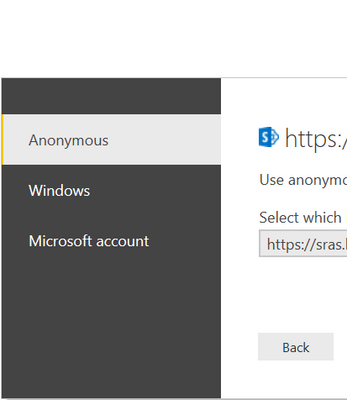
I need to enter my organization account credentials in order to access SharePoint List.
Solved! Go to Solution.


- Mark as New
- Bookmark
- Subscribe
- Mute
- Subscribe to RSS Feed
- Permalink
- Report Inappropriate Content
hi @Haya
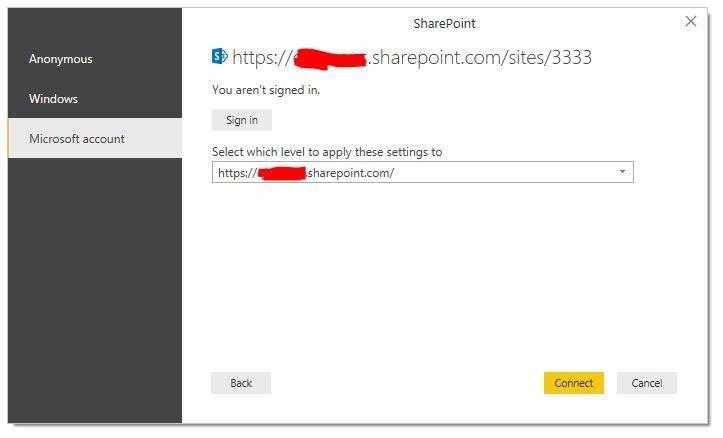
Use Microsoft Account as below:
Regards,
Lin
If this post helps, then please consider Accept it as the solution to help the other members find it more quickly.

- Mark as New
- Bookmark
- Subscribe
- Mute
- Subscribe to RSS Feed
- Permalink
- Report Inappropriate Content
Hello, is this being solved? I have the same issue!

- Mark as New
- Bookmark
- Subscribe
- Mute
- Subscribe to RSS Feed
- Permalink
- Report Inappropriate Content
Please follow the below steps.
1. File > Options & Settings >> Options >> Clear Cache (Data, Q&A Cache Management)
2. File > Options & Settings >> Data Source Settings >> Global Permissions >> Clear Permissions >> Clear All Permissions
3. Try to connect the data source now from "Get Data".
Please refer the link for alternate way.
https://docs.microsoft.com/en-us/power-bi/desktop-use-onedrive-business-links
If you have any concerns, please let us know.
If this post helps, then please consider Accept it as the solution to help the other members find it more
If this post was helpful may I ask you to mark it as solution and click on thumb symbol?
- Mark as New
- Bookmark
- Subscribe
- Mute
- Subscribe to RSS Feed
- Permalink
- Report Inappropriate Content
Thanks @venal
I do follow your steps but it didn't work.
Please not that I didn't see the "Organizational account" option from the first time I open Power BI.
Even the link is not helpful. I dont want to work with Excel !
- Mark as New
- Bookmark
- Subscribe
- Mute
- Subscribe to RSS Feed
- Permalink
- Report Inappropriate Content
Please refer the below links to ocnnect to the Sharepoint list in Power Bi Desktop.
Step 1
Open Power BI Desktop > Get Data > Click More.
Step 2
Search for SharePoint > SharePoint Online List.
Step 3
Enter the URL of your SharePoint site.
Step 4
Click on Organizational account > Sign In.
It will open the screen of Office 365 Login > Enter Credentials.
Step 6
Click on Connect.
Step 7
It will show all the lists available in the SharePoint - lists are on the left corner and their preview is on the right.
Select all the lists which you want to use directly in the Power BI.
Click on Load.
Step 8
It will load all the lists. Expand "Fields" column to view all the fields shown in the SharePoint List.
We can also view all the lists in relationship list.
In Data tab, you can also view the data of your SharePoint List.
If you have any queries, please let us know.
If this post helps, then please consider Accept it as the solution to help the other members find it more
If this post was helpful may I ask you to mark it as solution and click on thumb symbol?
- Mark as New
- Bookmark
- Subscribe
- Mute
- Subscribe to RSS Feed
- Permalink
- Report Inappropriate Content
Dear @venal
in Step #4:
I dont see " Organizational account " option. It is missing ! and this is my question !
- Mark as New
- Bookmark
- Subscribe
- Mute
- Subscribe to RSS Feed
- Permalink
- Report Inappropriate Content
hi @Haya
Use Microsoft Account as below:
Regards,
Lin
If this post helps, then please consider Accept it as the solution to help the other members find it more quickly.


- Mark as New
- Bookmark
- Subscribe
- Mute
- Subscribe to RSS Feed
- Permalink
- Report Inappropriate Content
I am still having this exact issue today.

Helpful resources

Power BI Monthly Update - November 2025
Check out the November 2025 Power BI update to learn about new features.

Fabric Data Days
Advance your Data & AI career with 50 days of live learning, contests, hands-on challenges, study groups & certifications and more!

FabCon Atlanta 2026
Join us at FabCon Atlanta, March 16-20, for the ultimate Fabric, Power BI, AI and SQL community-led event. Save $200 with code FABCOMM.

| User | Count |
|---|---|
| 58 | |
| 45 | |
| 42 | |
| 21 | |
| 18 |


