cancel
Showing results for 
Search instead for 
Did you mean: 

The Power BI Data Visualization World Championships is back! Get ahead of the game and start preparing now! Learn more

Reply
AbdelrahmanAyad
Frequent Visitor

Trying To Select from multiple lists

Hey Guys , 


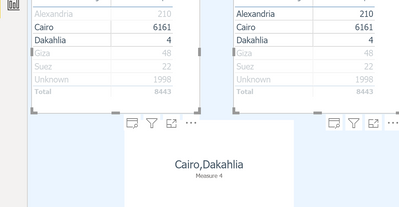
I have two lists that they don't filter each other but filter another visual , The two lists use the same dimensions i want to be. able. to select multiple values from both lists and pass them to the third visual , but when I do they just give me blank or give me the interesction between my selection as the screenshot below 


Screen Shot 2022-10-17 at 6.54.55 PM.png


however the needed result is : Cairo , Dakahlia , Alexandria


Thank you inn advance

1 ACCEPTED SOLUTION
v-yalanwu-msft
Community Support
Community Support

Hi, @AbdelrahmanAyad ;

Try to create the measure as follow:

Measure = CONCATENATEX( DISTINCT( UNION(VALUES('Table'[Name]),VALUES(TableA[Name]))),[Name],",")

The final show:
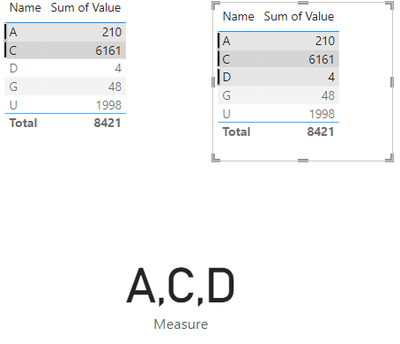
vyalanwumsft_0-1666078002641.png

If the above one can't help you get the desired result, please provide some sample data in your tables (exclude sensitive data) with Text format and your expected result with backend logic and special examples. It is better if you can share a simplified pbix file. You can refer the following link to upload the file to the community. Thank you.

How to upload PBI in Community


Best Regards,
Community Support Team _ Yalan Wu
If this post helps, then please consider Accept it as the solution to help the other members find it more quickly.

View solution in original post

1 REPLY 1
v-yalanwu-msft
Community Support
Community Support

Hi, @AbdelrahmanAyad ;

Try to create the measure as follow:

Measure = CONCATENATEX( DISTINCT( UNION(VALUES('Table'[Name]),VALUES(TableA[Name]))),[Name],",")

The final show:

vyalanwumsft_0-1666078002641.png

If the above one can't help you get the desired result, please provide some sample data in your tables (exclude sensitive data) with Text format and your expected result with backend logic and special examples. It is better if you can share a simplified pbix file. You can refer the following link to upload the file to the community. Thank you.

How to upload PBI in Community


Best Regards,
Community Support Team _ Yalan Wu
If this post helps, then please consider Accept it as the solution to help the other members find it more quickly.

Helpful resources

Announcements
Power BI DataViz World Championships

Power BI Dataviz World Championships

The Power BI Data Visualization World Championships is back! Get ahead of the game and start preparing now!

December 2025 Power BI Update Carousel

Power BI Monthly Update - December 2025

Check out the December 2025 Power BI Holiday Recap!

FabCon Atlanta 2026 carousel

FabCon Atlanta 2026

Join us at FabCon Atlanta, March 16-20, for the ultimate Fabric, Power BI, AI and SQL community-led event. Save $200 with code FABCOMM.