cancel
Showing results for 
Search instead for 
Did you mean: 

Learn from the best! Meet the four finalists headed to the FINALS of the Power BI Dataviz World Championships! Register now

Reply
Anonymous
Not applicable

True/False DAX query

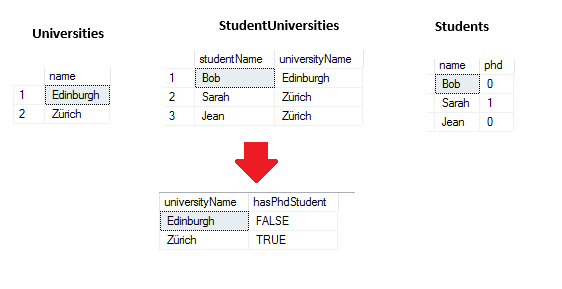
I have 3 three tables (see image at bottom of question) which represent a list of students belonging to a developer community, the universities they attend and if they have a PHD or not (0 if yes, 1 if no).


What I want to do is produce a report that has a list of universities and TRUE or FALSE depending on whether they have any PHD students or not. So, in this example snippet, the output report would be two universities - "Zurich" - "TRUE", "Edinburgh" "FALSE".


What query could I use to generate the values for this PHD true/false column? The issue i'm having is I don't know how to write such a query to cover 3 tables. Help would be much appreciated.


snip.PNG

1 ACCEPTED SOLUTION
judspud
Solution Supplier
Solution Supplier

Hi @Anonymous 


As long as your tables are all connected properly the mesaure should span across them with no problems.


Im assuming your tables follow the relationships below

Universities to StudentUniversities on the University column

StudentUniversities to Students on the Student column


If so, then a measure as below should work:


 if(sum(Students[phd])>0,True(),False)


Place into a table the name column from the Universities table and the measure and you should have the result you requested 🙂


Hope this helps


Thanks,

George

View solution in original post

5 REPLIES 5
judspud
Solution Supplier
Solution Supplier

Hi @Anonymous 


As long as your tables are all connected properly the mesaure should span across them with no problems.


Im assuming your tables follow the relationships below

Universities to StudentUniversities on the University column

StudentUniversities to Students on the Student column


If so, then a measure as below should work:


 if(sum(Students[phd])>0,True(),False)


Place into a table the name column from the Universities table and the measure and you should have the result you requested 🙂


Hope this helps


Thanks,

George

@Anonymous few question before post the solution:


in student univesity table, does each student can be only in one university or multiple university?


in student table, I assume each student is a unique row.


Subscribe to the @PowerBIHowTo YT channel for an upcoming video on List and Record functions in Power Query!!

Learn Power BI and Fabric - subscribe to our YT channel - Click here: @PowerBIHowTo

If my solution proved useful, I'd be delighted to receive Kudos. When you put effort into asking a question, it's equally thoughtful to acknowledge and give Kudos to the individual who helped you solve the problem. It's a small gesture that shows appreciation and encouragement! ❤


Did I answer your question? Mark my post as a solution. Proud to be a Super User! Appreciate your Kudos 🙂
Feel free to email me with any of your BI needs.

Anonymous
Not applicable


@parry2k wrote:

@Anonymousfew question before post the solution:


in student univesity table, does each student can be only in one university or multiple university?


in student table, I assume each student is a unique row.


A student can only be part of one university.


And yes correct, each student is unique row 

@Anonymous solution proposed by @judspud will work.


Subscribe to the @PowerBIHowTo YT channel for an upcoming video on List and Record functions in Power Query!!

Learn Power BI and Fabric - subscribe to our YT channel - Click here: @PowerBIHowTo

If my solution proved useful, I'd be delighted to receive Kudos. When you put effort into asking a question, it's equally thoughtful to acknowledge and give Kudos to the individual who helped you solve the problem. It's a small gesture that shows appreciation and encouragement! ❤


Did I answer your question? Mark my post as a solution. Proud to be a Super User! Appreciate your Kudos 🙂
Feel free to email me with any of your BI needs.

Anonymous
Not applicable

Thanks for your help @judspud @parry2k 

Helpful resources

Announcements
New to Fabric survey Carousel

New to Fabric Survey

If you have recently started exploring Fabric, we'd love to hear how it's going. Your feedback can help with product improvements.

Power BI DataViz World Championships carousel

Power BI DataViz World Championships - June 2026

A new Power BI DataViz World Championship is coming this June! Don't miss out on submitting your entry.

Join our Fabric User Panel

Join our Fabric User Panel

Share feedback directly with Fabric product managers, participate in targeted research studies and influence the Fabric roadmap.

March Power BI Update Carousel

Power BI Community Update - March 2026

Check out the March 2026 Power BI update to learn about new features.