
cancel
Showing results for 
Search instead for 
Did you mean: 

The Power BI Data Visualization World Championships is back! Get ahead of the game and start preparing now! Learn more

Reply
rmcgrath
Advocate II
Advocate II

Trouble with X-axis

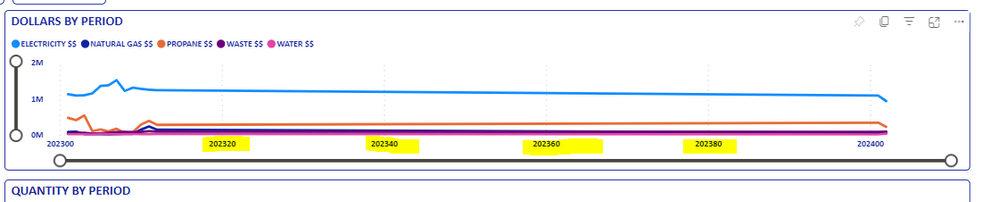
Hello.  My company reports a lot of financials in monthly periods, using the format "202301" (for January 2023).  As I plot those on the X-axis, Power BI increments the periods: [I wanted it to show 202300, 202301, 202302, 202303, etc.]

Power BI increments the periodsPower BI increments the periods

I tried switching to "Categorical", but the ordering of the x-axis got screwed up:

Strange ordering?Strange ordering?

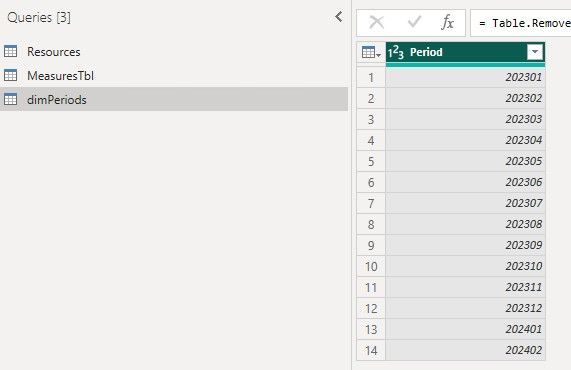
Lastly, in my .pbix file, I have a Dimension table specifically for the periods, but that does not seem to be helping with the ordering of the x-axis?:

dimPeriods table.jpg

Any help on getting the order correct on the x-axis would be greatly appreciated!

1 ACCEPTED SOLUTION
samratpbi
Super User
Super User

Hi,

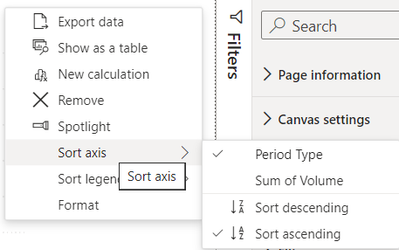
can you try to sort your x-axis?

If you click your visual, at top right of the visual, 3 dots appear.

samratpbi_1-1713278878178.png

If this resolves your problem, then please mark it as solution, Thanks!

View solution in original post

4 REPLIES 4
qqqqqwwwweeerrr
Super User
Super User

Hi @rmcgrath 


You can check this video where you can sort by column: https://youtu.be/PUaFtLpIMvY


Here first you need to create new table with respect to you period and assign the required order and it will be shorted. 


Did I answer your question? Mark my post as a solution! Appreciate your Kudos!!
Check for more intersing solution here: www.youtube.com/@Howtosolveprobem

Regards

Thank you!  This is also helpful...sorting the axis did the trick

samratpbi
Super User
Super User

Hi,

can you try to sort your x-axis?

If you click your visual, at top right of the visual, 3 dots appear.

samratpbi_1-1713278878178.png

If this resolves your problem, then please mark it as solution, Thanks!

Omg - thank you!!  I didn't even realize that option was contained within the 3 dots!!

Helpful resources

Announcements
Power BI DataViz World Championships

Power BI Dataviz World Championships

The Power BI Data Visualization World Championships is back! Get ahead of the game and start preparing now!

December 2025 Power BI Update Carousel

Power BI Monthly Update - December 2025

Check out the December 2025 Power BI Holiday Recap!

FabCon Atlanta 2026 carousel

FabCon Atlanta 2026

Join us at FabCon Atlanta, March 16-20, for the ultimate Fabric, Power BI, AI and SQL community-led event. Save $200 with code FABCOMM.