
Advance your Data & AI career with 50 days of live learning, dataviz contests, hands-on challenges, study groups & certifications and more!
Get registeredGet Fabric Certified for FREE during Fabric Data Days. Don't miss your chance! Request now
Hi everyone,
I'm needing to create the following matrix:
[Current Year], [Prior Year], [# Difference] and [% Variation] are different measures already created
But I need it to be all in one measure to add the matrix in different rows
the Sales table has the following format:
| Year | Month | Sales |
| 2022 | 1 | 80 |
| 2022 | 2 | 90 |
| 2022 | 3 | 100 |
| 2022 | 4 | 110 |
| 2022 | 5 | 120 |
| 2022 | 6 | 130 |
| 2022 | 7 | 140 |
| 2022 | 8 | 150 |
| 2022 | 9 | 160 |
| 2022 | 10 | 170 |
| 2022 | 11 | 180 |
| 2022 | 12 | 190 |
| 2023 | 1 | 100 |
| 2023 | 2 | 120 |
| 2023 | 3 | 140 |
| 2023 | 4 | 150 |
| 2023 | 5 | 170 |
Can you think of how I should do it?
PD: excuse my english, i speak spanish
Thanks!
Solved! Go to Solution.
Hi @kaguirre
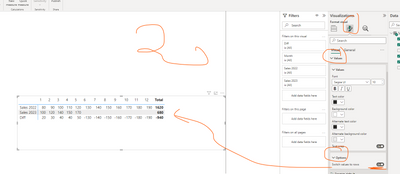
The easiest way to get a table like yours on the picture is, to use all your measures and the option " switch values to rows on matrix"
If this post helps, then please consider Accepting it as the solution to help the other members find it more quickly.
I was glad to help 🙂
Hi @kaguirre
The easiest way to get a table like yours on the picture is, to use all your measures and the option " switch values to rows on matrix"
If this post helps, then please consider Accepting it as the solution to help the other members find it more quickly.
Advance your Data & AI career with 50 days of live learning, contests, hands-on challenges, study groups & certifications and more!
Check out the October 2025 Power BI update to learn about new features.