Join us at FabCon Atlanta from March 16 - 20, 2026, for the ultimate Fabric, Power BI, AI and SQL community-led event. Save $200 with code FABCOMM.
Register now!The Power BI Data Visualization World Championships is back! Get ahead of the game and start preparing now! Learn more
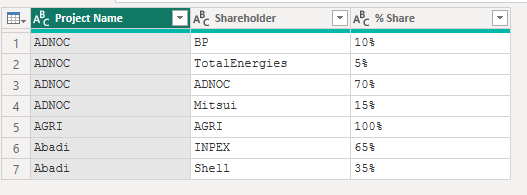
Hi community. I have the following table:
| Project Name | Shareholder | % Share |
| ADNOC | BP | 10% |
| ADNOC | TotalEnergies | 5% |
| ADNOC | ADNOC | 70% |
| ADNOC | Mitsui | 15% |
| AGRI | AGRI | 100% |
| Abadi | INPEX | 65% |
| Abadi | Shell | 35% |
As you can see I have several shareholders for each project which translates to several rows for 1 project. I would like the output table to be something like this with just 1 row per project:
| Project Name | Shareholders |
| ADNOC | BP 10%, TotalEnergies 5%, ADNOC 70%, Mitsui 15% |
| AGRI | AGRI 100% |
| Abadi | INPEX 65%, Shell 35% |
I am having a hard time finding a solution in Power Query.
Thanks!
Solved! Go to Solution.
Try this:
let
Source = Table.FromRows(Json.Document(Binary.Decompress(Binary.FromText("i45WcnTx83dW0lFyCgAShgaqSrE6CMGQ/JLEHNe81KL0zNRiIN8UVRpGm6Np880sKS7NBJkH0+Ae5AlSD6EMDWDqkxJTQMo8/QJcI4C0mSmqeHBGak4OkDYGiccCAA==", BinaryEncoding.Base64), Compression.Deflate)), let _t = ((type nullable text) meta [Serialized.Text = true]) in type table [#"Project Name" = _t, Shareholder = _t, #"% Share" = _t]),
#"Changed Type" = Table.TransformColumnTypes(Source,{{"Project Name", type text}, {"Shareholder", type text}, {"% Share", Percentage.Type}}),
#"Merged Columns" = Table.CombineColumns(Table.TransformColumnTypes(#"Changed Type", {{"% Share", type text}}, "en-US"),{"Shareholder", "% Share"},Combiner.CombineTextByDelimiter(" ", QuoteStyle.None),"Merged"),
#"Added Suffix" = Table.TransformColumns(#"Merged Columns", {{"Merged", each _ & "%", type text}}),
#"Grouped Rows" = Table.Group(#"Added Suffix", {"Project Name"}, {{"Shareholders", each Text.Combine([Merged], ", "), type text}})
in
#"Grouped Rows"
IP:
OP:

Hope it helps!
Try this:
let
Source = Table.FromRows(Json.Document(Binary.Decompress(Binary.FromText("i45WcnTx83dW0lFyCgAShgaqSrE6CMGQ/JLEHNe81KL0zNRiIN8UVRpGm6Np880sKS7NBJkH0+Ae5AlSD6EMDWDqkxJTQMo8/QJcI4C0mSmqeHBGak4OkDYGiccCAA==", BinaryEncoding.Base64), Compression.Deflate)), let _t = ((type nullable text) meta [Serialized.Text = true]) in type table [#"Project Name" = _t, Shareholder = _t, #"% Share" = _t]),
#"Changed Type" = Table.TransformColumnTypes(Source,{{"Project Name", type text}, {"Shareholder", type text}, {"% Share", Percentage.Type}}),
#"Merged Columns" = Table.CombineColumns(Table.TransformColumnTypes(#"Changed Type", {{"% Share", type text}}, "en-US"),{"Shareholder", "% Share"},Combiner.CombineTextByDelimiter(" ", QuoteStyle.None),"Merged"),
#"Added Suffix" = Table.TransformColumns(#"Merged Columns", {{"Merged", each _ & "%", type text}}),
#"Grouped Rows" = Table.Group(#"Added Suffix", {"Project Name"}, {{"Shareholders", each Text.Combine([Merged], ", "), type text}})
in
#"Grouped Rows"
IP:
OP:
Hope it helps!
Does it have to be in Power Query? In DAX, you can create a measure with the CONCATENATEX() function to join all the shareholder names with the same project name.
Check out the November 2025 Power BI update to learn about new features.
Advance your Data & AI career with 50 days of live learning, contests, hands-on challenges, study groups & certifications and more!