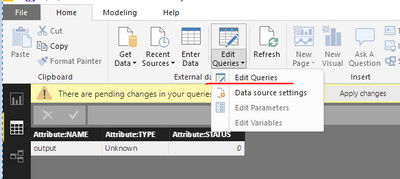
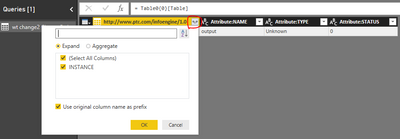
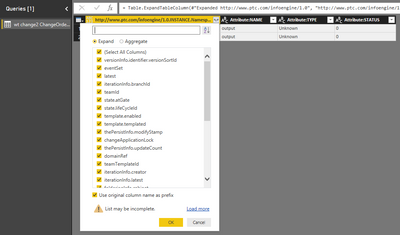
Power BI will not read my XML File. It returns:
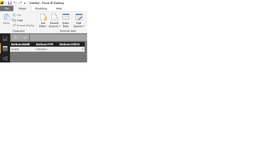
Excel reads the file OK. Access says schema cannot contain [.]
Ultimately I need to read this file from a URL, but I first want to know that PBI can read the data.
Any suggestions would be greatly appreciated.
Sample File with 2 records:
<?xml version="1.0" encoding="UTF-8"?>
<wc:COLLECTION xmlns:wc="http://www.ptc.com/infoengine/1.0">
<wt.change2.ChangeOrder2 NAME="output" TYPE="Unknown" STATUS="0">
  <wc:INSTANCE>
    <versionInfo.identifier.versionSortId>000001</versionInfo.identifier.versionSortId>
    <eventSet>*/wt.lifecycle.LifeCycleServiceEvent/STATE_CHANGE</eventSet>
    <latest>true</latest>
    <iterationInfo.branchId>70,997</iterationInfo.branchId>
    <teamId>OR:wt.team.Team:70985:909721222-1505846715100-65438140-205-128-101-10@terumo-dev.ptcmscloud.com</teamId>
    <state.atGate>false</state.atGate>
    <state.lifeCycleId>OR:wt.lifecycle.LifeCycleTemplate:70742:909721222-1505846715100-65438140-205-128-101-10@terumo-dev.ptcmscloud.com</state.lifeCycleId>
    <template.enabled>false</template.enabled>
    <template.templated>true</template.templated>
    <thePersistInfo.modifyStamp>2018-02-12 19:33:00 EST</thePersistInfo.modifyStamp>
    <changeApplicationLock>0</changeApplicationLock>
    <thePersistInfo.updateCount>4</thePersistInfo.updateCount>
    <domainRef>OR:wt.admin.AdministrativeDomain:8:909721222-1505846715100-65438140-205-128-101-10@terumo-dev.ptcmscloud.com</domainRef>
    <teamTemplateId>OR:wt.team.TeamTemplate:70836:909721222-1505846715100-65438140-205-128-101-10@terumo-dev.ptcmscloud.com</teamTemplateId>
    <iterationInfo.creator>uid=wcadmin,ou=people,cn=administrativeldap,cn=windchill_11.0,o=terumo:Ldap.ptcmscloud.com@Ldap.ptcmscloud.com</iterationInfo.creator>
    <iterationInfo.latest>true</iterationInfo.latest>
    <folderingInfo.cabinet>OR:wt.folder.Cabinet:313:909721222-1505846715100-65438140-205-128-101-10@terumo-dev.ptcmscloud.com</folderingInfo.cabinet>
    <iterationInfo.identifier.iterationId>1</iterationInfo.identifier.iterationId>
    <inheritedDomain>true</inheritedDomain>
    <iterationInfo.state>ctrld</iterationInfo.state>
    <containerReference>OR:wt.inf.container.ExchangeContainer:5:909721222-1505846715100-65438140-205-128-101-10@terumo-dev.ptcmscloud.com</containerReference>
    <versionInfo.identifier.versionLevel>1</versionInfo.identifier.versionLevel>
    <thePersistInfo.markForDelete>0</thePersistInfo.markForDelete>
    <state.state>OPEN</state.state>
    <iterationInfo.modifier>uid=wcadmin,ou=people,cn=administrativeldap,cn=windchill_11.0,o=terumo:Ldap.ptcmscloud.com@Ldap.ptcmscloud.com</iterationInfo.modifier>
    <thePersistInfo.createStamp>2017-09-19 14:50:16 EDT</thePersistInfo.createStamp>
    <masterReference>OR:wt.change2.WTChangeOrder2Master:70995:909721222-1505846715100-65438140-205-128-101-10@terumo-dev.ptcmscloud.com</masterReference>
    <versionInfo.identifier.versionId>A</versionInfo.identifier.versionId>
    <entrySet>
      + Participant: wt.org.WTUser:11: [Read, Modify, Download, Modify Content]</entrySet>
    <thePersistInfo.updateStamp>2018-02-12 19:33:00 EST</thePersistInfo.updateStamp>
    <obid>VR:wt.change2.WTChangeOrder2:70997:909721222-1505846715100-65438140-205-128-101-10@terumo-dev.ptcmscloud.com</obid>
    <class>wt.change2.WTChangeOrder2</class>
  </wc:INSTANCE>
  <wc:INSTANCE>
    <versionInfo.identifier.versionSortId>000001</versionInfo.identifier.versionSortId>
    <latest>true</latest>
    <iterationInfo.branchId>3,589,083</iterationInfo.branchId>
    <state.atGate>false</state.atGate>
    <state.lifeCycleId>OR:wt.lifecycle.LifeCycleTemplate:79057:909721222-1505846715100-65438140-205-128-101-10@terumo-dev.ptcmscloud.com</state.lifeCycleId>
    <template.enabled>true</template.enabled>
    <template.templated>true</template.templated>
    <thePersistInfo.modifyStamp>2018-02-21 22:16:39 EST</thePersistInfo.modifyStamp>
    <changeApplicationLock>0</changeApplicationLock>
    <thePersistInfo.updateCount>2</thePersistInfo.updateCount>
    <iterationInfo.creator>uid=wcadmin,ou=people,cn=administrativeldap,cn=windchill_11.0,o=terumo:Ldap.ptcmscloud.com@Ldap.ptcmscloud.com</iterationInfo.creator>
    <domainRef>OR:wt.admin.AdministrativeDomain:69948:909721222-1505846715100-65438140-205-128-101-10@terumo-dev.ptcmscloud.com</domainRef>
    <iterationInfo.latest>true</iterationInfo.latest>
    <folderingInfo.cabinet>OR:wt.folder.Cabinet:70000:909721222-1505846715100-65438140-205-128-101-10@terumo-dev.ptcmscloud.com</folderingInfo.cabinet>
    <iterationInfo.identifier.iterationId>1</iterationInfo.identifier.iterationId>
    <inheritedDomain>true</inheritedDomain>
    <iterationInfo.state>ctrld</iterationInfo.state>
    <versionInfo.identifier.versionLevel>1</versionInfo.identifier.versionLevel>
    <thePersistInfo.markForDelete>0</thePersistInfo.markForDelete>
    <state.state>INWORK</state.state>
    <iterationInfo.modifier>uid=wcadmin,ou=people,cn=administrativeldap,cn=windchill_11.0,o=terumo:Ldap.ptcmscloud.com@Ldap.ptcmscloud.com</iterationInfo.modifier>
    <thePersistInfo.createStamp>2018-02-21 22:16:39 EST</thePersistInfo.createStamp>
    <containerReference>OR:wt.inf.container.OrgContainer:69946:909721222-1505846715100-65438140-205-128-101-10@terumo-dev.ptcmscloud.com</containerReference>
    <versionInfo.identifier.versionId>A</versionInfo.identifier.versionId>
    <thePersistInfo.updateStamp>2018-02-21 22:16:39 EST</thePersistInfo.updateStamp>
    <obid>VR:wt.change2.WTChangeOrder2:3589083:909721222-1505846715100-65438140-205-128-101-10@terumo-dev.ptcmscloud.com</obid>
    <class>wt.change2.WTChangeOrder2</class>
  </wc:INSTANCE>
</wt.change2.ChangeOrder2>
</wc:COLLECTION>