Get certified for free when you join Fabric Data Days 2026 and dive into Fabric, Power BI, SQL, AI, and other essential data skills.
Join nowJuly 7 - July 17 | Round 2 of the Power BI Dataviz World Championships. Don't miss your chance! Learn more
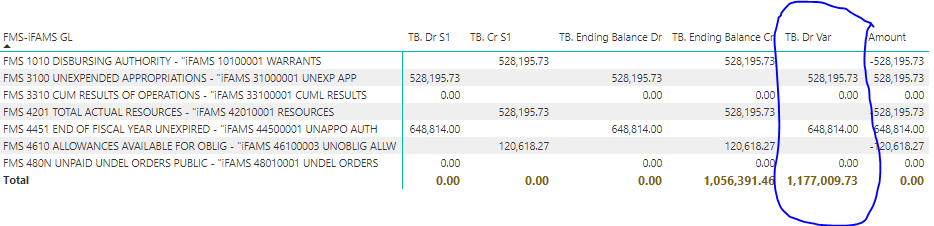
Totals should be 1,177,009.73
I want the total of my Trial Balance to equal the displayed line values. The problem is that the displayed line values are sorted to Dr or Cr based on their SUMMARY level sign, positive is Dr, negative is Cr. I have tried 4 different calculations and the best is this one but the part in red is not calculating the total correctly:
Solved! Go to Solution.
Solved it! Thanks to Measure-Totals-The-Final-Word Measure total basics. The correct calculation shows up circled in blue below. Any problems with this solution?
Hi @PeterRLC ,
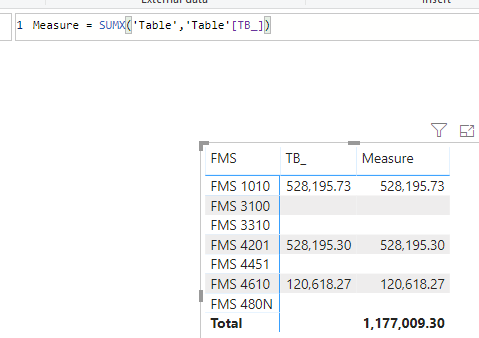
From the information you provided, I could only get the output like this.
If it is convenient, could you share your data sample which could reproduce the scenario as table format and your desired output so that we could give further advice on it?
Best Regards,
Cherry
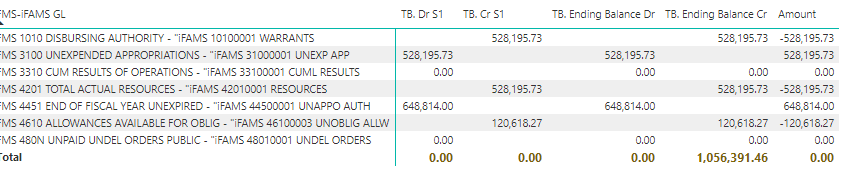
Yes, here is the original amount column. I want to sort negatives to the credit column and positives to the debit column.
Solved it! Thanks to Measure-Totals-The-Final-Word Measure total basics. The correct calculation shows up circled in blue below. Any problems with this solution?
Is it possibly a memory hog? And what would the solution be for that?
Also tried: (Calculates correctly but also runs out of memory)
Join us in Barcelona for FabCon and SQLCon, the Fabric, Power BI, SQL, and AI community event. Save €200 with code FABCMTY200.
Join Fabric Data Days 2026: 60 days of free live/on-demand sessions, challenges, study groups, and certification opportunities.
| User | Count |
|---|---|
| 22 | |
| 22 | |
| 18 | |
| 17 | |
| 13 |
| User | Count |
|---|---|
| 61 | |
| 52 | |
| 47 | |
| 41 | |
| 38 |