Join us at FabCon Atlanta from March 16 - 20, 2026, for the ultimate Fabric, Power BI, AI and SQL community-led event. Save $200 with code FABCOMM.
Register now!The Power BI Data Visualization World Championships is back! Get ahead of the game and start preparing now! Learn more
Hello !
I am struggling with a function i want to create. my objective is to create an indicactor which shows the trend between two selectionned dates. Thoses dates are selectionned by the user using a slicer.
As an exemple :
My table has 3 columns : Article Name - Date of sale (only the first day of each month as 01.01.18 or 02.01.2018.....) - Quantity
First case :
The user select April - May - June - July using a slicer
Second case :
The user select only April - September
What i want to do, is to show the trend (Just a number not a line) for both of selections.
Hence, it is a dynamic trend.
I don't know if it is possible to use selections of user and work with it, but it could be really useful
Thank you !
Nabil
Solved! Go to Solution.
Hi @Anonymous,
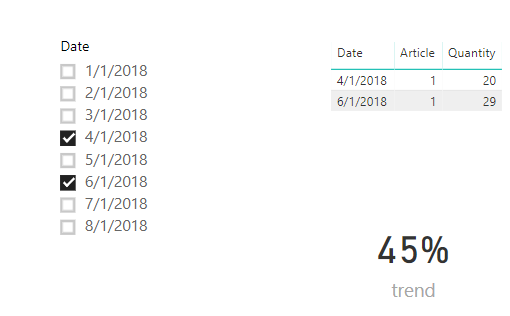
Please refer to below measure:
trend =
VAR firstdatevalue =
CALCULATE (
SUM ( Sample2[Quantity] ),
FILTER ( Sample2, Sample2[Date] = MIN ( Sample2[Date] ) )
)
VAR lastdatevalue =
CALCULATE (
SUM ( Sample2[Quantity] ),
FILTER ( Sample2, Sample2[Date] = MAX ( Sample2[Date] ) )
)
RETURN
DIVIDE ( lastdatevalue - firstdatevalue, firstdatevalue )
Best regards,
Yuliana Gu
Can you share sample data and the expected results?
Hello,
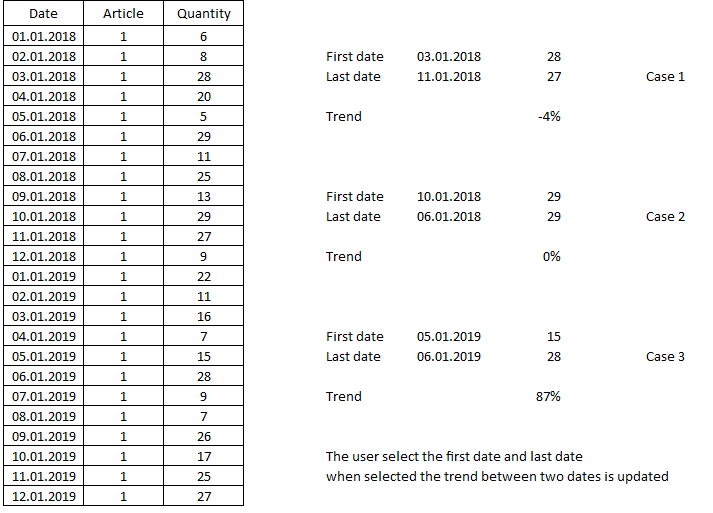
Here is a sample :
I just simplfied the number of article, in my case there more than 1000...
Thank you!
Hi @Anonymous,
Please refer to below measure:
trend =
VAR firstdatevalue =
CALCULATE (
SUM ( Sample2[Quantity] ),
FILTER ( Sample2, Sample2[Date] = MIN ( Sample2[Date] ) )
)
VAR lastdatevalue =
CALCULATE (
SUM ( Sample2[Quantity] ),
FILTER ( Sample2, Sample2[Date] = MAX ( Sample2[Date] ) )
)
RETURN
DIVIDE ( lastdatevalue - firstdatevalue, firstdatevalue )
Best regards,
Yuliana Gu
Hello,
It matchs perfectly my needs !
Thank you !
The Power BI Data Visualization World Championships is back! Get ahead of the game and start preparing now!
| User | Count |
|---|---|
| 39 | |
| 37 | |
| 33 | |
| 32 | |
| 29 |
| User | Count |
|---|---|
| 133 | |
| 88 | |
| 85 | |
| 68 | |
| 64 |