cancel
Showing results for 
Search instead for 
Did you mean: 

A new Data Days event is coming soon! This time we’re going bigger than ever. Fabric, Power BI, SQL, AI and more. Don't miss out.

Reply
Cian_MRO
New Member

Trend Line to Column Chart

Hi,


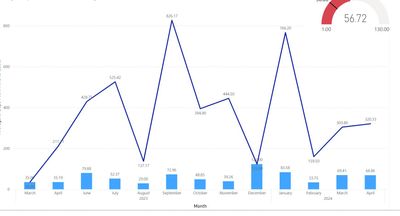
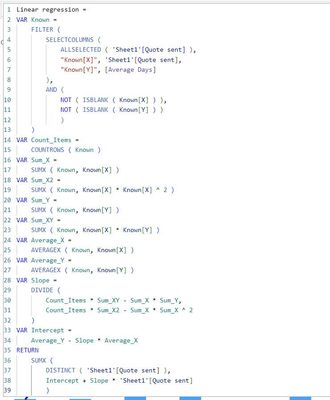
I'm trying to use the below to create a straight trend line on my column chart. 

It doesn't seem to be doing what I'm after, any pointers?


I know there is other styles of graph that can display a trend line but I really need it on this specific style of graph.


thanks 

IMG_4184.jpeg

IMG_4183.jpeg

1 ACCEPTED SOLUTION
Anonymous
Not applicable

Hi @Cian_MRO ,


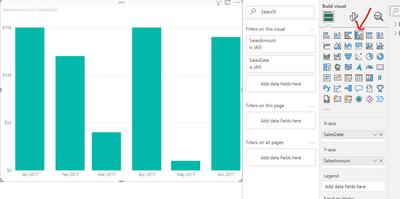
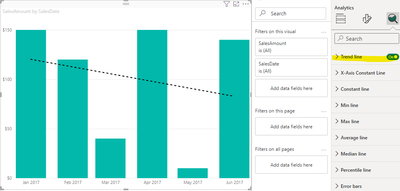
Maybe you can use clustered column chart to create visual and use trend line.

vkongfanfmsft_2-1714360506890.png

vkongfanfmsft_3-1714360553518.png


Best Regards,
Adamk Kong


If this post helps, then please consider Accept it as the solution to help the other members find it more quickly.

View solution in original post

2 REPLIES 2
Anonymous
Not applicable

Hi @Cian_MRO ,


Maybe you can use clustered column chart to create visual and use trend line.

vkongfanfmsft_2-1714360506890.png

vkongfanfmsft_3-1714360553518.png


Best Regards,
Adamk Kong


If this post helps, then please consider Accept it as the solution to help the other members find it more quickly.

Thanks for the reply, unfortunately I think this only works for numerical or individual dates, if using date hierarchy like I am to group data by month/year, it doesnt give the option of a trend line. Thanks

Helpful resources

Announcements
Fabric SQL PBI Data Days

Data Days 2026 coming soon!

Sign up to receive a private message when registration opens and key events begin.

New to Fabric survey Carousel

New to Fabric Survey

If you have recently started exploring Fabric, we'd love to hear how it's going. Your feedback can help with product improvements.

Power BI DataViz World Championships carousel

Power BI DataViz World Championships - June 2026

A new Power BI DataViz World Championship is coming this June! Don't miss out on submitting your entry.