cancel
Showing results for 
Search instead for 
Did you mean: 

The Power BI Data Visualization World Championships is back! Get ahead of the game and start preparing now! Learn more

Reply
chrisbohill
New Member

Treemaps - Highlighting certain boxes

Hi,


I'm trying to create a simple treemap of work packages withing a scope of work. The number of tasks within each work package determines the size while the % complete determines the saturation. 


Some of these work packages are on the project critial path. For each package I have 'Critial Path' attribute which is either Yes or No.


Is there a way to highlight, in the treemap, those work pacakges that are on the critial path by placing a border around the box? So all critial path work packages would be highlighted with a red border making it easy for the end user to quickly identify and see the % complete of those critial path packages.


Thanks!

Chris

3 REPLIES 3
v-xjiin-msft
Solution Sage
Solution Sage

Hi @chrisbohill,


Please share us more information of your requirement like some screenshots about the treemap or some sample data and its corresponding expected result. Otherwise, it is hard for us to understand your requirement.


Thanks,
Xi Jin.

Hi,


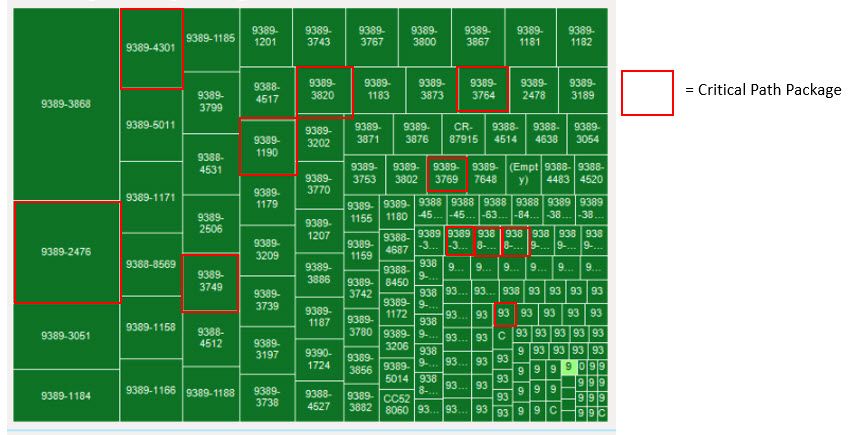
Thanks for the follow-up. See example mock-up below. I have my work packages (task count within each work package = size / color = % of those tasks completed).

Spoiler
 

What I want to do is highlight those work packages that have been defined as being on the critical path (I have an attribute called 'Critical Path' and each Work package will be either 'Yes' or 'No'. For those that are 'Yes' I want a way to easily distinguish them with a quick glance. I figured a border did this. See below.

Thanks!


Treemap.jpg

Hi @chrisbohill,


So in your scenario, you want to highlight the value based on conditions in Treemap. Right?


However as I know, currently conditional formatting can only be used in Table or Matrix. It is not supported in Treemap. I'm afraid your requirement cannot be achieved. Smiley Sad


And there already exists an Idea for it. You can vote it up.

https://ideas.powerbi.com/forums/265200-power-bi-ideas/suggestions/9588453-conditional-formatting-th... 


Thanks,
Xi Jin.

Helpful resources

Announcements
Power BI DataViz World Championships

Power BI Dataviz World Championships

The Power BI Data Visualization World Championships is back! Get ahead of the game and start preparing now!

December 2025 Power BI Update Carousel

Power BI Monthly Update - December 2025

Check out the December 2025 Power BI Holiday Recap!

FabCon Atlanta 2026 carousel

FabCon Atlanta 2026

Join us at FabCon Atlanta, March 16-20, for the ultimate Fabric, Power BI, AI and SQL community-led event. Save $200 with code FABCOMM.