cancel
Showing results for 
Search instead for 
Did you mean: 

The Power BI Data Visualization World Championships is back! Get ahead of the game and start preparing now! Learn more

Reply
nathaliaalves
Regular Visitor

Treemap summarization of a quick measure

Hello,


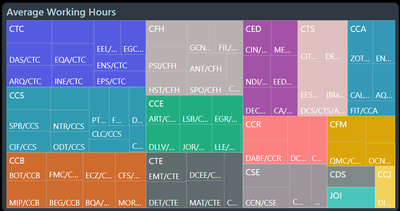
I'm trying to use a Treemap for showing average values from a quick measure for a category and its details. However, it seems that the Treemap is sorting the category over the sum of the averages of each detail instead of the averages overall.


My Treemap looks like this:
nathaliaalves_0-1660228558374.png


My quick measure looks like this:

AverageWorkingHours =
DIVIDE(
    SUM('FactCampusCH'[Carga-horária]),
    SUM('FactCampusQtdDocentes'[Quantidade Docentes])
)
 
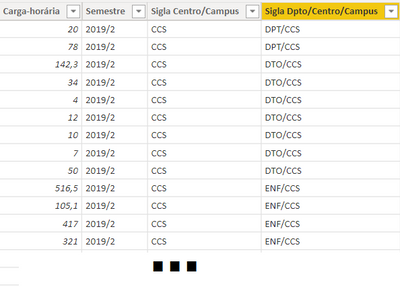
FactCampusCH looks like this:
nathaliaalves_3-1660229501366.png


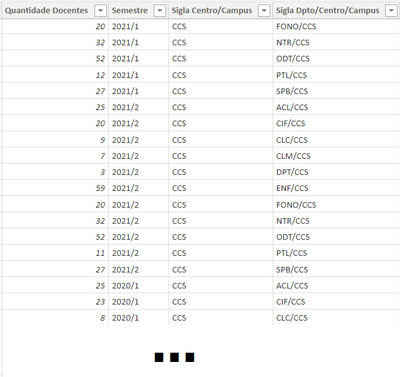
FactCampusQtdDocentes looks like this:
nathaliaalves_4-1660229582604.png


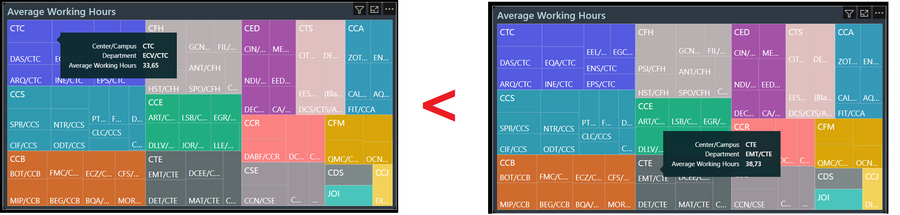
I noticed that each category block (e.g. campuses CTC, CCS, CFH, CCS, etc.) is sorted over the sum of each of their details (average working hours of Departments) but I wanted the biggest average to appear first and not the biggest sum. This makes it seems that "CTC" has bigger average working hours than "CTE" (because CTC has more Departments, making the sum of its averages bigger than CTE), which is not true.
nathaliaalves_1-1660228784937.png


If I take the details off, the Treemap looks (correctly) like this (CTE first, CDS second, etc.):
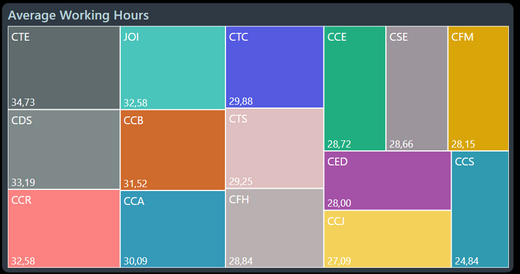
nathaliaalves_5-1660229884170.png


I wanted to maintain this correct order with the details. But once I put on the details the Treemap changes the ordering 😞


Any ideas on how can I achieve this?


Thanks!


4 REPLIES 4
blqs12
Regular Visitor

Hi, I am currently facing the same issue. Did you find any workaround or solution to this @nathaliaalves ?

Aethelson
New Member

I have exactly the same problem. Is there any solution?

amitchandak
Super User
Super User

@nathaliaalves , Tree Map does not support the sort option. The usual trick is to add a tooltip and sort of that

Share with Power BI Enthusiasts: Full Power BI Video (20 Hours) YouTube
Microsoft Fabric Series 60+ Videos YouTube
Microsoft Fabric Hindi End to End YouTube

Sorry, I didn't quite understand. I don't want to "sort", I just want the order of the category "blocks" to be based on the average and not the sum of the details.

Helpful resources

Announcements
Power BI DataViz World Championships

Power BI Dataviz World Championships

The Power BI Data Visualization World Championships is back! Get ahead of the game and start preparing now!

November Power BI Update Carousel

Power BI Monthly Update - November 2025

Check out the November 2025 Power BI update to learn about new features.

FabCon Atlanta 2026 carousel

FabCon Atlanta 2026

Join us at FabCon Atlanta, March 16-20, for the ultimate Fabric, Power BI, AI and SQL community-led event. Save $200 with code FABCOMM.