Join us at FabCon Atlanta from March 16 - 20, 2026, for the ultimate Fabric, Power BI, AI and SQL community-led event. Save $200 with code FABCOMM.
Register now!The Power BI Data Visualization World Championships is back! Get ahead of the game and start preparing now! Learn more
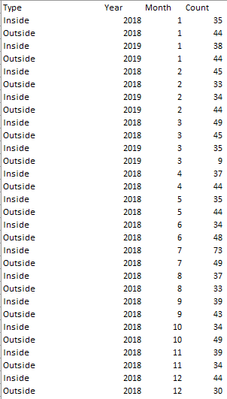
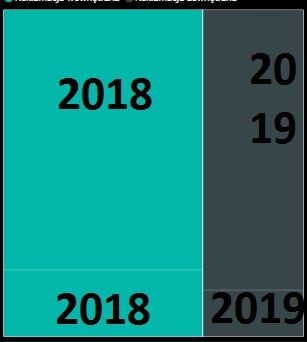
Dear All,I have a simple set of data that i want to present on a treemap. My chart
isn't clear enough for the user and i don't know how to make it more readable mostly because values in the same year group have one color and i don't know how to distinct them. Does anyone know how to do it? Below data and the chart
Hey @Anonymous
Why not use a bar chart?
Think it will visualise nicer than a table.
Cheers!
Thank you for replying @Anonymous
I have choosen a treemap because i already have 3 bar charts in my dashboard and adding another one makes my dashboard less readable. I will consider diffrent type of chart although i am still intrested how to solve aforementioned problem.
Cheers!
The Power BI Data Visualization World Championships is back! Get ahead of the game and start preparing now!
| User | Count |
|---|---|
| 40 | |
| 37 | |
| 33 | |
| 29 | |
| 27 |
| User | Count |
|---|---|
| 133 | |
| 104 | |
| 61 | |
| 59 | |
| 55 |