Join us at FabCon Atlanta from March 16 - 20, 2026, for the ultimate Fabric, Power BI, AI and SQL community-led event. Save $200 with code FABCOMM.
Register now!Learn from the best! Meet the four finalists headed to the FINALS of the Power BI Dataviz World Championships! Register now
Hi Guys
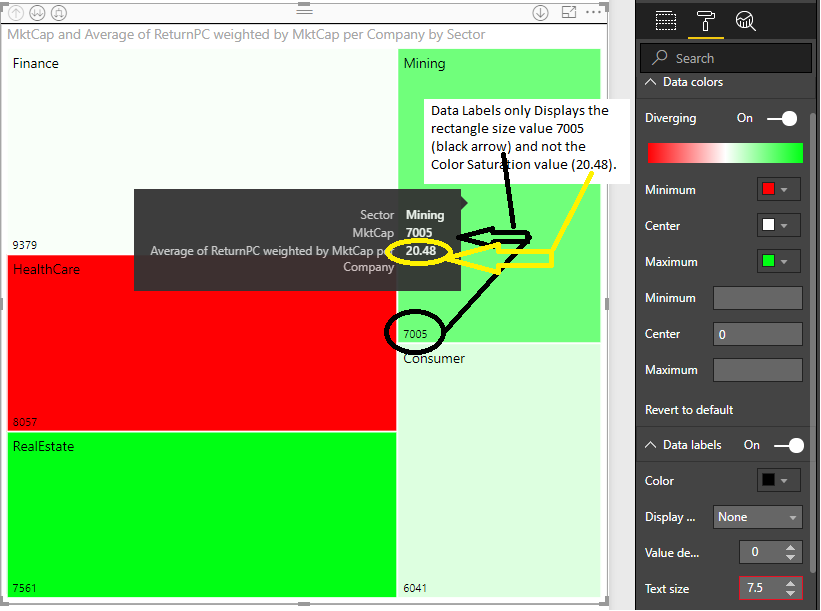
In a TreeMap, does anyone know how to show the actual value used for Color Saturation as a data label?
The main data label shows the 'Values' on the treemap (ie rectangle size) but I would LOVE to see the actual color saturation value on the treemap as a data label as well?
I look forward to hearing from anyone.
kind regards
Craig
Perth, Australia
Solved! Go to Solution.
HI @karajan,
I don't think treemap visual can achieve this, maybe you can submit this requirement to ideas forum.
Regards,
Xiaoxin Sheng
HI @karajan,
Please enter to format tag and you'll see 'Data color' and 'Data labels' option.
You can modify/turn on them to achieve your requirement.
Regards,
Xiaoxin Sheng
Dear Xiaoxin
Thank you very much for your reply. The Data Label only shows Rectangle Area and not Color Saturation values.
The tree map has two value dimensions.. the rectangle area (which displays OK with Data Labels) and the Colour Saturation (which does not display when Data Labels is switched on).
At present I can only see the Color Saturation value when I mouse over and it comes up as part of the tool tip for a rectangle. I am seeking a way to have the Color Saturation display as a Data Label permanently on the TreeMap without needing to mouse over for the tool tip.
kind regards
Craig Perth, Australia
HI @karajan,
I don't think treemap visual can achieve this, maybe you can submit this requirement to ideas forum.
Regards,
Xiaoxin Sheng
Hi Xiaoxin
Thank you for your help.
I will submit the suggestion for a data label for color saturation to the ideas formum
regards
Craig
Share feedback directly with Fabric product managers, participate in targeted research studies and influence the Fabric roadmap.
Check out the February 2026 Power BI update to learn about new features.
| User | Count |
|---|---|
| 68 | |
| 60 | |
| 45 | |
| 19 | |
| 15 |