cancel
Showing results for 
Search instead for 
Did you mean: 

July 7 - July 17 | Round 2 of the Power BI Dataviz World Championships. Don't miss your chance! Learn more

Reply
Anonymous
Not applicable

Tree Map

Is it possible to use one value to set the size of the box and another for the data label?  It seems whatever you put in the "Values" field sets the size and the label.


1 ACCEPTED SOLUTION
v-yingjl
Community Support
Community Support

Hi @Anonymous ,

Treemaps display hierarchical data as a set of nested rectangles. Power BI bases the size of the space inside each rectangle on the measured value.

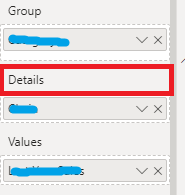
For this case, you cannot change the box size unless you have the other value to split the box and add it into Details.( Color Saturation and Details cannot be used at the same time.)

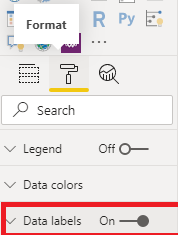
In Format menu, you can enable Data labels to show the box value.

details.pngdata label.png


For further information about Treemap, you can refer the following Microsoft document that could help you:

https://docs.microsoft.com/en-us/power-bi/visuals/power-bi-visualization-treemaps


Best Regards,

Yingjie Li


If this post helps then please consider Accept it as the solution to help the other members find it more quickly.


View solution in original post

2 REPLIES 2
v-yingjl
Community Support
Community Support

Hi @Anonymous ,

Treemaps display hierarchical data as a set of nested rectangles. Power BI bases the size of the space inside each rectangle on the measured value.

For this case, you cannot change the box size unless you have the other value to split the box and add it into Details.( Color Saturation and Details cannot be used at the same time.)

In Format menu, you can enable Data labels to show the box value.

details.pngdata label.png


For further information about Treemap, you can refer the following Microsoft document that could help you:

https://docs.microsoft.com/en-us/power-bi/visuals/power-bi-visualization-treemaps


Best Regards,

Yingjie Li


If this post helps then please consider Accept it as the solution to help the other members find it more quickly.


Greg_Deckler
Community Champion
Community Champion

You can add a field into Details.


Follow on LinkedIn
@ me in replies or I'll lose your thread!!!
Instead of a Kudo, please vote for this idea
Become an expert!: Enterprise DNA
External Tools: MSHGQM
YouTube Channel!: Microsoft Hates Greg
Latest book!:
DAX For Humans

DAX is easy, CALCULATE makes DAX hard...

Helpful resources

Announcements
FabCon and SQLCon Barcelona 2026

FabCon & SQLCon – Barcelona 2026

Join us in Barcelona for FabCon and SQLCon, the Fabric, Power BI, SQL, and AI community event. Save €200 with code FABCMTY200.

60 days of Data Days Carousel

Data Days 2026

Join Fabric Data Days 2026: 60 days of free live/on-demand sessions, challenges, study groups, and certification opportunities.

Power BI DataViz World Championships carousel

Power BI DataViz World Championships - June 2026

A new Power BI DataViz World Championship is coming this June! Don't miss out on submitting your entry.

Top Solution Authors