Don't miss your chance to take the Fabric Data Engineer (DP-700) exam on us!
Learn moreNext up in the FabCon + SQLCon recap series: The roadmap for Microsoft SQL and Maximizing Developer experiences in Fabric. All sessions are available on-demand after the live show. Register now
Hello All,
I am new to power BI. working on a report creation where I need to join multiple tables and bring one table's data by transposing. Aware of Transposing option available in query editor but not able to make it work as need to join multiple tables.
See highligthed columns in final table[ Coming from Account table ]. Please help. Left side in picture shows source tables in model and right side is final table structure needed.
Solved! Go to Solution.
Hi , @mpk
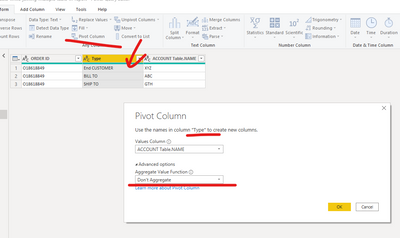
After you merge "Name table" and "Account table ",please select the column" type " and click the function "pivot columns".
The result will show as below.
Here is a sample pbix file.
Best Regards,
Community Support Team _ Eason
If this post helps, then please consider Accept it as the solution to help the other members find it more quickly.
Hi , @mpk
After you merge "Name table" and "Account table ",please select the column" type " and click the function "pivot columns".
The result will show as below.
Here is a sample pbix file.
Best Regards,
Community Support Team _ Eason
If this post helps, then please consider Accept it as the solution to help the other members find it more quickly.
@mpk , the order of operation is important, refer if these can help
https://radacad.com/append-vs-merge-in-power-bi-and-power-query
Transpose : https://yodalearning.com/tutorials/power-query-helps-transposing-data/
If you have recently started exploring Fabric, we'd love to hear how it's going. Your feedback can help with product improvements.
A new Power BI DataViz World Championship is coming this June! Don't miss out on submitting your entry.
Share feedback directly with Fabric product managers, participate in targeted research studies and influence the Fabric roadmap.
| User | Count |
|---|---|
| 48 | |
| 45 | |
| 41 | |
| 19 | |
| 18 |
| User | Count |
|---|---|
| 68 | |
| 67 | |
| 33 | |
| 31 | |
| 29 |