cancel
Showing results for 
Search instead for 
Did you mean: 

The Power BI Data Visualization World Championships is back! It's time to submit your entry. Live now!

Reply
Simon_29
Helper II
Helper II

Transposing columns

Hello,

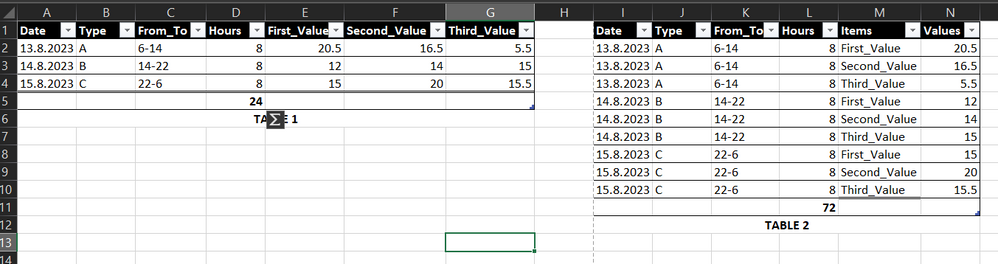
I need to create something similar to the screenshot below.
I have TABLE 1 as a SharePoint list. I need to move the columns with First_Value into rows, because I need to continue working with those values ​​+ their data in the Slicer filter as well. However, when I transpose, i.e. unpivot these columns to rows, the values ​​are duplicated. All values ​​are fine when duplicated, but the Hours column takes on a completely different meaning. For example, there are 8 hours for From_To 6-14. However, if I transpose it, there are already more hours, but I cannot work with this number because it makes a different sense.
PowerBI_FIX1.png
I would probably need an arithmetic mean or some solution to solve this. Can you help me? Thank you

4 REPLIES 4
Ashish_Mathur
Super User
Super User

Hi,

You are performing the correct step i.e. "Unpivoting Other Columns".  The values are bound to repeat.  You will have to customise the DAX formulas to get your desired calculations workinng.


Regards,
Ashish Mathur
http://www.ashishmathur.com
https://www.linkedin.com/in/excelenthusiasts/

Hi, thanks for advice.
Since I'm weaker in DAX, could you try to draw for me how this metric could look like? Thank you 🙂 

Hi,

Share data in a format that can be pasted in an MS Excel file and show the expected result very clearly.


Regards,
Ashish Mathur
http://www.ashishmathur.com
https://www.linkedin.com/in/excelenthusiasts/
christinepayton
Super User
Super User

Typically if you don't want to duplicate rows, you'd just reference or duplicate the query and remove all columns except the row ID and the column you want to unpivot in the second query, then unpivot, and create a relationship between the two tables on the ID field. You may need to set the relationship to bidirectional to get the filtering to go the correct direction. 

Helpful resources

Announcements
Power BI DataViz World Championships

Power BI Dataviz World Championships

The Power BI Data Visualization World Championships is back! It's time to submit your entry.

January Power BI Update Carousel

Power BI Monthly Update - January 2026

Check out the January 2026 Power BI update to learn about new features.

FabCon Atlanta 2026 carousel

FabCon Atlanta 2026

Join us at FabCon Atlanta, March 16-20, for the ultimate Fabric, Power BI, AI and SQL community-led event. Save $200 with code FABCOMM.