
cancel
Showing results for 
Search instead for 
Did you mean: 

Learn from the best! Meet the four finalists headed to the FINALS of the Power BI Dataviz World Championships! Register now

Reply
amirabedhiafi
Impactful Individual

Transposing a table

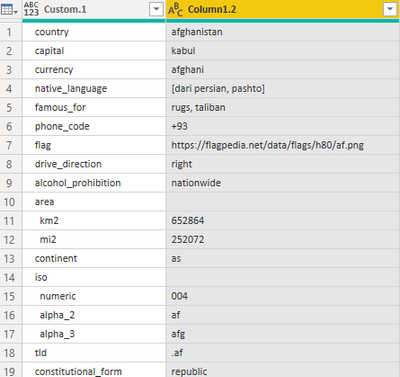
I have the following table (as result of many steps) : 


amirabedhiafi_0-1608488675181.png


I want to get a result as below :  as I need to transpose the table :


amirabedhiafi_1-1608489509770.png


Amira Bedhiafi
Full Stack Business Intelligence Consultant @Capgemini
1 ACCEPTED SOLUTION
mahoneypat
Microsoft Employee
Microsoft Employee

If data for the next country are below the shown data in the same column you can use this approach.


- Add an index column starting at 1

- Divide that column by the # of rows of data per country (19 shown) and round up to the nearest integer.  You should get the same integer for all rows for the same country

- Highlight the first column and choose pivot column on the transform tab

- in the pop up choose the 2nd column for the Values and in the pull down choose no aggregation


Regards,

Pat


Did I answer your question? Mark my post as a solution! Kudos are also appreciated!

To learn more about Power BI, follow me on Twitter or subscribe on YouTube.


@mahoneypa HoosierBI on YouTube


View solution in original post

1 REPLY 1
mahoneypat
Microsoft Employee
Microsoft Employee

If data for the next country are below the shown data in the same column you can use this approach.


- Add an index column starting at 1

- Divide that column by the # of rows of data per country (19 shown) and round up to the nearest integer.  You should get the same integer for all rows for the same country

- Highlight the first column and choose pivot column on the transform tab

- in the pop up choose the 2nd column for the Values and in the pull down choose no aggregation


Regards,

Pat


Did I answer your question? Mark my post as a solution! Kudos are also appreciated!

To learn more about Power BI, follow me on Twitter or subscribe on YouTube.


@mahoneypa HoosierBI on YouTube


Helpful resources

Announcements
Join our Fabric User Panel

Join our Fabric User Panel

Share feedback directly with Fabric product managers, participate in targeted research studies and influence the Fabric roadmap.

February Power BI Update Carousel

Power BI Monthly Update - February 2026

Check out the February 2026 Power BI update to learn about new features.

FabCon Atlanta 2026 carousel

FabCon Atlanta 2026

Join us at FabCon Atlanta, March 16-20, for the ultimate Fabric, Power BI, AI and SQL community-led event. Save $200 with code FABCOMM.