Join us at FabCon Atlanta from March 16 - 20, 2026, for the ultimate Fabric, Power BI, AI and SQL community-led event. Save $200 with code FABCOMM.
Register now!The Power BI Data Visualization World Championships is back! Get ahead of the game and start preparing now! Learn more
Hi there
Below given sample data should be converted into City and Date. Any Suggestions?
Data Table
| City | Q1 | Q2 | Q3 | Q4 |
| London | 1/1/2018 | 4/1/2018 | 6/30/2018 | 9/28/2018 |
| Manchester | 4/1/2018 | 6/30/2018 | 9/28/2018 | |
| Westham | 6/30/2018 | 9/28/2018 |
Expected Outcome
| City | Date |
| London | 1/1/2018 |
| London | 4/1/2018 |
| London | 6/30/2018 |
| London | 9/28/2018 |
| Manchester | 4/1/2018 |
| Manchester | 6/30/2018 |
| Manchester | 9/28/2018 |
| Westham | 6/30/2018 |
| Westham | 9/28/2018 |
Regards
Jayanthan
Solved! Go to Solution.
Hi @jayanthan ,
You could implement it in Query Editor. I created a sample that you can follow the steps.
1. Select the columns of Q1, Q2, Q3 and Q4 > unpivot columns.
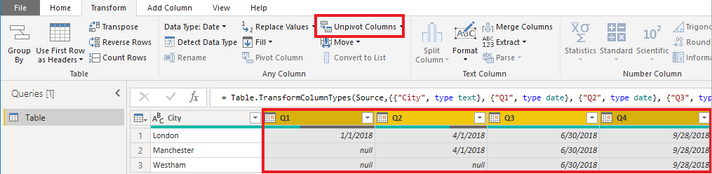
2. Remove the column of Attribute.
3. Then you get the table that you want.
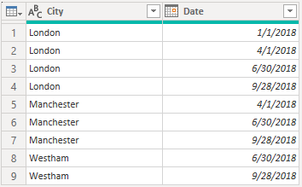
let
Source = Table.FromRows(Json.Document(Binary.Decompress(Binary.FromText("i45W8snPS8nPU9JRMtQ31DcyMLQAMk0QTDN9YwMY21LfyALCjtWJVvJNzEvOSC0uSS0CSikQqyscqCMjMReqRQG32lgA", BinaryEncoding.Base64), Compression.Deflate)), let _t = ((type text) meta [Serialized.Text = true]) in type table [City = _t, Q1 = _t, Q2 = _t, Q3 = _t, Q4 = _t]),
#"Changed Type" = Table.TransformColumnTypes(Source,{{"City", type text}, {"Q1", type date}, {"Q2", type date}, {"Q3", type date}, {"Q4", type date}}),
#"Unpivoted Columns" = Table.UnpivotOtherColumns(#"Changed Type", {"City"}, "Attribute", "Value"),
#"Removed Columns" = Table.RemoveColumns(#"Unpivoted Columns",{"Attribute"}),
#"Renamed Columns" = Table.RenameColumns(#"Removed Columns",{{"Value", "Date"}})
in
#"Renamed Columns"
Best Regards,
Xue Ding
If this post helps, then please consider Accept it as the solution to help the other members find it more quickly. Kudos are nice too.
Did you find a way to make it appear on power query editor @jayanthan? I created a new table from my source file using query with the hopes to transpose/ unpivot it later, but the table I created is not showing on my power query editor 😞
Hi @jayanthan ,
You could implement it in Query Editor. I created a sample that you can follow the steps.
1. Select the columns of Q1, Q2, Q3 and Q4 > unpivot columns.
2. Remove the column of Attribute.
3. Then you get the table that you want.
let
Source = Table.FromRows(Json.Document(Binary.Decompress(Binary.FromText("i45W8snPS8nPU9JRMtQ31DcyMLQAMk0QTDN9YwMY21LfyALCjtWJVvJNzEvOSC0uSS0CSikQqyscqCMjMReqRQG32lgA", BinaryEncoding.Base64), Compression.Deflate)), let _t = ((type text) meta [Serialized.Text = true]) in type table [City = _t, Q1 = _t, Q2 = _t, Q3 = _t, Q4 = _t]),
#"Changed Type" = Table.TransformColumnTypes(Source,{{"City", type text}, {"Q1", type date}, {"Q2", type date}, {"Q3", type date}, {"Q4", type date}}),
#"Unpivoted Columns" = Table.UnpivotOtherColumns(#"Changed Type", {"City"}, "Attribute", "Value"),
#"Removed Columns" = Table.RemoveColumns(#"Unpivoted Columns",{"Attribute"}),
#"Renamed Columns" = Table.RenameColumns(#"Removed Columns",{{"Value", "Date"}})
in
#"Renamed Columns"
Best Regards,
Xue Ding
If this post helps, then please consider Accept it as the solution to help the other members find it more quickly. Kudos are nice too.
Thank you for the suggestion. However, I cannot use edit queries as those fields are from new custom columns, therefore they will not show in edit queries.
Regards
Jayanthan
The Power BI Data Visualization World Championships is back! Get ahead of the game and start preparing now!
| User | Count |
|---|---|
| 39 | |
| 37 | |
| 33 | |
| 32 | |
| 29 |
| User | Count |
|---|---|
| 133 | |
| 88 | |
| 85 | |
| 68 | |
| 64 |