Don't miss your chance to take the Fabric Data Engineer (DP-700) exam on us!
Learn moreThe FabCon + SQLCon recap series starts April 14th at 8am Pacific. If you’re tracking where AI is going inside Fabric, this first session is a can't miss. Register now
Hello Guys,
Can you please help me with transposing table?
I need to create P&L per specific category.
My problem is that Category is in rows but I need that in columns.
Please be aware that current % are not averages but weighted average calculated as measures.
(DAX formula : SUMX('Test',Test'[Total amount]*Test[New ROA])/SUM('Test'[Total amount])
In best case scenario I would include there as well figures (these can be sums)
Many thanks in advance.
Andrej
Solved! Go to Solution.
Hi,
I tried but i can't any way to get table like which u mention in above.
but i suggested to u, y u go with like this model. it will also help to u reach your goal.
pls look these images , and let me know if any help.
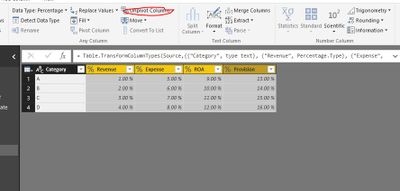
Select four column and click Unpivot
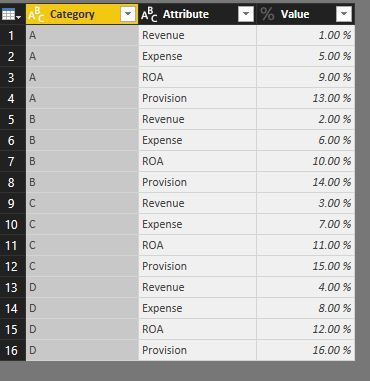
Now this is your Table
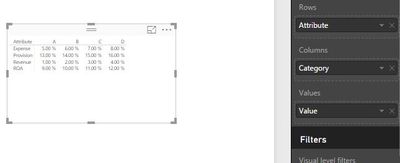
This is Matrix Report
Here you find a nifty workaround for your request: http://exceleratorbi.com.au/measures-on-rows-here-is-how-i-did-it/
... and of course: Pls vote for this to become a standard-feature here: https://ideas.powerbi.com/forums/265200-power-bi-ideas/suggestions/10948962-matrix-measures-or-value...
Imke Feldmann (The BIccountant)
If you liked my solution, please give it a thumbs up. And if I did answer your question, please mark this post as a solution. Thanks!
How to integrate M-code into your solution -- How to get your questions answered quickly -- How to provide sample data -- Check out more PBI- learning resources here -- Performance Tipps for M-queries
Hello ImkeF. Thank you for your sugestion. I will look at this once I will be back from my holiday.
Hi,
I tried but i can't any way to get table like which u mention in above.
but i suggested to u, y u go with like this model. it will also help to u reach your goal.
pls look these images , and let me know if any help.
Select four column and click Unpivot
Now this is your Table
This is Matrix Report
Hello Baskar. Thank you for your sugestion. I will look at this once I will be back from my holiday.
If you have recently started exploring Fabric, we'd love to hear how it's going. Your feedback can help with product improvements.
A new Power BI DataViz World Championship is coming this June! Don't miss out on submitting your entry.
Share feedback directly with Fabric product managers, participate in targeted research studies and influence the Fabric roadmap.
| User | Count |
|---|---|
| 53 | |
| 40 | |
| 38 | |
| 19 | |
| 18 |
| User | Count |
|---|---|
| 70 | |
| 69 | |
| 34 | |
| 33 | |
| 30 |