Join us at FabCon Atlanta from March 16 - 20, 2026, for the ultimate Fabric, Power BI, AI and SQL community-led event. Save $200 with code FABCOMM.
Register now!The Power BI Data Visualization World Championships is back! Get ahead of the game and start preparing now! Learn more
Hello Community,
Please review the below,
Can anyone suggest to me how to do it?
I have tried Transpose and Unpivot Column in Power Query but did not get the expected result.
What do I want to do?
Column A,
I am looking for a separate count for 1,2,3,4,5
count "1" in column A=2
count "2" in column A=1
| Raw Data | ||||
| A | B | C | D | E |
| 1 | 2 | 3 | 5 | 4 |
| 5 | 5 | 2 | 5 | 4 |
| 4 | 4 | 2 | 1 | 1 |
| 3 | 2 | 4 | 1 | 5 |
| 1 | 2 | 5 | 3 | 4 |
| 5 | 4 | 3 | 2 | 1 |
| 2 | 1 | 4 | 3 | 5 |
| Final Result | |||||
| 1 | 2 | 3 | 4 | 5 | |
| A | 2 | 1 | 1 | 1 | 2 |
| B | 1 | 3 | 0 | 2 | 1 |
| C | 0 | 2 | 2 | 2 | 1 |
| D | 2 | 1 | 2 | 0 | 0 |
| E | 2 | 0 | 0 | 3 | 2 |
Solved! Go to Solution.
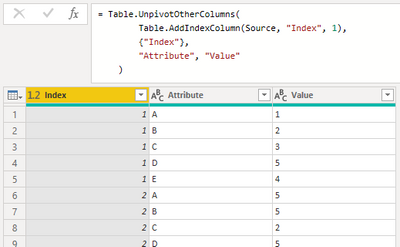
Simply add an index column before unpivoting the dataset,
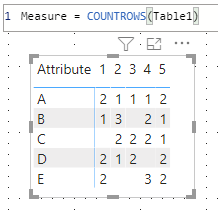
Then, counting is easy,
| Thanks to the great efforts by MS engineers to simplify syntax of DAX! Most beginners are SUCCESSFULLY MISLED to think that they could easily master DAX; but it turns out that the intricacy of the most frequently used RANKX() is still way beyond their comprehension! |
DAX is simple, but NOT EASY! |
Simply add an index column before unpivoting the dataset,
Then, counting is easy,
| Thanks to the great efforts by MS engineers to simplify syntax of DAX! Most beginners are SUCCESSFULLY MISLED to think that they could easily master DAX; but it turns out that the intricacy of the most frequently used RANKX() is still way beyond their comprehension! |
DAX is simple, but NOT EASY! |
The Power BI Data Visualization World Championships is back! Get ahead of the game and start preparing now!
| User | Count |
|---|---|
| 40 | |
| 35 | |
| 34 | |
| 31 | |
| 28 |
| User | Count |
|---|---|
| 136 | |
| 102 | |
| 68 | |
| 66 | |
| 58 |