
cancel
Showing results for 
Search instead for 
Did you mean: 

The Power BI Data Visualization World Championships is back! Get ahead of the game and start preparing now! Learn more

Reply
venstart
Frequent Visitor

Transpose or Pivot Columns / Rows

Hi There


I have a Power BI table which is called " Log Class "

There are columns here with the main unique identifier is the column called " LoadSheetNo. " 


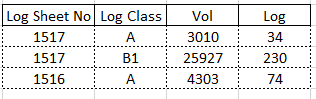
Currently my values are is a row, like below screenshot:

Log Class Currently.png

Which is a problem, I want the "Log Class" which is the "A" & "B1" to be as a column and not in a row. Currently there are 2 row since there is only 2 unique "LoadSheetNo." which are : 1517 & 1516


So the same example above data, see below how I want the data to be in this table either using Transpose or Pivot whereby now is will be : 

Columns : 4 

Rows : 3 (excl the header)


Below how it show be:

Log Class Want.PNG

How is it now 3 rows ? -- - Because LoadSheetNo : 1517 have both Log Class "A" & "B1" and whereas Loadsheetno : 1516 only have "A" and not "B1"


How do I resolve this, please guide me as I am not an expert in Power BI

1 ACCEPTED SOLUTION
PhilipTreacy
Super User
Super User

Hi @venstart 

Download sample PBIX with data and queries shown here

If that sample shows all the columns in your data then you can duplicate the table, remove columns from each table that are not needed (remove A cols from B table and B cols from A table) then Append the 2 tables to give the desired result.

app-tab.png

Regards

Phil


Did I answer your question? Then please mark my post as the solution.
If I helped you, click on the Thumbs Up to give Kudos.


Blog :: YouTube Channel :: Connect on Linkedin


Proud to be a Super User!


View solution in original post

4 REPLIES 4
PhilipTreacy
Super User
Super User

Hi @venstart 

Here's the PBIX file using your text file but the transformation steps are the same as the first file I linked to.

The final result is in the Append1 query.  You'll need to modify the Source step in the other 2 queries to point to the location of your own text file.

Regards

Phil


Did I answer your question? Then please mark my post as the solution.
If I helped you, click on the Thumbs Up to give Kudos.


Blog :: YouTube Channel :: Connect on Linkedin


Proud to be a Super User!


PhilipTreacy
Super User
Super User

Hi @venstart 

Download sample PBIX with data and queries shown here

If that sample shows all the columns in your data then you can duplicate the table, remove columns from each table that are not needed (remove A cols from B table and B cols from A table) then Append the 2 tables to give the desired result.

app-tab.png

Regards

Phil


Did I answer your question? Then please mark my post as the solution.
If I helped you, click on the Thumbs Up to give Kudos.


Blog :: YouTube Channel :: Connect on Linkedin


Proud to be a Super User!


vanessafvg
Community Champion
Community Champion

can you provide sample data in text format rather than a picture?


If I took the time to answer your question and I came up with a solution, please mark my post as a solution and /or give kudos freely for the effort 🙂 Thank you!

Proud to be a Super User!


Hi there


Kindly find the data in raw text file ( this is the current table)


Link to the txt file below:

https://www.file.io/download/AZ5DZAjoHtOu 

http://m.uploadedit.com/busd/1611303491147.txt 

Helpful resources

Announcements
Power BI DataViz World Championships

Power BI Dataviz World Championships

The Power BI Data Visualization World Championships is back! Get ahead of the game and start preparing now!

December 2025 Power BI Update Carousel

Power BI Monthly Update - December 2025

Check out the December 2025 Power BI Holiday Recap!

FabCon Atlanta 2026 carousel

FabCon Atlanta 2026

Join us at FabCon Atlanta, March 16-20, for the ultimate Fabric, Power BI, AI and SQL community-led event. Save $200 with code FABCOMM.