cancel
Showing results for 
Search instead for 
Did you mean: 

We've captured the moments from FabCon & SQLCon that everyone is talking about, and we are bringing them to the community, live and on-demand. Starts on April 14th. Register now

Reply
jppuam
Helper V
Helper V

Transpose data problem

Hello,

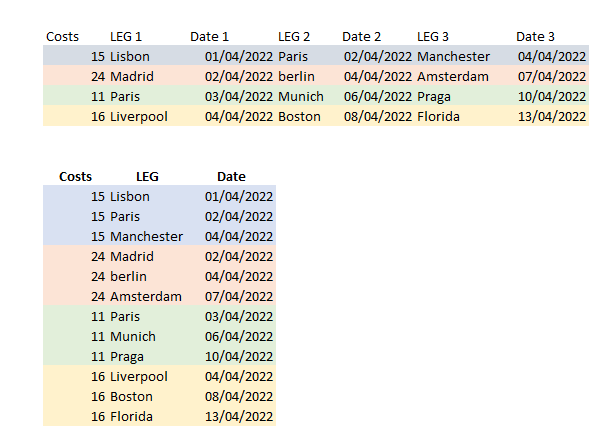
i'm trying to transpose data like the picture in attached. But i can not do like i wanted (below in the pic).

Is it possible to implement this ?

U2.png

thansk,

JR

1 ACCEPTED SOLUTION
ryan_mayu
Super User
Super User

@jppuam 

maybe you can create a new table

Table 2 = 
VAR tbl1=SELECTCOLUMNS('Table',"Costs",'Table'[Costs],"LEG",'Table'[LEG 1],"Date",'Table'[Date 1])
VAR tbl2=SELECTCOLUMNS('Table',"Costs",'Table'[Costs],"LEG",'Table'[LEG 2],"Date",'Table'[Date 2])
VAR tbl3=SELECTCOLUMNS('Table',"Costs",'Table'[Costs],"LEG",'Table'[LEG 3],"Date",'Table'[Date 3])
return UNION(tbl1,tbl2,tbl3)

1.PNG


Did I answer your question? Mark my post as a solution!

Proud to be a Super User!


View solution in original post

5 REPLIES 5
Ashish_Mathur
Super User
Super User

Hi,

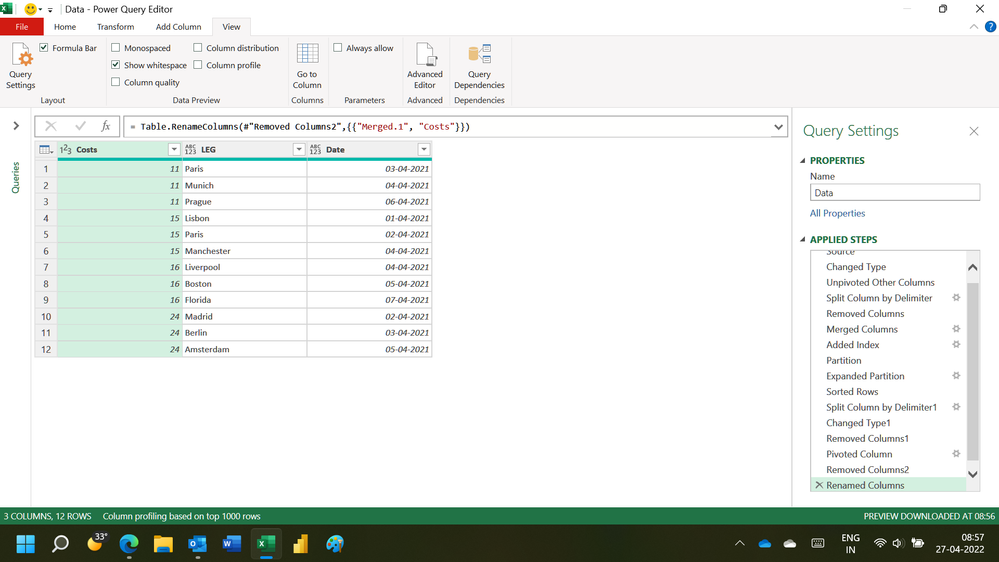
This M code works

let
    Source = Excel.CurrentWorkbook(){[Name="Data"]}[Content],
    #"Changed Type" = Table.TransformColumnTypes(Source,{{"Costs", Int64.Type}, {"LEG 1", type text}, {"Date 1", type date}, {"LEG 2", type text}, {"Date 2", type date}, {"LEG 3", type text}, {"Date 3", type date}}),
    #"Unpivoted Other Columns" = Table.UnpivotOtherColumns(#"Changed Type", {"Costs"}, "Attribute", "Value"),
    #"Split Column by Delimiter" = Table.SplitColumn(#"Unpivoted Other Columns", "Attribute", Splitter.SplitTextByDelimiter(" ", QuoteStyle.Csv), {"Attribute.1", "Attribute.2"}),
    #"Removed Columns" = Table.RemoveColumns(#"Split Column by Delimiter",{"Attribute.2"}),
    #"Merged Columns" = Table.CombineColumns(Table.TransformColumnTypes(#"Removed Columns", {{"Costs", type text}}, "en-IN"),{"Costs", "Attribute.1"},Combiner.CombineTextByDelimiter(",", QuoteStyle.None),"Merged"),
    #"Added Index" = Table.AddIndexColumn(#"Merged Columns", "Index", 1, 1, Int64.Type),
    Partition = Table.Group(#"Added Index", {"Merged"}, {{"Partition", each Table.AddIndexColumn(_, "Index1",1,1), type table}}),
    #"Expanded Partition" = Table.ExpandTableColumn(Partition, "Partition", {"Value", "Index", "Index1"}, {"Value", "Index", "Index1"}),
    #"Sorted Rows" = Table.Sort(#"Expanded Partition",{{"Index", Order.Ascending}}),
    #"Split Column by Delimiter1" = Table.SplitColumn(#"Sorted Rows", "Merged", Splitter.SplitTextByDelimiter(",", QuoteStyle.Csv), {"Merged.1", "Merged.2"}),
    #"Changed Type1" = Table.TransformColumnTypes(#"Split Column by Delimiter1",{{"Merged.1", Int64.Type}, {"Merged.2", type text}}),
    #"Removed Columns1" = Table.RemoveColumns(#"Changed Type1",{"Index"}),
    #"Pivoted Column" = Table.Pivot(#"Removed Columns1", List.Distinct(#"Removed Columns1"[Merged.2]), "Merged.2", "Value"),
    #"Removed Columns2" = Table.RemoveColumns(#"Pivoted Column",{"Index1"}),
    #"Renamed Columns" = Table.RenameColumns(#"Removed Columns2",{{"Merged.1", "Costs"}})
in
    #"Renamed Columns"

Hope this helps.
Untitled.png


Regards,
Ashish Mathur
http://www.ashishmathur.com
https://www.linkedin.com/in/excelenthusiasts/
ryan_mayu
Super User
Super User

@jppuam 

maybe you can create a new table

Table 2 = 
VAR tbl1=SELECTCOLUMNS('Table',"Costs",'Table'[Costs],"LEG",'Table'[LEG 1],"Date",'Table'[Date 1])
VAR tbl2=SELECTCOLUMNS('Table',"Costs",'Table'[Costs],"LEG",'Table'[LEG 2],"Date",'Table'[Date 2])
VAR tbl3=SELECTCOLUMNS('Table',"Costs",'Table'[Costs],"LEG",'Table'[LEG 3],"Date",'Table'[Date 3])
return UNION(tbl1,tbl2,tbl3)

1.PNG


Did I answer your question? Mark my post as a solution!

Proud to be a Super User!


Thanks Ryan_mayu, 😀

you are welcome


Did I answer your question? Mark my post as a solution!

Proud to be a Super User!


amitchandak
Super User
Super User

@jppuam , Unpivot all column other than first.


Split column by delimiter or use text before delimiter and get Leg and Date from new attribute column


Pivot the attribute and value gain


Split Column Power Query: https://youtu.be/FyO9Vmhcfag

Text Before Delimiter and Text After Delimiter: https://youtu.be/oGY4RoPKDOE

Share with Power BI Enthusiasts: Full Power BI Video (20 Hours) YouTube
Microsoft Fabric Series 60+ Videos YouTube
Microsoft Fabric Hindi End to End YouTube

Helpful resources

Announcements
New to Fabric survey Carousel

New to Fabric Survey

If you have recently started exploring Fabric, we'd love to hear how it's going. Your feedback can help with product improvements.

Power BI DataViz World Championships carousel

Power BI DataViz World Championships - June 2026

A new Power BI DataViz World Championship is coming this June! Don't miss out on submitting your entry.

Join our Fabric User Panel

Join our Fabric User Panel

Share feedback directly with Fabric product managers, participate in targeted research studies and influence the Fabric roadmap.

March Power BI Update Carousel

Power BI Community Update - March 2026

Check out the March 2026 Power BI update to learn about new features.