
Join us at FabCon Atlanta from March 16 - 20, 2026, for the ultimate Fabric, Power BI, AI and SQL community-led event. Save $200 with code FABCOMM.
Register now!The Power BI Data Visualization World Championships is back! Get ahead of the game and start preparing now! Learn more
With PowerQuery how can I get from this
| Header | ID |
| Comment from X | 1 |
| Group 1 | 2 |
| Posted Aug 8, 2022 | 3 |
| ID12322 | 4 |
| Comment from John | 1 |
| Group 2 | 2 |
| Posted Sep 6, 2022 | 3 |
| ID123 | 4 |
| Comment from John | 1 |
| Group 2 | 2 |
| Posted Sep 12, 2022 | 3 |
| ID12323 | 4 |
To
| 1 | 2 | 3 | 4 |
| Comment from X | Group 1 | Posted Aug 8, 2022 | ID12322 |
| Comment from John | Group 2 | Posted Sep 6, 2022 | ID123 |
| Comment from John | Group 2 | Posted Sep 12, 2022 | ID12323 |
Thank you so much
Solved! Go to Solution.
Hey @yetanotherusern
you can use the Pivot Operation, but first you have to prepare the table:
This is how the table will look after these steps:
This is the formula for the custom column.
Number.RoundUp( [Index] / 4 )
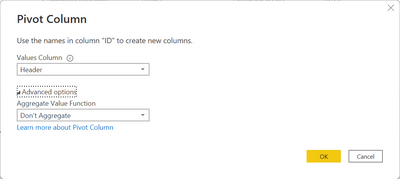
Then i removed the Index column, marked the ID column and use the transform Pivot configured like this:
And here is the result:
Hopefully, this provides what you are looking for.
Regards,
Tom
Hey @yetanotherusern
you can use the Pivot Operation, but first you have to prepare the table:
This is how the table will look after these steps:
This is the formula for the custom column.
Number.RoundUp( [Index] / 4 )
Then i removed the Index column, marked the ID column and use the transform Pivot configured like this:
And here is the result:
Hopefully, this provides what you are looking for.
Regards,
Tom
Herzlichen Danke - wirklich toll!
(Heartfelt thank you - really cool)
The Power BI Data Visualization World Championships is back! Get ahead of the game and start preparing now!
| User | Count |
|---|---|
| 39 | |
| 35 | |
| 33 | |
| 32 | |
| 27 |
| User | Count |
|---|---|
| 136 | |
| 96 | |
| 77 | |
| 67 | |
| 65 |