cancel
Showing results for 
Search instead for 
Did you mean: 

Learn from the best! Meet the four finalists headed to the FINALS of the Power BI Dataviz World Championships! Register now

Reply
Anonymous
Not applicable

Transformation / calculated table

Dear Community,


I look for solution for the following problem.


1. I have a table with raw data - e.g. shipments form A-to-B with various service providers and their offered prices.


ShipmentGrouping attributePrice - service provider 1Price - service provider 2
shipment1Group A1015

shipment2

Group B2010
shipment3Group A3540
shipment4Group B2525


2. For evaluation purpose I would like to create an other table structure with some aggregation - derived from Table1.


Grouping attributeService providerPrice (sum)
AService provider145
AService provider255
BService provider145
BService provider235


How can I create Table2 from Table1 in PowerBI desktop? 🤔


Every suggestion, idea is highly appreciated!


Thank you!

1 ACCEPTED SOLUTION
harshnathani
Community Champion
Community Champion

Hi @Anonymous ,


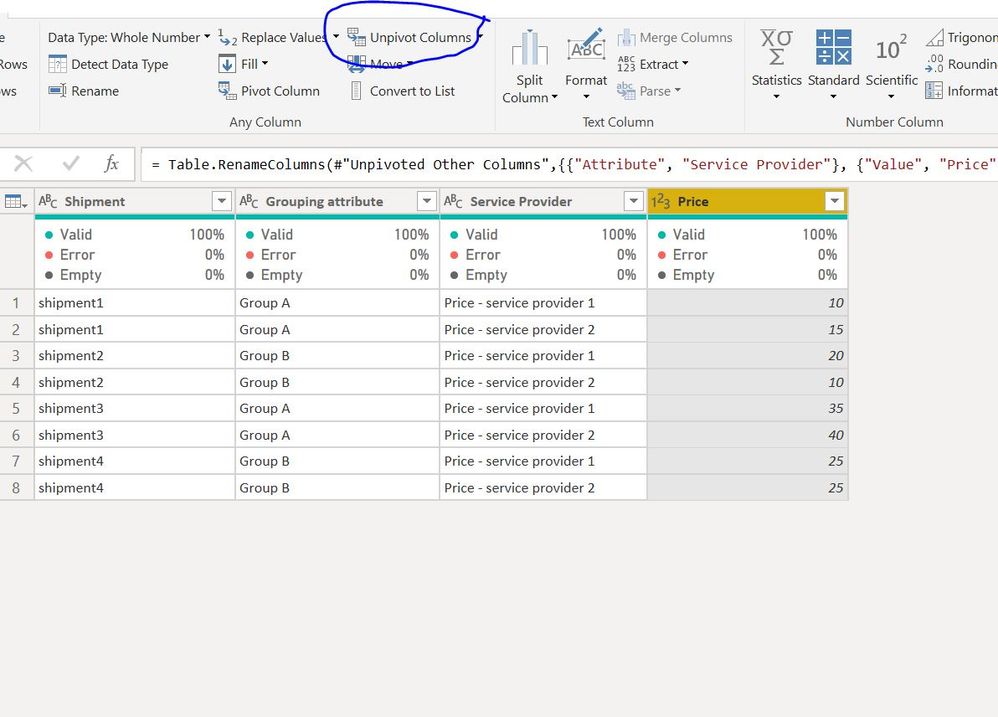
You will need to unpivot your table.


Select First 2 column and then click on Unpivot Other Column


1.jpg


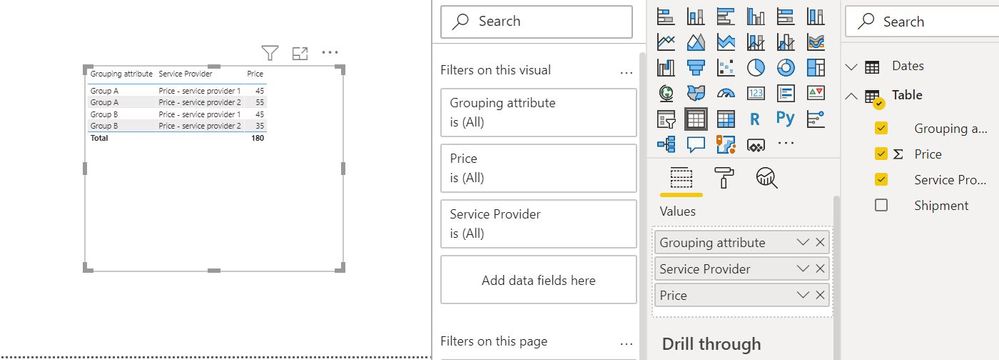
You cna then just pull the columns in the visualization pane to get your results.


2.JPG


Regards,
Harsh Nathani
Did I answer your question? Mark my post as a solution! Appreciate with a Kudos!! (Click the Thumbs Up Button)


View solution in original post

5 REPLIES 5
Anonymous
Not applicable

Dear Community,


I look for solution for the following problem.


1. I have a table with raw data - e.g. shipments form A-to-B with various service providers and their offered prices.


ShipmentGrouping attributePrice - service provider 1Price - service provider 2
shipment1Group A1015

shipment2

Group B2010
shipment3Group A3540
shipment4Group B2525


2. For evaluation purpose I would like to create an other table structure with some aggregation - derived from Table1.


Grouping attributeService providerPrice (sum)
AService provider145
AService provider255
BService provider145
BService provider235


How can I create Table2 from Table1 in PowerBI desktop? 🤔


Every suggestion, idea is highly appreciated!


Thank you!
Believe this post is duplicated with the one below:


https://community.powerbi.com/t5/Desktop/Transformation-calculated-table/m-p/1307528


Regards

Miguel Félix


Did I answer your question? Mark my post as a solution!

Proud to be a Super User!

Check out my blog: Power BI em Português


Anonymous
Not applicable

Thank you very much for both of you for your help!

amitchandak
Super User
Super User

@Anonymous , you have an option in edit query /data transformation mode.

Refer document

https://radacad.com/pivot-and-unpivot-with-power-bi
Transpose : https://yodalearning.com/tutorials/power-query-helps-transposing-data/

Share with Power BI Enthusiasts: Full Power BI Video (20 Hours) YouTube
Microsoft Fabric Series 60+ Videos YouTube
Microsoft Fabric Hindi End to End YouTube
harshnathani
Community Champion
Community Champion

Hi @Anonymous ,


You will need to unpivot your table.


Select First 2 column and then click on Unpivot Other Column


1.jpg


You cna then just pull the columns in the visualization pane to get your results.


2.JPG


Regards,
Harsh Nathani
Did I answer your question? Mark my post as a solution! Appreciate with a Kudos!! (Click the Thumbs Up Button)


Helpful resources

Announcements
Join our Fabric User Panel

Join our Fabric User Panel

Share feedback directly with Fabric product managers, participate in targeted research studies and influence the Fabric roadmap.

February Power BI Update Carousel

Power BI Monthly Update - February 2026

Check out the February 2026 Power BI update to learn about new features.

FabCon Atlanta 2026 carousel

FabCon Atlanta 2026

Join us at FabCon Atlanta, March 16-20, for the ultimate Fabric, Power BI, AI and SQL community-led event. Save $200 with code FABCOMM.