Don't miss your chance to take the Fabric Data Engineer (DP-700) exam on us!
Learn moreNext up in the FabCon + SQLCon recap series: The roadmap for Microsoft SQL and Maximizing Developer experiences in Fabric. All sessions are available on-demand after the live show. Register now
Hello,
I have the following table:
| Area | Year | Quarter | Cat1 | Cat2 | Cat3 |
| a1 | 2022 | 1 | 1 | 1 | 1 |
| a1 | 2023 | 2 | 3 | 2 | 1 |
| a2 | 2022 | 4 | 2 | 4 | 5 |
I want to transform it to the following:
| Category | Value | Area | Year | Quarter |
| Cat1 | 1 | a1 | 2022 | 1 |
| Cat1 | 3 | a1 | 2023 | 2 |
| Cat1 | 2 | a2 | 2022 | 4 |
| Cat2 | 1 | a1 | 2022 | 1 |
| Cat2 | 2 | a1 | 2023 | 2 |
| Cat2 | 4 | a2 | 2022 | 4 |
| Cat3 | 1 | a1 | 2022 | 1 |
| Cat3 | 1 | a1 | 2023 | 2 |
| Cat3 | 5 | a2 | 2022 | 4 |
So basically transpose column Cat1, Cat2, Cat3 from table1 and create a separated line for each combination of Area, Year.
How can I do it? Thanks a lot, I am trying this for hours now.
Solved! Go to Solution.
Hi @Marcel1989
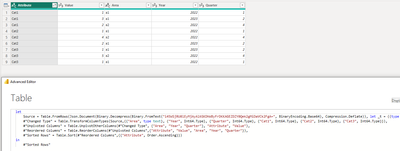
Select three columns(cat1,cat2, cat3) together and the unpivot to get the desired result.
Also, PFB the M code (Advance Editor)
let
Source = Table.FromRows(Json.Document(Binary.Decompress(Binary.FromText("i45WSjRU0lEyMjAyAlKGKDhWByFrDKKAGEZDZY0Qek2gMiDaVCk2FgA=", BinaryEncoding.Base64), Compression.Deflate)), let _t = ((type nullable text) meta [Serialized.Text = true]) in type table [Area = _t, Year = _t, Quarter = _t, Cat1 = _t, Cat2 = _t, Cat3 = _t]),
#"Changed Type" = Table.TransformColumnTypes(Source,{{"Area", type text}, {"Year", Int64.Type}, {"Quarter", Int64.Type}, {"Cat1", Int64.Type}, {"Cat2", Int64.Type}, {"Cat3", Int64.Type}}),
#"Unpivoted Columns" = Table.UnpivotOtherColumns(#"Changed Type", {"Area", "Year", "Quarter"}, "Attribute", "Value"),
#"Reordered Columns" = Table.ReorderColumns(#"Unpivoted Columns",{"Attribute", "Value", "Area", "Year", "Quarter"}),
#"Sorted Rows" = Table.Sort(#"Reordered Columns",{{"Attribute", Order.Ascending}})
in
#"Sorted Rows"
Hi @Marcel1989
Select three columns(cat1,cat2, cat3) together and the unpivot to get the desired result.
Also, PFB the M code (Advance Editor)
let
Source = Table.FromRows(Json.Document(Binary.Decompress(Binary.FromText("i45WSjRU0lEyMjAyAlKGKDhWByFrDKKAGEZDZY0Qek2gMiDaVCk2FgA=", BinaryEncoding.Base64), Compression.Deflate)), let _t = ((type nullable text) meta [Serialized.Text = true]) in type table [Area = _t, Year = _t, Quarter = _t, Cat1 = _t, Cat2 = _t, Cat3 = _t]),
#"Changed Type" = Table.TransformColumnTypes(Source,{{"Area", type text}, {"Year", Int64.Type}, {"Quarter", Int64.Type}, {"Cat1", Int64.Type}, {"Cat2", Int64.Type}, {"Cat3", Int64.Type}}),
#"Unpivoted Columns" = Table.UnpivotOtherColumns(#"Changed Type", {"Area", "Year", "Quarter"}, "Attribute", "Value"),
#"Reordered Columns" = Table.ReorderColumns(#"Unpivoted Columns",{"Attribute", "Value", "Area", "Year", "Quarter"}),
#"Sorted Rows" = Table.Sort(#"Reordered Columns",{{"Attribute", Order.Ascending}})
in
#"Sorted Rows"
Hi @Anonymous
thank you, your solution works perfectly. I think my understanding of unipivot was wrong, but I thanks to your answer I fully understand now.
If you have recently started exploring Fabric, we'd love to hear how it's going. Your feedback can help with product improvements.
A new Power BI DataViz World Championship is coming this June! Don't miss out on submitting your entry.
Share feedback directly with Fabric product managers, participate in targeted research studies and influence the Fabric roadmap.
| User | Count |
|---|---|
| 53 | |
| 45 | |
| 44 | |
| 20 | |
| 19 |
| User | Count |
|---|---|
| 73 | |
| 71 | |
| 34 | |
| 33 | |
| 31 |