Join us at FabCon Atlanta from March 16 - 20, 2026, for the ultimate Fabric, Power BI, AI and SQL community-led event. Save $200 with code FABCOMM.
Register now!Get Fabric Certified for FREE during Fabric Data Days. Don't miss your chance! Request now
Hi all,
I have a problem with extracting some of my values for a table then having them with out a date but keep the ids from the other columns. What i mean is that i have a table like this:
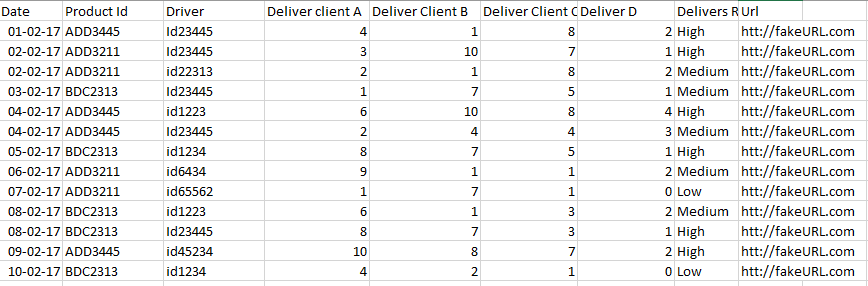
I want to have a sum of the delivers to each client and then to sort the client in order of more delivers, but at the same time have the driversids either concatenated or add as a column and then url of the routes ffor the drivers (create in power query) .
I try to filter them out with a anking but doesn't wok:
(Column)Ranking =
var Summe1 = SUM(table[value])
var Summe2 = SUM(table[value)
var Summe3 = SUM(table[value)
Return
SWITCH(TRUE(),
(Summe1+Summe2+Summe3) >= 15, "high",
AND((Summe1+SummeComp2+Summe3)>9,
(Summe1+Summe2+Summe3)<15), "Medium", "low")
Measure X =Calculate(Sum(table[deliver A]), Ranking = "high")
and so on, but want I want is so,mething like this:

In this way I try to concatenate the driver and then give it a single url. But the date always separates the values.
Do you know how is possible if I have to use another Column or measure or just rebuild a new table without dates?
I know is a little bit complicated let me know if you need more info.
Thanks in advance,
Jorge
Solved! Go to Solution.
Hi @Jmenas,
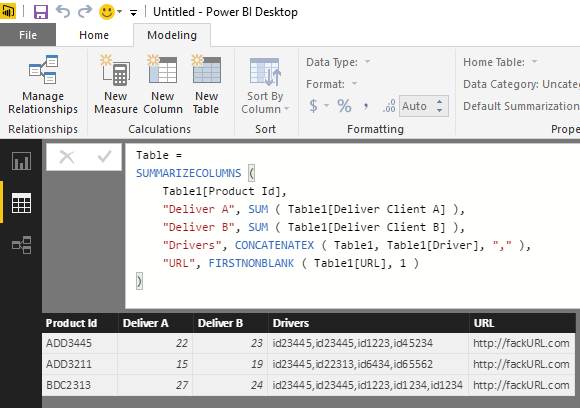
According to your description above, you should be able to use the formula below to create calculate table in this scenario.![]()
Table =
SUMMARIZECOLUMNS (
Table1[Product Id],
"Deliver A", SUM ( Table1[Deliver Client A] ),
"Deliver B", SUM ( Table1[Deliver Client B] ),
"Drivers", CONCATENATEX ( Table1, Table1[Driver], "," ),
"URL", FIRSTNONBLANK ( Table1[URL], 1 )
)
Regards
Hi @Jmenas,
According to your description above, you should be able to use the formula below to create calculate table in this scenario.![]()
Table =
SUMMARIZECOLUMNS (
Table1[Product Id],
"Deliver A", SUM ( Table1[Deliver Client A] ),
"Deliver B", SUM ( Table1[Deliver Client B] ),
"Drivers", CONCATENATEX ( Table1, Table1[Driver], "," ),
"URL", FIRSTNONBLANK ( Table1[URL], 1 )
)
Regards
@v-ljerr-msft Thanks that help a lot. I had some other issues regarding the dates but I could solved it.
Thanks!
cheers,
Jorge
Check out the November 2025 Power BI update to learn about new features.
Advance your Data & AI career with 50 days of live learning, contests, hands-on challenges, study groups & certifications and more!