cancel
Showing results for 
Search instead for 
Did you mean: 

July 7 - July 17 | Round 2 of the Power BI Dataviz World Championships. Don't miss your chance! Learn more

Reply
Anonymous
Not applicable

Transform data

Hi all,
 
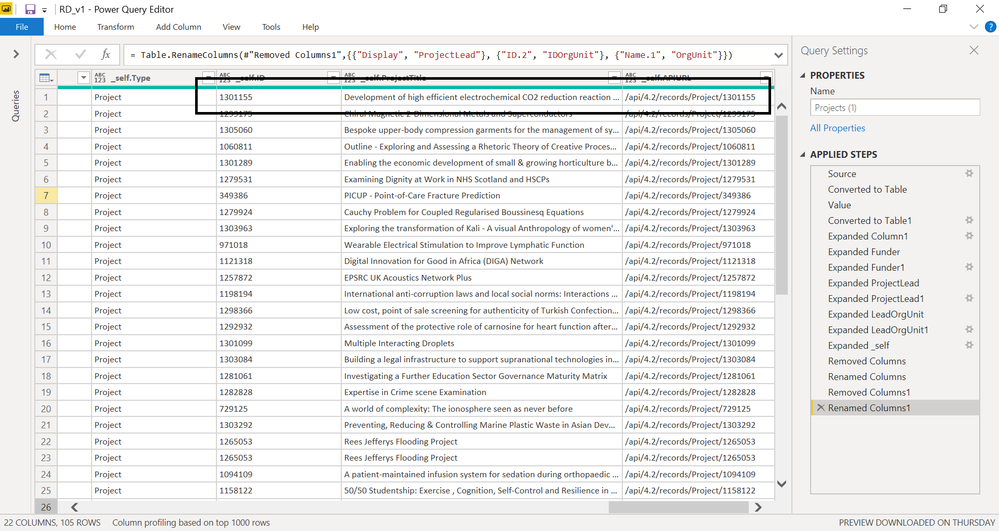
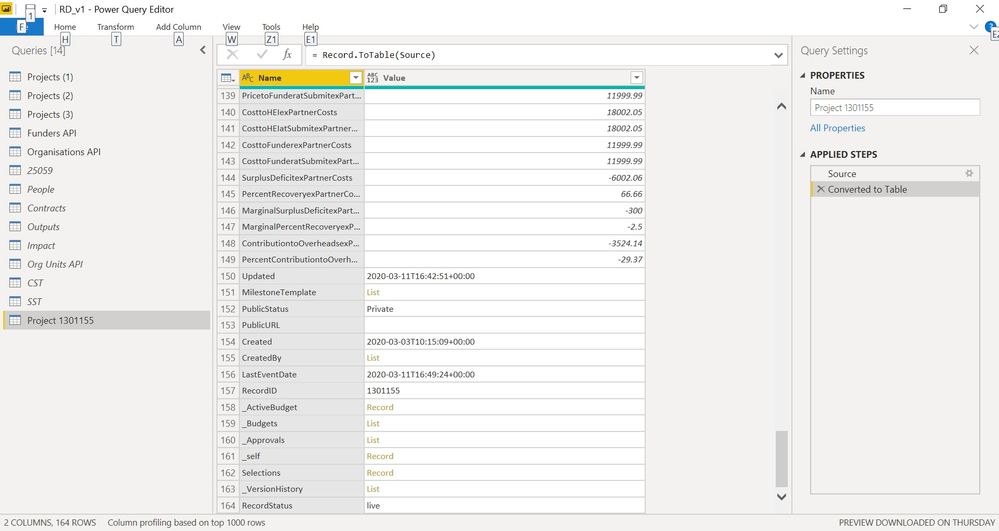
I hope you can help me. See attached two images. The image "Projects lists" is a list of projects from an API (first page). Now, for each project/row, the last column provides another API to drill through each project. The resulting drill for the selected project is the "Project" image. The project has a mix of data/list/record.
 
Ideally, I should have just one table (Projects-all) extracing all info from each API ("Project") provided in each page and row from "Project list". First column of "Project" should be the columns for "Projects-all", and the second "Projects" column should be the rows for each project/row. For this I would need to:
 
  • Read how many pages my data source has (I queried the first page, but doesn't provide how many pages)
  • For each page call the API of each project/row
  • For each API project transform different types of data.
  • Merge results into one single table. This would be the fact table (Projects-all).
Do you know how to do this? Do you know of any web source where I can learn how to do this? I googled "different data transformation" scenarios and read several posts on this forum, but nothing. 
 
Thanks
 
Projects list.pngProject.jpg
1 ACCEPTED SOLUTION
v-lid-msft
Community Support
Community Support

Hi @Anonymous ,


We can add a custom column to each rows of query 1, which call api for each id, then expand the new column to columns, then the result can merge into one table. If you want to count the pages number, we can do it with dax code.


Best regards,


Community Support Team _ Dong Li
If this post helps, then please consider Accept it as the solution to help the other members find it more quickly.

View solution in original post

1 REPLY 1
v-lid-msft
Community Support
Community Support

Hi @Anonymous ,


We can add a custom column to each rows of query 1, which call api for each id, then expand the new column to columns, then the result can merge into one table. If you want to count the pages number, we can do it with dax code.


Best regards,


Community Support Team _ Dong Li
If this post helps, then please consider Accept it as the solution to help the other members find it more quickly.

Helpful resources

Announcements
FabCon and SQLCon Barcelona 2026

FabCon & SQLCon – Barcelona 2026

Join us in Barcelona for FabCon and SQLCon, the Fabric, Power BI, SQL, and AI community event. Save €200 with code FABCMTY200.

60 days of Data Days Carousel

Data Days 2026

Join Fabric Data Days 2026: 60 days of free live/on-demand sessions, challenges, study groups, and certification opportunities.

Power BI DataViz World Championships carousel

Power BI DataViz World Championships - June 2026

A new Power BI DataViz World Championship is coming this June! Don't miss out on submitting your entry.