cancel
Showing results for 
Search instead for 
Did you mean: 

The Power BI Data Visualization World Championships is back! Get ahead of the game and start preparing now! Learn more

Reply
gancw1
Resolver II
Resolver II

Transform column error

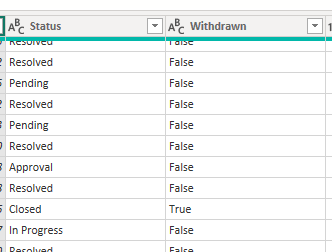
I have these 2 columns. I want to change the value of [Status] to "Withdrawn" if [Withdrawn] = "True"

gancw1_0-1679909665293.png


I have written this code 


= Table.TransformColumns(#"Added Conditional Column", {{"Status", each if [Withdrawn] = "True" then "Withdrawn" else [Status], type text}})


but I am getting this error


Expression.Error: We cannot apply field access to the type Text.
Details:
Value=Assigned
Key=Withdrawn


What is the reason for the error ?

1 ACCEPTED SOLUTION
selimovd
Super User
Super User

Hey @gancw1 ,


I don't think it will work with with the Table.TransformColumns function.

But you can easily do that with the Table.ReplaceValues function.

The following code should do it:

= Table.ReplaceValue(#"Added Conditional Column", each [Status], each if [Withdrawn] = "True" then "Withdrawn" else [Status], Replacer.ReplaceText,{"Status"})


Otherwise you can just add a conditional column and then delete the original.


If you need any help please let me know.
If I answered your question I would be happy if you could mark my post as a solution ✔️ and give it a thumbs up 👍

Best regards
Denis

Blog: WhatTheFact.bi
Follow me: twitter.com/DenSelimovic

View solution in original post

2 REPLIES 2
gancw1
Resolver II
Resolver II

Thanks that works !

selimovd
Super User
Super User

Hey @gancw1 ,


I don't think it will work with with the Table.TransformColumns function.

But you can easily do that with the Table.ReplaceValues function.

The following code should do it:

= Table.ReplaceValue(#"Added Conditional Column", each [Status], each if [Withdrawn] = "True" then "Withdrawn" else [Status], Replacer.ReplaceText,{"Status"})


Otherwise you can just add a conditional column and then delete the original.


If you need any help please let me know.
If I answered your question I would be happy if you could mark my post as a solution ✔️ and give it a thumbs up 👍

Best regards
Denis

Blog: WhatTheFact.bi
Follow me: twitter.com/DenSelimovic

Helpful resources

Announcements
Power BI DataViz World Championships

Power BI Dataviz World Championships

The Power BI Data Visualization World Championships is back! Get ahead of the game and start preparing now!

December 2025 Power BI Update Carousel

Power BI Monthly Update - December 2025

Check out the December 2025 Power BI Holiday Recap!

FabCon Atlanta 2026 carousel

FabCon Atlanta 2026

Join us at FabCon Atlanta, March 16-20, for the ultimate Fabric, Power BI, AI and SQL community-led event. Save $200 with code FABCOMM.