cancel
Showing results for 
Search instead for 
Did you mean: 

Vote for your favorite vizzies from the Power BI Dataviz World Championship submissions. Vote now!

Reply
DianaT
Helper I
Helper I

Transform boolean matrix into count?

Hi all,


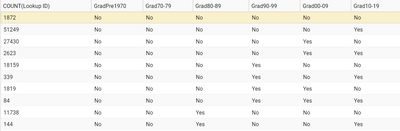
I have a data set that looks like this:

DianaT_0-1595550010200.png

Is it possible for Power BI to transform the boolean matrix into something like this:


Grad cohort        Count

GradPre1970        0

Grad70-79            0

Grad80-89            11,882

Grad90-99            20,401

etc.


Your help will be greatly appreciated.


Cheers,

Diana


1 ACCEPTED SOLUTION
ryan_mayu
Super User
Super User

@DianaT 

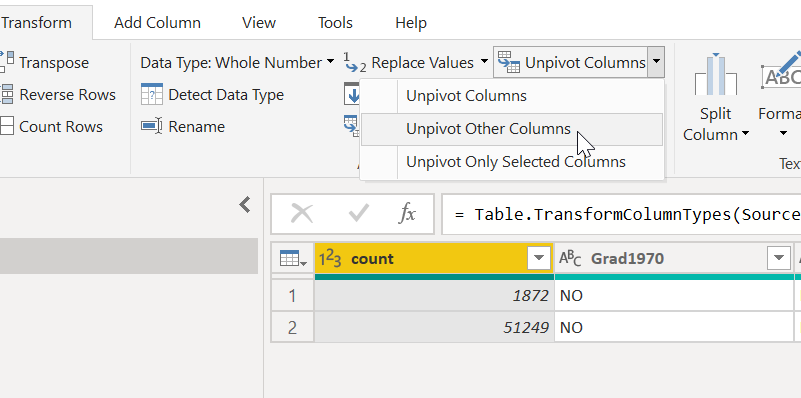
in the PQ, select count column and unpivot other columns.

1.PNG

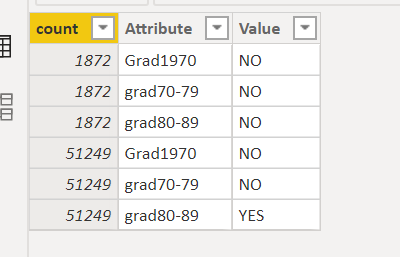
then you get a new data layout

2.PNG

Then create a measure

Measure = CALCULATE(sum('Table'[count]),FILTER('Table','Table'[Value]="YES"))+0

1.PNG


Did I answer your question? Mark my post as a solution!

Proud to be a Super User!


View solution in original post

4 REPLIES 4
amitchandak
Super User
Super User

@DianaT , if you want to keep them as column


GradPre1970 new  = if([GradPre1970] ="No",0,1)

for each column and sum up.

In matrix, you can show them on the row.

https://www.burningsuit.co.uk/blog/2019/04/7-secrets-of-the-matrix-visual/


You can unpivot the data

https://radacad.com/pivot-and-unpivot-with-power-bi
and use replace function in power query (on right click of column) and convert no to 0 and yes to 1

https://www.youtube.com/watch?v=UZQ9EFvEECY


Then you can do simple addition

Share with Power BI Enthusiasts: Full Power BI Video (20 Hours) YouTube
Microsoft Fabric Series 60+ Videos YouTube
Microsoft Fabric Hindi End to End YouTube
Greg_Deckler
Community Champion
Community Champion

@DianaT - @ryan_mayu is 100% correct, definitely the way to go.


Follow on LinkedIn
@ me in replies or I'll lose your thread!!!
Instead of a Kudo, please vote for this idea
Become an expert!: Enterprise DNA
External Tools: MSHGQM
YouTube Channel!: Microsoft Hates Greg
Latest book!:
DAX For Humans

DAX is easy, CALCULATE makes DAX hard...
ryan_mayu
Super User
Super User

@DianaT 

in the PQ, select count column and unpivot other columns.

1.PNG

then you get a new data layout

2.PNG

Then create a measure

Measure = CALCULATE(sum('Table'[count]),FILTER('Table','Table'[Value]="YES"))+0

1.PNG


Did I answer your question? Mark my post as a solution!

Proud to be a Super User!


Thank you Ryan. Your solution works beautifully.

Helpful resources

Announcements
Power BI DataViz World Championships

Power BI Dataviz World Championships

Vote for your favorite vizzies from the Power BI World Championship submissions!

Sticker Challenge 2026 Carousel

Join our Community Sticker Challenge 2026

If you love stickers, then you will definitely want to check out our Community Sticker Challenge!

January Power BI Update Carousel

Power BI Monthly Update - January 2026

Check out the January 2026 Power BI update to learn about new features.

FabCon Atlanta 2026 carousel

FabCon Atlanta 2026

Join us at FabCon Atlanta, March 16-20, for the ultimate Fabric, Power BI, AI and SQL community-led event. Save $200 with code FABCOMM.