Learn from the best! Meet the four finalists headed to the FINALS of the Power BI Dataviz World Championships! Register now
Hi all,
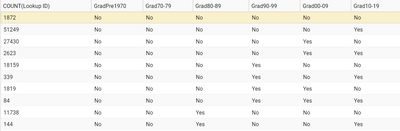
I have a data set that looks like this:
Is it possible for Power BI to transform the boolean matrix into something like this:
Grad cohort Count
GradPre1970 0
Grad70-79 0
Grad80-89 11,882
Grad90-99 20,401
etc.
Your help will be greatly appreciated.
Cheers,
Diana
Solved! Go to Solution.
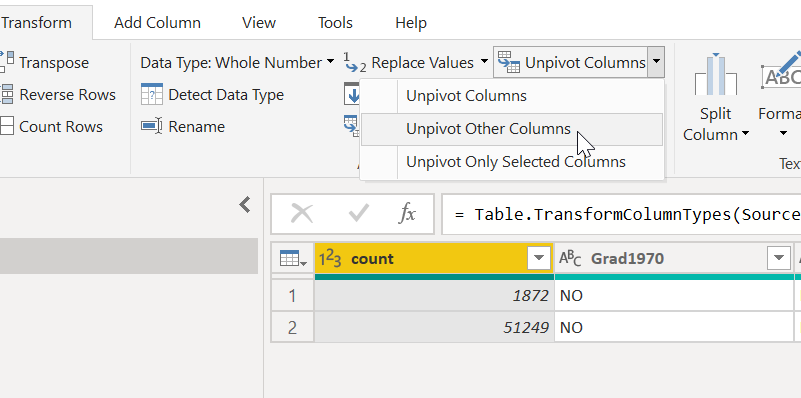
in the PQ, select count column and unpivot other columns.
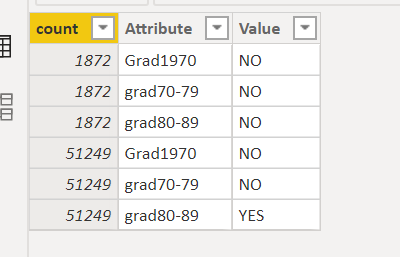
then you get a new data layout
Then create a measure
Measure = CALCULATE(sum('Table'[count]),FILTER('Table','Table'[Value]="YES"))+0
Proud to be a Super User!
@DianaT , if you want to keep them as column
GradPre1970 new = if([GradPre1970] ="No",0,1)
for each column and sum up.
In matrix, you can show them on the row.
https://www.burningsuit.co.uk/blog/2019/04/7-secrets-of-the-matrix-visual/
You can unpivot the data
https://radacad.com/pivot-and-unpivot-with-power-bi
and use replace function in power query (on right click of column) and convert no to 0 and yes to 1
https://www.youtube.com/watch?v=UZQ9EFvEECY
Then you can do simple addition
@DianaT - @ryan_mayu is 100% correct, definitely the way to go.
in the PQ, select count column and unpivot other columns.
then you get a new data layout
Then create a measure
Measure = CALCULATE(sum('Table'[count]),FILTER('Table','Table'[Value]="YES"))+0
Proud to be a Super User!
Thank you Ryan. Your solution works beautifully.
| User | Count |
|---|---|
| 57 | |
| 44 | |
| 32 | |
| 16 | |
| 14 |
| User | Count |
|---|---|
| 82 | |
| 66 | |
| 42 | |
| 27 | |
| 25 |