Join us at FabCon Atlanta from March 16 - 20, 2026, for the ultimate Fabric, Power BI, AI and SQL community-led event. Save $200 with code FABCOMM.
Register now!Vote for your favorite vizzies from the Power BI Dataviz World Championship submissions. Vote now!
Hi all,
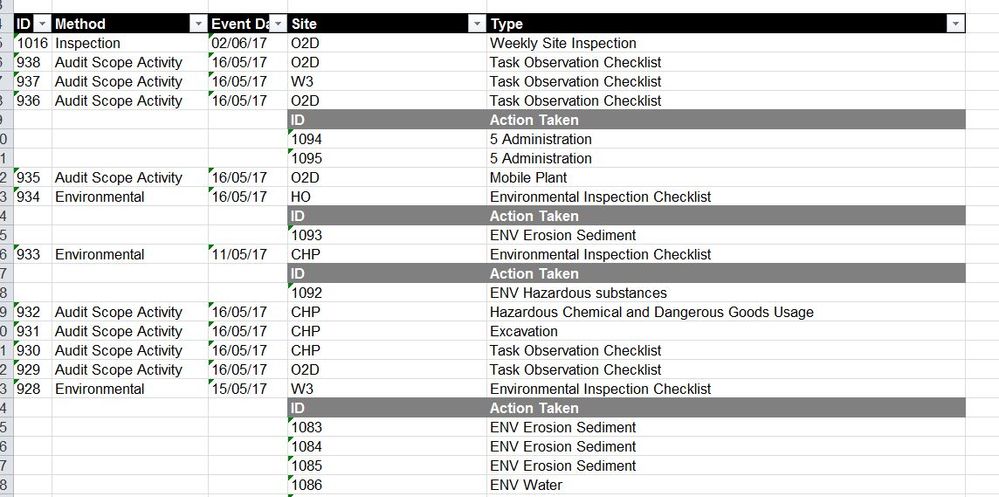
I have a table which consists of inspection event details, and some inspections include nested information (actions raised during the inspections). Is there are way that I can clean this table or export the nested rows of actions into a related query, so that I can use the nested information?
The table currently looks like this:
Very new to this, so any help is greatly appreciated!
Solved! Go to Solution.
Hi,
It would help if you also explain what the result should look like.
I assumed it shoud be something like this, with left MasterTable and right ActionTable (just a few rows):
Queries (you can copy and paste in the Advanced Query edtor, accessible via "Edit Query"):
Both queries are generated using standard menu options in the Query Editor.
MasterTable:
let
Source = Table1,
#"Filtered Rows" = Table.SelectRows(Table1, each ([ID] <> null))
in
#"Filtered Rows"ActionTable:
let
Source = Table1,
#"Filled Down" = Table.FillDown(Source,{"ID"}),
#"Filtered Rows" = Table.SelectRows(#"Filled Down", each ([Method] = null)),
#"Renamed Columns" = Table.RenameColumns(#"Filtered Rows",{{"Site", "ActionID"}, {"Type", "Action Taken"}}),
#"Filtered Rows1" = Table.SelectRows(#"Renamed Columns", each ([ActionID] <> "ID")),
#"Removed Columns" = Table.RemoveColumns(#"Filtered Rows1",{"Method", "Event Date"})
in
#"Removed Columns"
Hi,
It would help if you also explain what the result should look like.
I assumed it shoud be something like this, with left MasterTable and right ActionTable (just a few rows):
Queries (you can copy and paste in the Advanced Query edtor, accessible via "Edit Query"):
Both queries are generated using standard menu options in the Query Editor.
MasterTable:
let
Source = Table1,
#"Filtered Rows" = Table.SelectRows(Table1, each ([ID] <> null))
in
#"Filtered Rows"ActionTable:
let
Source = Table1,
#"Filled Down" = Table.FillDown(Source,{"ID"}),
#"Filtered Rows" = Table.SelectRows(#"Filled Down", each ([Method] = null)),
#"Renamed Columns" = Table.RenameColumns(#"Filtered Rows",{{"Site", "ActionID"}, {"Type", "Action Taken"}}),
#"Filtered Rows1" = Table.SelectRows(#"Renamed Columns", each ([ActionID] <> "ID")),
#"Removed Columns" = Table.RemoveColumns(#"Filtered Rows1",{"Method", "Event Date"})
in
#"Removed Columns"
Of course! thanks so much. I was over-thinking it, when all I had to do was duplicate the table and filter accordingly.
Vote for your favorite vizzies from the Power BI World Championship submissions!
If you love stickers, then you will definitely want to check out our Community Sticker Challenge!
Check out the January 2026 Power BI update to learn about new features.
| User | Count |
|---|---|
| 63 | |
| 51 | |
| 41 | |
| 20 | |
| 16 |
| User | Count |
|---|---|
| 122 | |
| 107 | |
| 47 | |
| 30 | |
| 24 |