We've captured the moments from FabCon & SQLCon that everyone is talking about, and we are bringing them to the community, live and on-demand. Starts on April 14th. Register now
Hello
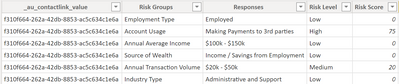
I was wondering if you could help me. I have the following table where i have duplicate values.
And i want to display it like the following: ( ive only displayed 2 Riskgroup, but i want to show all the group in a single view)
| _au_contactlink_value | Risk Group | Response | Risk Level | Riskscore | Risk Group | Response | Risk Level | Riskscore |
| f310f664-262a-42db-8853-ac5c634c1e6a | Employment Type | Employed | Low | 0 | Account Usage | Making Payment to 3rd parties | High | 75 |
thanks
viral
Solved! Go to Solution.
Hello i was able to manage to do it.
In Power query i seperated the table to each groups and then added a custom number to represent the question and did a pivot to a single view.
Hi @viralpatel21 ,
According to your description, you need to display groupings of data from different rows into one row.
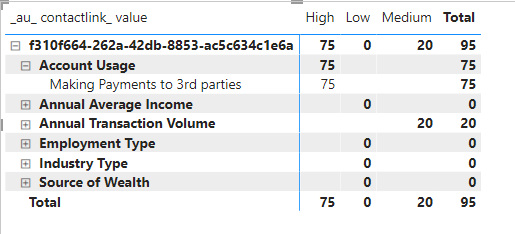
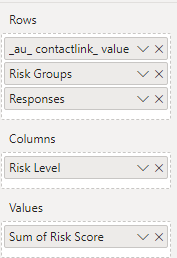
It may not be possible to do the same as the example diagram, but you can achieve a similar effect with matrix visuals:
Best Regards,
Gallen Luo
If this post helps, then please consider Accept it as the solution to help the other members find it more quickly.
Hello i was able to manage to do it.
In Power query i seperated the table to each groups and then added a custom number to represent the question and did a pivot to a single view.
If you have recently started exploring Fabric, we'd love to hear how it's going. Your feedback can help with product improvements.
A new Power BI DataViz World Championship is coming this June! Don't miss out on submitting your entry.
Share feedback directly with Fabric product managers, participate in targeted research studies and influence the Fabric roadmap.
| User | Count |
|---|---|
| 57 | |
| 38 | |
| 32 | |
| 18 | |
| 16 |
| User | Count |
|---|---|
| 66 | |
| 66 | |
| 40 | |
| 34 | |
| 25 |