Get certified for free when you join Fabric Data Days 2026 and dive into Fabric, Power BI, SQL, AI, and other essential data skills.
Join nowTry your skills in the Power BI Dataviz World Championship! Round one ends June 26. Join now
Hello Everyone!
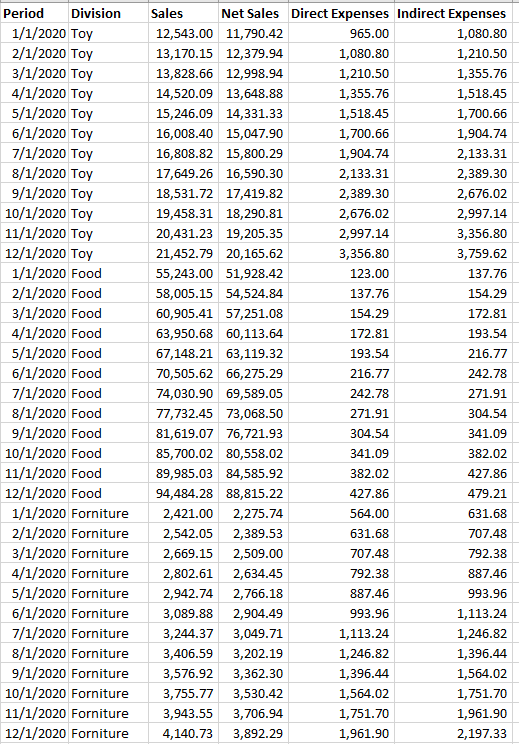
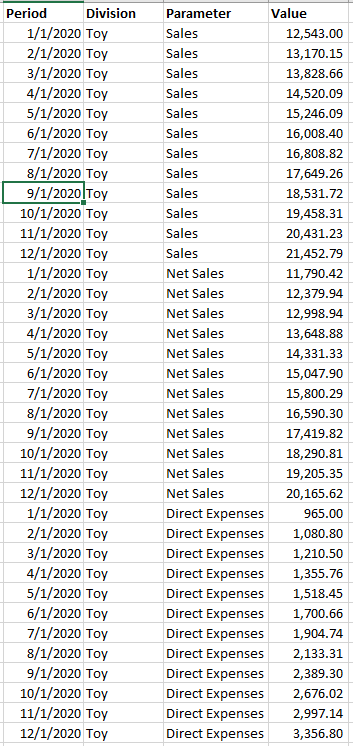
I have a table with the following structure, due to visualization and measuments I have to transform it in to this format:
Original Table:
Desire Table:
I need your help please!
Kind Regards
Solved! Go to Solution.
Hi, @Anonymous
It’s my pleasure to answer for you.
According to your description,I think you can edit it in PQ.
Like this:
If it doesn’t solve your problem, please feel free to ask me.
Best Regards
Janey Guo
If this post helps, then please consider Accept it as the solution to help the other members find it more quickly.
Hi, @Anonymous
It’s my pleasure to answer for you.
According to your description,I think you can edit it in PQ.
Like this:
If it doesn’t solve your problem, please feel free to ask me.
Best Regards
Janey Guo
If this post helps, then please consider Accept it as the solution to help the other members find it more quickly.
Hi @Anonymous ,
In Power Query, multi-select (hold down Ctrl wihle clicking) your [Period] and [Division] fields.
Go to the Transform tab on the ribbon, find the little dropdown button by 'Unpivot Columns' and select 'Unpivot Other Columns'.
Voila!
Pete
Proud to be a Datanaut!
@Anonymous , Try unpivot
https://radacad.com/pivot-and-unpivot-with-power-bi
Video : https://youtu.be/2HjkBtxSM0g
| User | Count |
|---|---|
| 23 | |
| 19 | |
| 19 | |
| 17 | |
| 11 |
| User | Count |
|---|---|
| 55 | |
| 55 | |
| 41 | |
| 40 | |
| 30 |