Don't miss your chance to take exam DP-600 or DP-700 on us!
Request nowLearn from the best! Meet the four finalists headed to the FINALS of the Power BI Dataviz World Championships! Register now
In the current dataset I have I am encountering a problem that I can not wrap my head around.
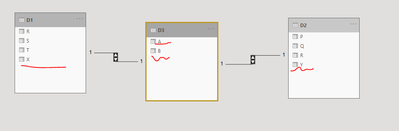
I have a total of three datasets.
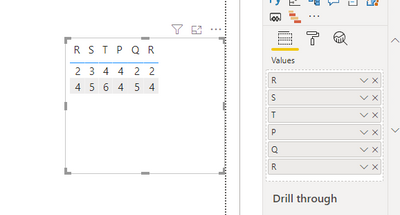
Dataset 1 has Column X containing values that are equal to Column A of Dataset 3. Dataset 2 has column Y containing values that are equal to Colunmn B of Dataset 3. My goal is to relate Columns R,S,T in Dataset 1 and Columns P, Q, R in Dataset 2 to each other based on the information in Column A/B. However, using relationships in the Model creates a loop that does not work. How can I transform the dataset in PowerQuery such that I can plot Columns R,S,T vs Columns P, Q , R?
MWE of the datasets:
Dataset 1:
X R S T
ab 2 3 4
xy 4 5 6
Dataset 2:
Y P Q R
qw 4 2 2
ds 4 5 4
Dataset 3:
A B
ab qw
xy ds
Solved! Go to Solution.
I solved this by combining Query Dataset 3 with Dataset 2 and manually exchanging Column Y with column B. You could then append query dataset 1 and dataset 2 to reach a homogeneous dataset.
@Anonymous , Not very clear.
But merge dataset 3 and 1 (A- X) and then merge with 2 (Y- B)
https://radacad.com/append-vs-merge-in-power-bi-and-power-query
Share feedback directly with Fabric product managers, participate in targeted research studies and influence the Fabric roadmap.
Check out the February 2026 Power BI update to learn about new features.
| User | Count |
|---|---|
| 55 | |
| 48 | |
| 38 | |
| 16 | |
| 15 |
| User | Count |
|---|---|
| 85 | |
| 70 | |
| 38 | |
| 28 | |
| 25 |