Don't miss your chance to take the Fabric Data Engineer (DP-700) exam on us!
Learn moreWe've captured the moments from FabCon & SQLCon that everyone is talking about, and we are bringing them to the community, live and on-demand. Starts on April 14th. Register now
Hi Community
I need to create a Fact table based on lengthy columnar data. Need to reduce the repeating columns and summarize based on a condition.
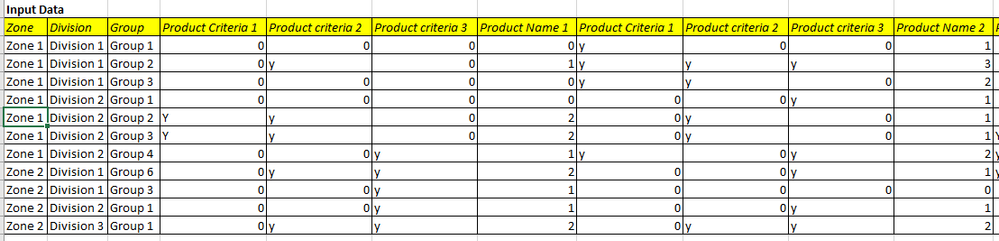
Input Data
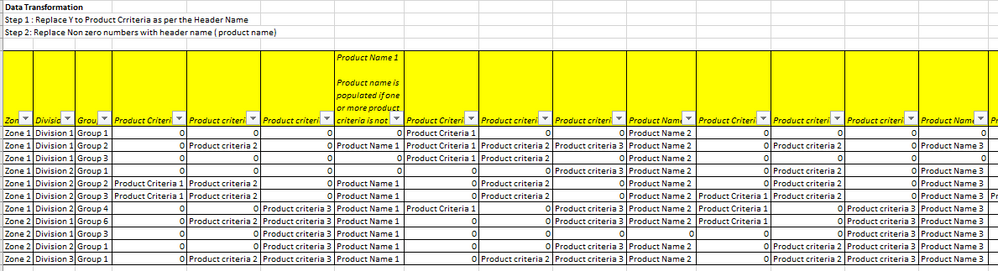
My input data looks like the image "Input data". This is a dynamic data set comprising for 3 product criteria per product. Need to transform the data as follows
step 1: if there is a "Y" in the product criteria column, then it needs to be replaced with the header name of product criteria fields
step 2: The non zero values in the product name needs to be replaced with the header name (which is the product name)
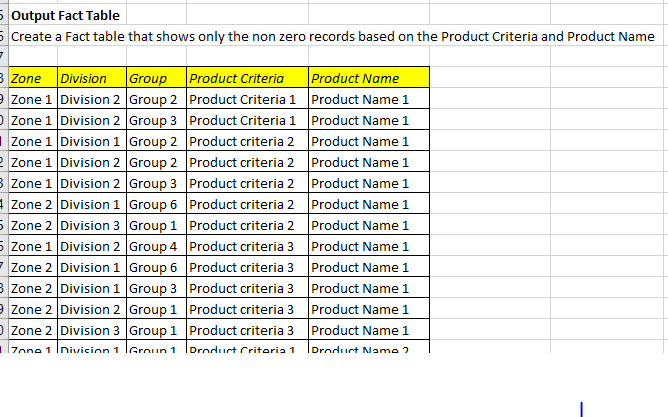
step 3: The non zero records needs to summarised by product criteria and product name. Illustrative output is provided in the image above.
Thanks for your assistance.
PS: Newbie to the community. Could not find an option to attach the excel containing the dummy data to this post.
Solved! Go to Solution.
Hi @PBIuser_23 ,
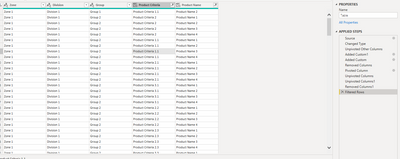
Please see if this meet your needs:
let
Source = Table.FromRows(Json.Document(Binary.Decompress(Binary.FromText("jZJNCoNADIWvUmbtQhPxBELPYGWWLmbjiKWFub3UthDjGzOLQB4P8uVvHN0jztOtcZXrwzs8Q5x3cV/ja9mzWkUSOfKP4atrAqmqzS//BwO/Fj6ZBAZ9JVGRgF8yA11uSZJkz3prX98ifLIB9Iy2gu9iEbiAoP2jtggt2EoSmoDOzED40t3pN2xi5g4ZAoOKJZe3CPiXcAVrRkzgE0FXKNfebw==", BinaryEncoding.Base64), Compression.Deflate)), let _t = ((type nullable text) meta [Serialized.Text = true]) in type table [Zone = _t, #"Division " = _t, #"Group " = _t, #"Product Criteria 1" = _t, #"Product criteria 2" = _t, #"Product criteria 3" = _t, #"Product Name 1" = _t, #"Product Criteria 1.1" = _t, #"Product criteria 2.1" = _t, #"Product criteria 3.1" = _t, #"Product Name 2" = _t, #"Product Criteria 1.2" = _t, #"Product criteria 2.2" = _t, #"Product criteria 3.2" = _t, #"Product Name 3" = _t, #"Product Criteria 1.3" = _t, #"Product criteria 2.3" = _t, #"Product criteria 3.3" = _t, #"Product Name 4" = _t]),
#"Changed Type" = Table.TransformColumnTypes(Source,{{"Zone", type text}, {"Division ", type text}, {"Group ", type text}, {"Product Criteria 1", type text}, {"Product criteria 2", type text}, {"Product criteria 3", type text}, {"Product Name 1", Int64.Type}, {"Product Criteria 1.1", type text}, {"Product criteria 2.1", type text}, {"Product criteria 3.1", type text}, {"Product Name 2", Int64.Type}, {"Product Criteria 1.2", type text}, {"Product criteria 2.2", type text}, {"Product criteria 3.2", type text}, {"Product Name 3", Int64.Type}, {"Product Criteria 1.3", type text}, {"Product criteria 2.3", type text}, {"Product criteria 3.3", type text}, {"Product Name 4", Int64.Type}}),
#"Unpivoted Other Columns" = Table.UnpivotOtherColumns(#"Changed Type", {"Division ", "Zone", "Group "}, "Attribute", "Value"),
#"Added Custom1" = Table.AddColumn(#"Unpivoted Other Columns", "AttributeProper", each Text.Proper([Attribute])),
#"Added Custom" = Table.AddColumn(#"Added Custom1", "Custom", each if Text.From([Value])="0" then [Value] else [AttributeProper]),
#"Removed Columns" = Table.RemoveColumns(#"Added Custom",{"Value", "Attribute"}),
#"Pivoted Column" = Table.Pivot(#"Removed Columns", List.Distinct(#"Removed Columns"[AttributeProper]), "AttributeProper", "Custom"),
#"Unpivoted Columns" = Table.UnpivotOtherColumns(#"Pivoted Column", List.Select(Table.ColumnNames(#"Pivoted Column"),each Text.Contains(_,"Product Criteria")= false), "Attribute", "Product Criteria"),
#"Unpivoted Columns1" = Table.UnpivotOtherColumns(#"Unpivoted Columns", List.Select(Table.ColumnNames(#"Unpivoted Columns"),each Text.Contains(_,"Product Name")= false), "Attribute.1", "Product Name"),
#"Removed Columns1" = Table.RemoveColumns(#"Unpivoted Columns1",{"Attribute", "Attribute.1"}),
#"Filtered Rows" = Table.SelectRows(#"Removed Columns1", each ([Product Criteria] <> "0") and ([Product Name] <> 0))
in
#"Filtered Rows"
A sample PBIX. for your reference is attached.
If I have not understood your needs correctly, please do not hesitate to inform me.
Hope it helps,
Community Support Team _ Caitlyn Yan
If this post helps then please consider Accept it as the solution to help the other members find it more quickly.
Hi @PBIuser_23 ,
Please see if this meet your needs:
let
Source = Table.FromRows(Json.Document(Binary.Decompress(Binary.FromText("jZJNCoNADIWvUmbtQhPxBELPYGWWLmbjiKWFub3UthDjGzOLQB4P8uVvHN0jztOtcZXrwzs8Q5x3cV/ja9mzWkUSOfKP4atrAqmqzS//BwO/Fj6ZBAZ9JVGRgF8yA11uSZJkz3prX98ifLIB9Iy2gu9iEbiAoP2jtggt2EoSmoDOzED40t3pN2xi5g4ZAoOKJZe3CPiXcAVrRkzgE0FXKNfebw==", BinaryEncoding.Base64), Compression.Deflate)), let _t = ((type nullable text) meta [Serialized.Text = true]) in type table [Zone = _t, #"Division " = _t, #"Group " = _t, #"Product Criteria 1" = _t, #"Product criteria 2" = _t, #"Product criteria 3" = _t, #"Product Name 1" = _t, #"Product Criteria 1.1" = _t, #"Product criteria 2.1" = _t, #"Product criteria 3.1" = _t, #"Product Name 2" = _t, #"Product Criteria 1.2" = _t, #"Product criteria 2.2" = _t, #"Product criteria 3.2" = _t, #"Product Name 3" = _t, #"Product Criteria 1.3" = _t, #"Product criteria 2.3" = _t, #"Product criteria 3.3" = _t, #"Product Name 4" = _t]),
#"Changed Type" = Table.TransformColumnTypes(Source,{{"Zone", type text}, {"Division ", type text}, {"Group ", type text}, {"Product Criteria 1", type text}, {"Product criteria 2", type text}, {"Product criteria 3", type text}, {"Product Name 1", Int64.Type}, {"Product Criteria 1.1", type text}, {"Product criteria 2.1", type text}, {"Product criteria 3.1", type text}, {"Product Name 2", Int64.Type}, {"Product Criteria 1.2", type text}, {"Product criteria 2.2", type text}, {"Product criteria 3.2", type text}, {"Product Name 3", Int64.Type}, {"Product Criteria 1.3", type text}, {"Product criteria 2.3", type text}, {"Product criteria 3.3", type text}, {"Product Name 4", Int64.Type}}),
#"Unpivoted Other Columns" = Table.UnpivotOtherColumns(#"Changed Type", {"Division ", "Zone", "Group "}, "Attribute", "Value"),
#"Added Custom1" = Table.AddColumn(#"Unpivoted Other Columns", "AttributeProper", each Text.Proper([Attribute])),
#"Added Custom" = Table.AddColumn(#"Added Custom1", "Custom", each if Text.From([Value])="0" then [Value] else [AttributeProper]),
#"Removed Columns" = Table.RemoveColumns(#"Added Custom",{"Value", "Attribute"}),
#"Pivoted Column" = Table.Pivot(#"Removed Columns", List.Distinct(#"Removed Columns"[AttributeProper]), "AttributeProper", "Custom"),
#"Unpivoted Columns" = Table.UnpivotOtherColumns(#"Pivoted Column", List.Select(Table.ColumnNames(#"Pivoted Column"),each Text.Contains(_,"Product Criteria")= false), "Attribute", "Product Criteria"),
#"Unpivoted Columns1" = Table.UnpivotOtherColumns(#"Unpivoted Columns", List.Select(Table.ColumnNames(#"Unpivoted Columns"),each Text.Contains(_,"Product Name")= false), "Attribute.1", "Product Name"),
#"Removed Columns1" = Table.RemoveColumns(#"Unpivoted Columns1",{"Attribute", "Attribute.1"}),
#"Filtered Rows" = Table.SelectRows(#"Removed Columns1", each ([Product Criteria] <> "0") and ([Product Name] <> 0))
in
#"Filtered Rows"
A sample PBIX. for your reference is attached.
If I have not understood your needs correctly, please do not hesitate to inform me.
Hope it helps,
Community Support Team _ Caitlyn Yan
If this post helps then please consider Accept it as the solution to help the other members find it more quickly.
If you have recently started exploring Fabric, we'd love to hear how it's going. Your feedback can help with product improvements.
A new Power BI DataViz World Championship is coming this June! Don't miss out on submitting your entry.
Share feedback directly with Fabric product managers, participate in targeted research studies and influence the Fabric roadmap.
| User | Count |
|---|---|
| 55 | |
| 40 | |
| 35 | |
| 19 | |
| 18 |
| User | Count |
|---|---|
| 71 | |
| 70 | |
| 38 | |
| 35 | |
| 23 |