cancel
Showing results for 
Search instead for 
Did you mean: 

July 7 - July 17 | Round 2 of the Power BI Dataviz World Championships. Don't miss your chance! Learn more

Reply
martinfernandez
Frequent Visitor

Transform DAX function into a Power Query function

Hi all,


I need to use the following DAX function in a Power Query custom column since I get a "circular dependency" when trying to relate an index column to the calculated one.


Period = 
CALCULATE(
    VALUES('Time Periods'[Time Period Code]),
    FILTER(
        'Time Periods',
        'Time Periods'[Start Date] >= EARLIER( 'Due Dates Cube'[Due Date] )
        && 'Time Periods'[End Date] <= EARLIER( 'Due Dates Cube'[Due Date] )
    )
)

How would you achieve this goal? Thanks in advance.


Regards,

Martin

2 ACCEPTED SOLUTIONS
TomMartens
Super User
Super User

Hey,

I'm wondering what you want to achieve, your DAX formula look somewhat odd.


Basically VALUES() returns a table, if this table contains just one row and one column its result can be automatically converted to a scalar value. Based on the filter I would guess that in some conditions it could be possible that there are more rows than just one.


For this reason, can you please explain in more detail what you want to achieve and you may also consider to provide an xlsx file with sample data, upload the file to onedrive or dropbox and share the link.


Regards,

Tom


Did I answer your question? Mark my post as a solution, this will help others!

Proud to be a Super User!
I accept Kudos 😉
Hamburg, Germany

View solution in original post

Thank you for replying. I just solved by using another way (a non-best practice one).


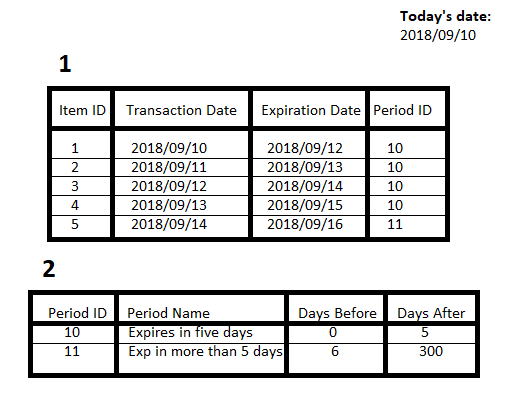
But, just in case, I needed to evaluate a "expiration date" column based on two columns from another table like (days before and days after😞


Ejemplo problema.png

According to previous image, I wanted to calculate '1st table'[Period ID] where '1st table'[Expiration Date] is between Duration.Days(DateTime.LocalNow()) + '2nd table'[Days Before] and Duration.Days(DateTime.LocalNow()) + '2nd table Days After'.


But I just deleted Days before and Days after columns, to add a conditional column "Period ID" to do the calculation manually.

View solution in original post

2 REPLIES 2
TomMartens
Super User
Super User

Hey,

I'm wondering what you want to achieve, your DAX formula look somewhat odd.


Basically VALUES() returns a table, if this table contains just one row and one column its result can be automatically converted to a scalar value. Based on the filter I would guess that in some conditions it could be possible that there are more rows than just one.


For this reason, can you please explain in more detail what you want to achieve and you may also consider to provide an xlsx file with sample data, upload the file to onedrive or dropbox and share the link.


Regards,

Tom


Did I answer your question? Mark my post as a solution, this will help others!

Proud to be a Super User!
I accept Kudos 😉
Hamburg, Germany

Thank you for replying. I just solved by using another way (a non-best practice one).


But, just in case, I needed to evaluate a "expiration date" column based on two columns from another table like (days before and days after😞


Ejemplo problema.png

According to previous image, I wanted to calculate '1st table'[Period ID] where '1st table'[Expiration Date] is between Duration.Days(DateTime.LocalNow()) + '2nd table'[Days Before] and Duration.Days(DateTime.LocalNow()) + '2nd table Days After'.


But I just deleted Days before and Days after columns, to add a conditional column "Period ID" to do the calculation manually.

Helpful resources

Announcements
FabCon and SQLCon Barcelona 2026

FabCon & SQLCon – Barcelona 2026

Join us in Barcelona for FabCon and SQLCon, the Fabric, Power BI, SQL, and AI community event. Save €200 with code FABCMTY200.

60 days of Data Days Carousel

Data Days 2026

Join Data Days 2026: 60 days of free live/on-demand sessions, challenges, study groups, and certification opportunities.

Power BI DataViz World Championships carousel

Power BI DataViz World Championships - June 2026

A new Power BI DataViz World Championship is coming this June! Don't miss out on submitting your entry.

Top Solution Authors