
cancel
Showing results for 
Search instead for 
Did you mean: 

Did you hear? There's a new SQL AI Developer certification (DP-800). Start preparing now and be one of the first to get certified. Register now

Reply
Anonymous
Not applicable

Transform Column to Row

I have current table as below; how can I transform to get the result table;

qhpowerbi_0-1684135496112.png

Thank you!
Qayyum Halid

2 REPLIES 2
miTutorials
Super User
Super User

Go to Power Query Editor


1. Select Q1 & Q2 column, Right click and choose Unpivot column

2. Repeat the same step above by selecting  the Whats your name and Age Column


You will be left with the way you want your table to look like but with duplicate rows.


Go to HOME tab under remove rows select remove duplicate rows. Thats it !


This Tutorial will provide you more details if required.


Pivot/Unpivot PowerBI Feature explained | Power Query | MiTutorials - YouTube


Regards

Ismail

www.Youtube.com/MiTutorials

Anonymous
Not applicable

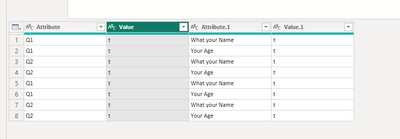
It become like this;

qhpowerbi_1-1684138347748.png


Then, if i remove Attribute duplicate; it become as below;

qhpowerbi_2-1684138387916.png


If i remove duplicate in Attribute.1, it become as below

qhpowerbi_3-1684138433456.png


Helpful resources

Announcements
April Power BI Update Carousel

Power BI Monthly Update - April 2026

Check out the April 2026 Power BI update to learn about new features.

New to Fabric survey Carousel

New to Fabric Survey

If you have recently started exploring Fabric, we'd love to hear how it's going. Your feedback can help with product improvements.

Power BI DataViz World Championships carousel

Power BI DataViz World Championships - June 2026

A new Power BI DataViz World Championship is coming this June! Don't miss out on submitting your entry.