Join us at FabCon Atlanta from March 16 - 20, 2026, for the ultimate Fabric, Power BI, AI and SQL community-led event. Save $200 with code FABCOMM.
Register now!The Power BI Data Visualization World Championships is back! It's time to submit your entry. Live now!
Hi all,
I have Date slicer
If the person is in destination 11 before the minimum date of the slicer
That means let consider Id 11 is present in destination 1 in before the minimum date of the slicer same person present in destination 2 but not in destination 1 at that particular period of time in slicer (mindate&&MAXDATE)
Here my calculation is divided(1(number of customers are transferred to another destination), the total number of customers in that destination,0)
IN retail I have Destination1
In F&B I have Destination2
Data
IDs DATE Destination sector
11 1/1/2018 destination1 Retail
22 1/12/2018 destination1 Retail
11 1/1/2019 destination2 F&B
22 1/12/2019 destination1 Retail
11 1/1/2020 destination1 Retail
if I selected minimum date 1/1/2019 to max 1/12/2019 for this particular period of time customers is transferred from destination1 to destination2(ID 11)
so (1/2)*100=50%
For destination1 50% of the customers are transferred to destination2
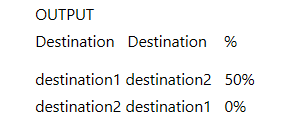
OUTPUT
Destination Destination %
destination1 destination2 50%
destination2 destination1 0%
Could you give a mathematical formula or fake code for [%]? From your description, I still don't understand the logic.
Best regards,
Lionel Chen
If this post helps, then please consider Accept it as the solution to help the other members find it more quickly.
@v-lionel-msft
For Example
ID DATE DESTINATION
1111 04/01/2019 DESTINATION1
2222 05/02/2019 DESTINATION1
3333 07/04/2019 DESTINATION2
1111 08/05/2019 DESTINATION2
3333 06/05/2019 DESTINATION1
If I select the dates from 01/01/2019 to 01/12/2019 then result should be like below like matrix table
DESTINATION1 DESTINATION2
DESTINATION1 0.00%( For destination1 to destination1 50.00%( For destination1 to destination2
how many customers are converted) how many customers are converted)
DESTINATION2 50.00%( For destination2 to destination1 0.00%( For destination 2 to destination 2
how many customers are converted) how many customers are converted)
FORMULA = Number of customers transfer to another destination/Total number of customers in that destination per that particular period of time in slicer
For destination1 to destination1 how many customers are converted =(0/2)*100=0.0%
For destination1 to destination2 how many customers are converted =(1/2)*100=50.0%
For destination2 to destination1 how many customers are converted = (1/2)*100=50.0%
For destination2 to destination2 how many customers are converted = (0/2)*100=0.0%
Thanks for your reply @v-lionel-msft please see the above logic
Hi @manideep547 ,
Maybe you can refer these formula:
Column 2 =
VAR x =
CALCULATE(
DISTINCTCOUNT([ID]),
ALLEXCEPT(
Sheet4,
Sheet4[DESTINATION]
)
)
VAR y =
CALCULATE(
COUNT([ID]),
ALLEXCEPT(
Sheet4,
Sheet4[DESTINATION]
)
)
RETURN
y - x
Column 5 =
IF(
[Column 2] = 0,
[DESTINATION] & "-" & [DESTINATION]
)
Column =
VAR x =
CALCULATE(
COUNT(Sheet4[DESTINATION]),
ALLEXCEPT(
Sheet4,
Sheet4[ID]
)
)
RETURN
IF(
x >1,
x/2
)
Column 6 =
VAR x =
CALCULATE(
MAX([DESTINATION]),
ALL(Sheet4)
)
RETURN
IF(
[Column] <> 0,
IF(
[DESTINATION] = x,
x & "-" & MIN([DESTINATION]),
[DESTINATION] & "-" & x
)
)
Best regards,
Lionel Chen
If this post helps, then please consider Accept it as the solution to help the other members find it more quickly.
Hey @manideep547
Check out this thread as I believe it helps answer your question: https://community.powerbi.com/t5/Desktop/SELECTEDVALUE-with-Slicer-Selection/td-p/381815
You may need to create a helper column or table to concat the possible destintation combinations.
If this helps please kudo.
If this solves your problem please accept it as a solution.
@Anonymous I need only measure
The Power BI Data Visualization World Championships is back! It's time to submit your entry.
Check out the January 2026 Power BI update to learn about new features.
| User | Count |
|---|---|
| 56 | |
| 42 | |
| 39 | |
| 23 | |
| 21 |
| User | Count |
|---|---|
| 144 | |
| 106 | |
| 63 | |
| 38 | |
| 31 |