FabCon is coming to Atlanta
Join us at FabCon Atlanta from March 16 - 20, 2026, for the ultimate Fabric, Power BI, AI and SQL community-led event. Save $200 with code FABCOMM.
Register now!- Power BI forums
- Get Help with Power BI
- Desktop
- Service
- Report Server
- Power Query
- Mobile Apps
- Developer
- DAX Commands and Tips
- Custom Visuals Development Discussion
- Health and Life Sciences
- Power BI Spanish forums
- Translated Spanish Desktop
- Training and Consulting
- Instructor Led Training
- Dashboard in a Day for Women, by Women
- Galleries
- Data Stories Gallery
- Themes Gallery
- Contests Gallery
- QuickViz Gallery
- Quick Measures Gallery
- Visual Calculations Gallery
- Notebook Gallery
- Translytical Task Flow Gallery
- TMDL Gallery
- R Script Showcase
- Webinars and Video Gallery
- Ideas
- Custom Visuals Ideas (read-only)
- Issues
- Issues
- Events
- Upcoming Events
The Power BI Data Visualization World Championships is back! Get ahead of the game and start preparing now! Learn more
- Power BI forums
- Forums
- Get Help with Power BI
- Desktop
- Re: Training 12 months DAX
- Subscribe to RSS Feed
- Mark Topic as New
- Mark Topic as Read
- Float this Topic for Current User
- Bookmark
- Subscribe
- Printer Friendly Page


- Mark as New
- Bookmark
- Subscribe
- Mute
- Subscribe to RSS Feed
- Permalink
- Report Inappropriate Content
Trailing 12 months DAX
Hi,
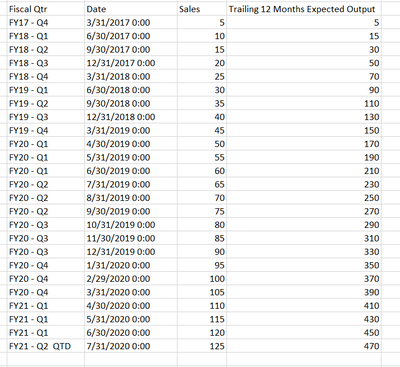
I have a Date column that is rolled up to the end of the quarter (Date) as per the attached image and the corresponding Fiscal Year ( Fiscal Qtr ).
I am struggling with getting a trailing 12 months (or 4 quarters) of the Sales column for the last 4 qtrs calculated at each corresponding quarters.
Trailing 12 Months Expected Output - is what i am looking for.
I tried this DAX Statement
Any help is much appreciated.
Solved! Go to Solution.


- Mark as New
- Bookmark
- Subscribe
- Mute
- Subscribe to RSS Feed
- Permalink
- Report Inappropriate Content
@BItoken , You formula seems correct, you need use MAx of date. End of month will not apply in your case
Trailing 12 Months = CALCULATE(SUM(Table[Sales]), DATESINPERIOD(Date[Date],Max(Date[Date]),-4,QUARTER))
or
Trailing 12 Months = CALCULATE(SUM(Table[Sales]), DATESINPERIOD(Date[Date],Max(Table[Date]),-4,QUARTER))
Always use date table. As solution might work without that, but will create issue in future.
To get the best of the time intelligence function. Make sure you have a date calendar and it has been marked as the date in model view. Also, join it with the date column of your fact/s. Refer :
https://radacad.com/creating-calendar-table-in-power-bi-using-dax-functions
https://www.archerpoint.com/blog/Posts/creating-date-table-power-bi
https://www.sqlbi.com/articles/creating-a-simple-date-table-in-dax/
Appreciate your Kudos.
- Mark as New
- Bookmark
- Subscribe
- Mute
- Subscribe to RSS Feed
- Permalink
- Report Inappropriate Content
Hi @BItoken ,
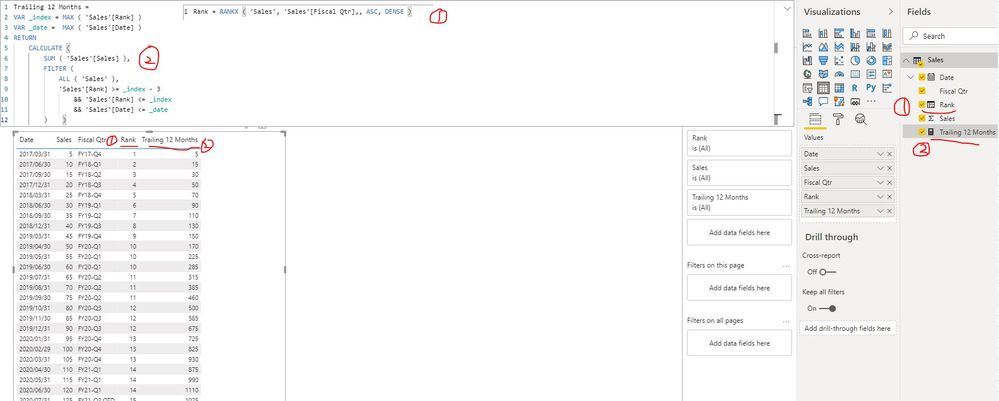
I created a sample pbix file for you, please check if that is what you want.
1. Create a calculated column to order by the data base on the fiscal quarter
Rank = RANKX ( 'Sales', 'Sales'[Fiscal Qtr],, ASC, DENSE )2. Create a measure to get the rolling 4 quaraters sales
Trailing 12 Months =
VAR _index = MAX ( 'Sales'[Rank] )
VAR _date =  MAX ( 'Sales'[Date] )
RETURN
    CALCULATE (
        SUM ( 'Sales'[Sales] ),
        FILTER (
            ALL ( 'Sales' ),
            'Sales'[Rank] >= _index - 3
                && 'Sales'[Rank] <= _index
                && 'Sales'[Date] <= _date
        )    )
Best Regards
Rena


- Mark as New
- Bookmark
- Subscribe
- Mute
- Subscribe to RSS Feed
- Permalink
- Report Inappropriate Content
Hi @BItoken
Create Measure # 12 Month Rollback =CALCULATE((SUM('Fact Table '[Amount]),DATESINPERIOD('Dim Date'[Date],MAX ('Dim Date '[Date]), -12, Month))
If your requirement is solved, please make THIS ANSWER a SOLUTION ✔️ and help other users find the solution quickly. Please hit the LIKE 👍 button if this comment helps you.
- Mark as New
- Bookmark
- Subscribe
- Mute
- Subscribe to RSS Feed
- Permalink
- Report Inappropriate Content
@BItoken , You formula seems correct, you need use MAx of date. End of month will not apply in your case
Trailing 12 Months = CALCULATE(SUM(Table[Sales]), DATESINPERIOD(Date[Date],Max(Date[Date]),-4,QUARTER))
or
Trailing 12 Months = CALCULATE(SUM(Table[Sales]), DATESINPERIOD(Date[Date],Max(Table[Date]),-4,QUARTER))
Always use date table. As solution might work without that, but will create issue in future.
To get the best of the time intelligence function. Make sure you have a date calendar and it has been marked as the date in model view. Also, join it with the date column of your fact/s. Refer :
https://radacad.com/creating-calendar-table-in-power-bi-using-dax-functions
https://www.archerpoint.com/blog/Posts/creating-date-table-power-bi
https://www.sqlbi.com/articles/creating-a-simple-date-table-in-dax/
Appreciate your Kudos.
- Mark as New
- Bookmark
- Subscribe
- Mute
- Subscribe to RSS Feed
- Permalink
- Report Inappropriate Content
- Mark as New
- Bookmark
- Subscribe
- Mute
- Subscribe to RSS Feed
- Permalink
- Report Inappropriate Content
Hi @amitchandak ,
I used this DAX function.
Although, i get the same values of Sales.
My Fiscal Qtr and Date and Sales are all in the same table.
- Mark as New
- Bookmark
- Subscribe
- Mute
- Subscribe to RSS Feed
- Permalink
- Report Inappropriate Content
Hi @BItoken ,
I created a sample pbix file for you, please check if that is what you want.
1. Create a calculated column to order by the data base on the fiscal quarter
Rank = RANKX ( 'Sales', 'Sales'[Fiscal Qtr],, ASC, DENSE )2. Create a measure to get the rolling 4 quaraters sales
Trailing 12 Months =
VAR _index = MAX ( 'Sales'[Rank] )
VAR _date =  MAX ( 'Sales'[Date] )
RETURN
    CALCULATE (
        SUM ( 'Sales'[Sales] ),
        FILTER (
            ALL ( 'Sales' ),
            'Sales'[Rank] >= _index - 3
                && 'Sales'[Rank] <= _index
                && 'Sales'[Date] <= _date
        )    )
Best Regards
Rena
- Mark as New
- Bookmark
- Subscribe
- Mute
- Subscribe to RSS Feed
- Permalink
- Report Inappropriate Content

- Mark as New
- Bookmark
- Subscribe
- Mute
- Subscribe to RSS Feed
- Permalink
- Report Inappropriate Content
Hi,
Share the link from where i can download your PBI file.
Regards,
Ashish Mathur
http://www.ashishmathur.com
https://www.linkedin.com/in/excelenthusiasts/


- Mark as New
- Bookmark
- Subscribe
- Mute
- Subscribe to RSS Feed
- Permalink
- Report Inappropriate Content
Hi @BItoken
this may be a solution. I added the column Fiscal Year with Power Query and used it in the measure (see attached pbix file):
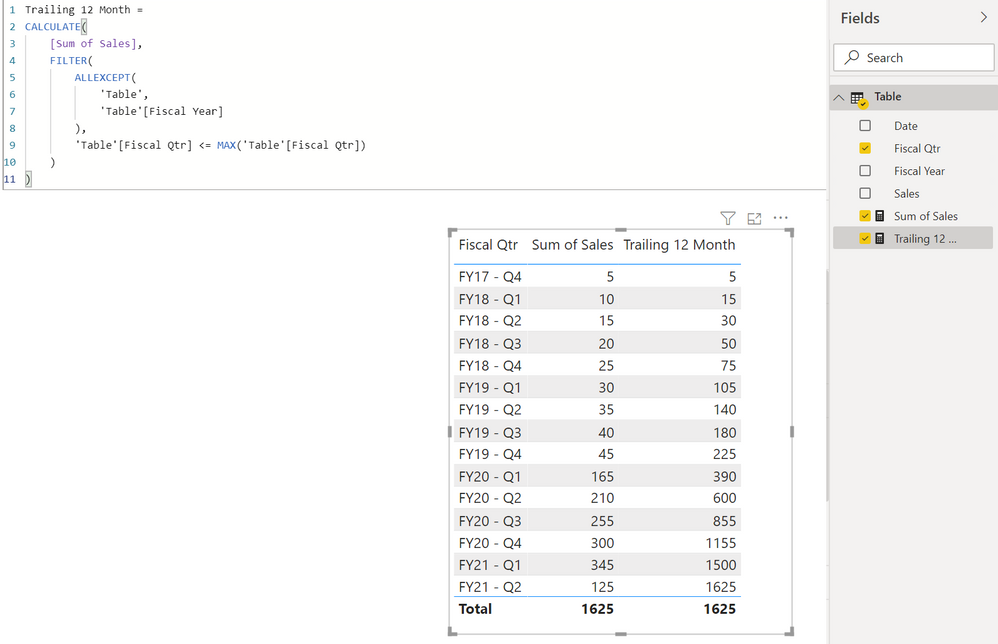
Trailing 12 Month =
CALCULATE(
    [Sum of Sales],
    FILTER(
        ALLEXCEPT(
            'Table',
            'Table'[Fiscal Year]
        ),
        'Table'[Fiscal Qtr] <= MAX('Table'[Fiscal Qtr])
    )
)
With kind regards from the town where the legend of the 'Pied Piper of Hamelin' is at home
FrankAT (Proud to be a Datanaut)
- Mark as New
- Bookmark
- Subscribe
- Mute
- Subscribe to RSS Feed
- Permalink
- Report Inappropriate Content
Hi @FrankAT
Your DAX query will get me the sum of all previous quarters Sum.
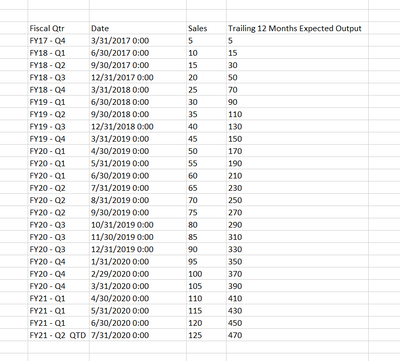
What i need to derive is the sum of last 4 trailing quarters for any given Qtr.
For example FY 21 Q1 value should be the sum of: FY21 - Q1, FY20 - Q4, FY20 - Q3, FY20 - Q2

Helpful resources

Power BI Monthly Update - November 2025
Check out the November 2025 Power BI update to learn about new features.

Fabric Data Days
Advance your Data & AI career with 50 days of live learning, contests, hands-on challenges, study groups & certifications and more!

FabCon Atlanta 2026
Join us at FabCon Atlanta, March 16-20, for the ultimate Fabric, Power BI, AI and SQL community-led event. Save $200 with code FABCOMM.

| User | Count |
|---|---|
| 58 | |
| 45 | |
| 42 | |
| 20 | |
| 18 |


| User | Count |
|---|---|
| 169 | |
| 109 | |
| 91 | |
| 55 | |
| 44 |


