cancel
Showing results for 
Search instead for 
Did you mean: 

The Power BI Data Visualization World Championships is back! Get ahead of the game and start preparing now! Learn more

Reply
anelliaf
Helper II
Helper II

Trailing 12-Month Visual

Hello,


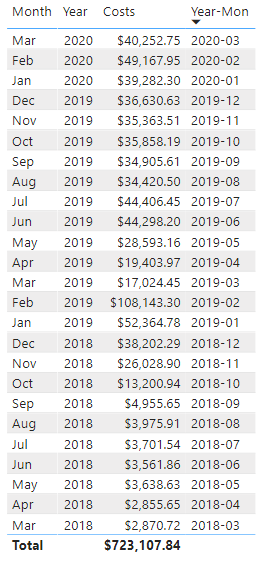
I have the following table showing the sum of costs for yyyy-mm:


pbi_yyyymm_table.PNG


I'd like to display this in a basic bar chart, but dynamically show the trainling 12-months from the current month.


Thanks,

Frank

1 ACCEPTED SOLUTION
jthomson
Solution Sage
Solution Sage

I'm not sure if there's a way to dynamically alter the start/end points of a visual like that, but you could use some logic to get the same result with a filter - if you use the correct combination of dateadd/eomonth/today, you should be able to define each record as being in the previous twelve months or not, then use it as a visual level filter


edit - I've completely forgotten that there's relative date filtering as an out of the box option, try dropping your date field into that as a visual level filter and seeing if previous 12 calendar months will get you what you want?

View solution in original post

3 REPLIES 3
amitchandak
Super User
Super User

Use a relative date filter or same option is also available visual level filter

https://docs.microsoft.com/en-us/power-bi/visuals/desktop-slicer-filter-date-range

Share with Power BI Enthusiasts: Full Power BI Video (20 Hours) YouTube
Microsoft Fabric Series 60+ Videos YouTube
Microsoft Fabric Hindi End to End YouTube
jthomson
Solution Sage
Solution Sage

I'm not sure if there's a way to dynamically alter the start/end points of a visual like that, but you could use some logic to get the same result with a filter - if you use the correct combination of dateadd/eomonth/today, you should be able to define each record as being in the previous twelve months or not, then use it as a visual level filter


edit - I've completely forgotten that there's relative date filtering as an out of the box option, try dropping your date field into that as a visual level filter and seeing if previous 12 calendar months will get you what you want?

I added the date field to the visual filter and used the relative date filter.


Thanks for you help!

Helpful resources

Announcements
Power BI DataViz World Championships

Power BI Dataviz World Championships

The Power BI Data Visualization World Championships is back! Get ahead of the game and start preparing now!

December 2025 Power BI Update Carousel

Power BI Monthly Update - December 2025

Check out the December 2025 Power BI Holiday Recap!

FabCon Atlanta 2026 carousel

FabCon Atlanta 2026

Join us at FabCon Atlanta, March 16-20, for the ultimate Fabric, Power BI, AI and SQL community-led event. Save $200 with code FABCOMM.