cancel
Showing results for 
Search instead for 
Did you mean: 

The Power BI Data Visualization World Championships is back! Get ahead of the game and start preparing now! Learn more

Reply
Displaced_2000
Frequent Visitor

Totals and Subtotals in Matrix

Hello,

I have an issue with my subtotals and totals in a matrix, I've seen that this is a common issue and found many solutions but I cant seem to apply them in my scenario.


I have 2 tables of data

  • Properties (3 types) - including type (named 'Scheme Bridge')
  • Staff (3 roles) - including time spent on task relating to the type of properties (named 'Task Matrix')

The raw formula would be

Property Type 1 x Staff role 1 = row total

Property Type 1 x Staff role 2 = row total

Property Type 1 x Staff role 3 = row total

Property Type 1 x All Staff Roles = Subtotal

etc


So from that I am expecting an output of 9 rows and then 3 subtotals (and a overall total which i don't need)

I'm sure you already know what I'm going to say now, that my row totals are perfect but my subtotals don't calculate correctly.


I've done a fair bit of reading about this and have tried summerize and sumx etc.  I am sure that is where the solution lies but I'm just not experienced enough yet to work it out.


I would expect in the Co-ordinator subtotal to have 9038.63 (not 23K)
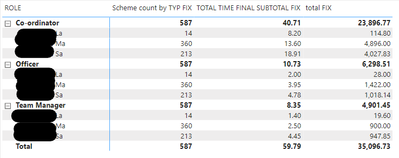
 

Displaced_2000_1-1626962470602.png


These are my current measures used in the above


Scheme count by TYP FIX = 
SUMX(
SUMMARIZE('Scheme bridge','Scheme bridge'[PRO_TYPE],"SUBTOTALSFIX",[Scheme count by TYPE]),[SUBTOTALSFIX])
TOTAL TIME FINAL SUBTOTAL FIX = 
SUMX(
SUMMARIZE('Task Matrix','Task Matrix'[PRO_TYPE],"SUBTOTALSFIX",[Time by role and TYP]),[SUBTOTALSFIX])
total FIX = [Scheme count by TYP FIX]*[TOTAL TIME FINAL SUBTOTAL FIX] 


Many Thanks for any guidance

1 ACCEPTED SOLUTION

Hi @Displaced_2000 ,

you can try this measure:

total FIX =
VAR _t =
    ADDCOLUMNS (
        SUMMARIZE ( 'Scheme bridge', 'Scheme Bridge'[PRO_ATY_DESCR] ),
        "@total", [Scheme count by TYP FIX] * [TOTAL TIME FINAL SUBTOTAL FIX]
    )
RETURN
    IF (
        ISINSCOPE ( 'Scheme Bridge'[PRO_ATY_DESCR] ),
        [Scheme count by TYP FIX] * [TOTAL TIME FINAL SUBTOTAL FIX],
        SUMX ( _t, [@total] )
    )

If this post helps, then please consider Accept it as the solution ✔️to help the other members find it more quickly.

If this post helps, then please consider Accept it as the solution to help the other members find it more quickly. Appreciate your Kudos.

Check out my latest demo report in the data story gallery.

Stand with Ukraine!


Here are official ways you can support Ukraine financially (accounts with multiple currencies):
1) Support the Armed Forces of Ukraine: https://bank.gov.ua/ua/about/support-the-armed-forces
2) Come Back Alive foundation: https://www.comebackalive.in.ua/

Thank you!

View solution in original post

3 REPLIES 3
Displaced_2000
Frequent Visitor

Hello,


I've produced a file with some test data and recreated all the measures to match the above.  Some of the numbers are different but the logic should be the same.


Test_Data LINK 


Any support with this would be appreciated. Cheers


Hi @Displaced_2000 ,

you can try this measure:

total FIX =
VAR _t =
    ADDCOLUMNS (
        SUMMARIZE ( 'Scheme bridge', 'Scheme Bridge'[PRO_ATY_DESCR] ),
        "@total", [Scheme count by TYP FIX] * [TOTAL TIME FINAL SUBTOTAL FIX]
    )
RETURN
    IF (
        ISINSCOPE ( 'Scheme Bridge'[PRO_ATY_DESCR] ),
        [Scheme count by TYP FIX] * [TOTAL TIME FINAL SUBTOTAL FIX],
        SUMX ( _t, [@total] )
    )

If this post helps, then please consider Accept it as the solution ✔️to help the other members find it more quickly.

If this post helps, then please consider Accept it as the solution to help the other members find it more quickly. Appreciate your Kudos.

Check out my latest demo report in the data story gallery.

Stand with Ukraine!


Here are official ways you can support Ukraine financially (accounts with multiple currencies):
1) Support the Armed Forces of Ukraine: https://bank.gov.ua/ua/about/support-the-armed-forces
2) Come Back Alive foundation: https://www.comebackalive.in.ua/

Thank you!

Many thanks, this worked perfectly 😀

Helpful resources

Announcements
Power BI DataViz World Championships

Power BI Dataviz World Championships

The Power BI Data Visualization World Championships is back! Get ahead of the game and start preparing now!

December 2025 Power BI Update Carousel

Power BI Monthly Update - December 2025

Check out the December 2025 Power BI Holiday Recap!

FabCon Atlanta 2026 carousel

FabCon Atlanta 2026

Join us at FabCon Atlanta, March 16-20, for the ultimate Fabric, Power BI, AI and SQL community-led event. Save $200 with code FABCOMM.