cancel
Showing results for 
Search instead for 
Did you mean: 

The Power BI Data Visualization World Championships is back! Get ahead of the game and start preparing now! Learn more

Reply
Anonymous
Not applicable

TotalYTD Advanced calculation

Hi, I have to calculate TotaYTD but the companies had different fiscal years, so I have to change the TotalYTD parameter for each one of them, for example:


Country   -   Company -  Store -  Sales

USA         -   Company1 -  ST1 -    1000    (the fiscal year ends on 31/12)

USA         -   Company2 -  ST2 -    500    (the fiscal year ends on 31/1)

Canada     -   Company4 -  ST5 -    10    (the fiscal year ends on 31/12)

.....


The measure I was using was the traditional Sales YTD = TOTALYTD([SALES],date[day],'31/01') but this doesnt take into account the different fiscal years.

I have an auxiliary table with the fiscal years for each company, so the problem is, how can I calculate the YTD at the company level to be able to change the fiscal year depending the company?


thanks a lot.


3 REPLIES 3
v-lionel-msft
Community Support
Community Support

Hi @Anonymous ,


v-lionel-msft_0-1601371365772.png

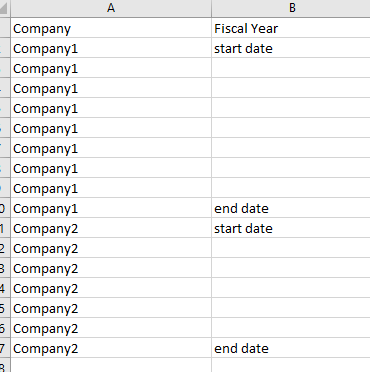
If you have a table like this, you can add the [Company] column to the slicer and filter through the slicer.

In doing so, you only need to create a measure, not for each company.


Best regards,
Lionel Chen

If this post helps, then please consider Accept it as the solution to help the other members find it more quickly.

Greg_Deckler
Community Champion
Community Champion

@Anonymous Time "intelligence" starts to get wonky if you stray outside the lines. You may find this helpful - https://community.powerbi.com/t5/Community-Blog/To-bleep-With-Time-Intelligence/ba-p/1260000

Also, see if my Time Intelligence the Hard Way provides a different way of accomplishing what you are going for.

https://community.powerbi.com/t5/Quick-Measures-Gallery/Time-Intelligence-quot-The-Hard-Way-quot-TITHW/m-p/434008


Follow on LinkedIn
@ me in replies or I'll lose your thread!!!
Instead of a Kudo, please vote for this idea
Become an expert!: Enterprise DNA
External Tools: MSHGQM
YouTube Channel!: Microsoft Hates Greg
Latest book!:
DAX For Humans

DAX is easy, CALCULATE makes DAX hard...
amitchandak
Super User
Super User

@Anonymous , totalytd, and datesytd do not allow a dynamic value for year-end this means you have to create a measure like. But this will company in the context


Switch( true() ,
max([Company]) = "Company1" ,CALCULATE(SUM(Sales[Sales Amount]),DATESYTD('Date'[Date],"12/31")),
max([Company]) = "Company2" ,CALCULATE(SUM(Sales[Sales Amount]),DATESYTD('Date'[Date],"1/31")),
max([Company]) = "Company3" ,CALCULATE(SUM(Sales[Sales Amount]),DATESYTD('Date'[Date],"12/31")),
)

Share with Power BI Enthusiasts: Full Power BI Video (20 Hours) YouTube
Microsoft Fabric Series 60+ Videos YouTube
Microsoft Fabric Hindi End to End YouTube

Helpful resources

Announcements
Power BI DataViz World Championships

Power BI Dataviz World Championships

The Power BI Data Visualization World Championships is back! Get ahead of the game and start preparing now!

December 2025 Power BI Update Carousel

Power BI Monthly Update - December 2025

Check out the December 2025 Power BI Holiday Recap!

FabCon Atlanta 2026 carousel

FabCon Atlanta 2026

Join us at FabCon Atlanta, March 16-20, for the ultimate Fabric, Power BI, AI and SQL community-led event. Save $200 with code FABCOMM.