cancel
Showing results for 
Search instead for 
Did you mean: 

The Power BI Data Visualization World Championships is back! Get ahead of the game and start preparing now! Learn more

Reply
danielkari
Regular Visitor

Total workingdays by subgroup

Hi! Let's say I have the following table


City | State

Dallas | TX
Houston | TX
Austin | TX

Atlanta | GA

Oklahoma City | OK


Is it possible to color scatter points (cities) by state? Like red for Texas etc. 

1 ACCEPTED SOLUTION
v-yuta-msft
Community Support
Community Support

Hi danielkari,


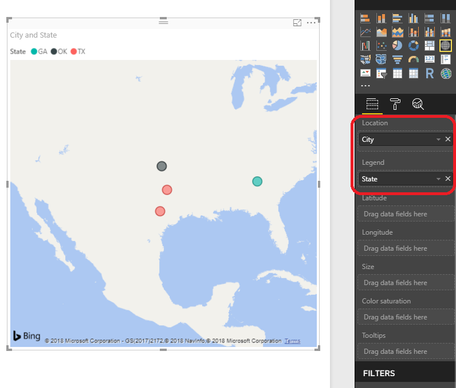
You may create a map visual and drag [State] colunmn into legend field and drag [City] column into Location field like below:

捕获.PNG 


Regards,

Jimmy Tao

View solution in original post

2 REPLIES 2
v-yuta-msft
Community Support
Community Support

Hi danielkari,


You may create a map visual and drag [State] colunmn into legend field and drag [City] column into Location field like below:

捕获.PNG 


Regards,

Jimmy Tao

quentin_vigne
Solution Sage
Solution Sage

Hi @danielkari


I think you can only do that in a Matrix with conditionnal formating but not on a map


- Quentin

Helpful resources

Announcements
November Power BI Update Carousel

Power BI Monthly Update - November 2025

Check out the November 2025 Power BI update to learn about new features.

Fabric Data Days Carousel

Fabric Data Days

Advance your Data & AI career with 50 days of live learning, contests, hands-on challenges, study groups & certifications and more!

FabCon Atlanta 2026 carousel

FabCon Atlanta 2026

Join us at FabCon Atlanta, March 16-20, for the ultimate Fabric, Power BI, AI and SQL community-led event. Save $200 with code FABCOMM.

Top Kudoed Authors