cancel
Showing results for 
Search instead for 
Did you mean: 

The FabCon + SQLCon recap series starts April 14th at 8am Pacific. If you’re tracking where AI is going inside Fabric, this first session is a can't miss. Register now

Reply
thhmez7
Helper III
Helper III

Total value of Measure does not work with RLS

Hi,


I have measure which counts of Activities by User in table.

It works without the created Row-level security.


The role, that I created, is a CRM security role with multiple User hierarchy levels.

This is how I created in "Manage Roles":

PATHCONTAINS(Systemusers[Path],
LOOKUPVALUE(Systemusers[systemuserid],
Systemusers[domainname],USERPRINCIPALNAME()))=True


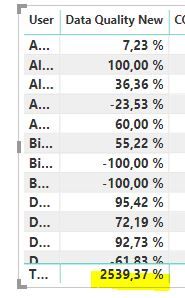
After testing the role in Power BI Desktop, the table doesn't show the correct total value. Or maybe the values in the rows aren't correct.

screenshot.JPGThe measure "Activities" sums the Count-Field from different tables:

Activities= CALCULATE(SUM('Task'[Count])) + CALCULATE(SUM('Notes'[Count ])) + CALCULATE(SUM('Projects'[Count ])) + CALCULATE(SUM('Activities'[Count]))
 
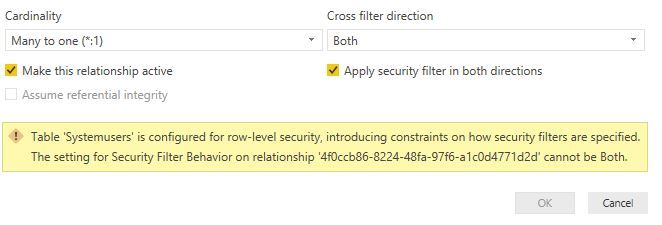
Also, I wanted to apply security filter in both directions between the tables Systemuser and Activitytable (where the measure was created), but it didn't work:
screenshot.JPG
Thanks for your help!
Kind regards.
 
1 ACCEPTED SOLUTION
Greg_Deckler
Community Champion
Community Champion

This looks like a measure totals problem. Very common. See my post about it here: https://community.powerbi.com/t5/DAX-Commands-and-Tips/Dealing-with-Measure-Totals/td-p/63376

Also, this Quick Measure, Measure Totals, The Final Word should get you what you need:
https://community.powerbi.com/t5/Quick-Measures-Gallery/Measure-Totals-The-Final-Word/m-p/547907


Follow on LinkedIn
@ me in replies or I'll lose your thread!!!
Instead of a Kudo, please vote for this idea
Become an expert!: Enterprise DNA
External Tools: MSHGQM
YouTube Channel!: Microsoft Hates Greg
Latest book!:
DAX For Humans

DAX is easy, CALCULATE makes DAX hard...

View solution in original post

2 REPLIES 2
Greg_Deckler
Community Champion
Community Champion

This looks like a measure totals problem. Very common. See my post about it here: https://community.powerbi.com/t5/DAX-Commands-and-Tips/Dealing-with-Measure-Totals/td-p/63376

Also, this Quick Measure, Measure Totals, The Final Word should get you what you need:
https://community.powerbi.com/t5/Quick-Measures-Gallery/Measure-Totals-The-Final-Word/m-p/547907


Follow on LinkedIn
@ me in replies or I'll lose your thread!!!
Instead of a Kudo, please vote for this idea
Become an expert!: Enterprise DNA
External Tools: MSHGQM
YouTube Channel!: Microsoft Hates Greg
Latest book!:
DAX For Humans

DAX is easy, CALCULATE makes DAX hard...

@Greg_Deckler 

Thanks a lot for the great overview in the Quick measure gallery. Your measure works well in my report with Summarizing the Count of Activities.


How does the measure look with percentage measure if I want the average of all percentages by User?

screenshot.JPG

Thanks in advance!

Helpful resources

Announcements
New to Fabric survey Carousel

New to Fabric Survey

If you have recently started exploring Fabric, we'd love to hear how it's going. Your feedback can help with product improvements.

Power BI DataViz World Championships carousel

Power BI DataViz World Championships - June 2026

A new Power BI DataViz World Championship is coming this June! Don't miss out on submitting your entry.

Join our Fabric User Panel

Join our Fabric User Panel

Share feedback directly with Fabric product managers, participate in targeted research studies and influence the Fabric roadmap.

March Power BI Update Carousel

Power BI Community Update - March 2026

Check out the March 2026 Power BI update to learn about new features.