cancel
Showing results for 
Search instead for 
Did you mean: 

July 7 - July 17 | Round 2 of the Power BI Dataviz World Championships. Don't miss your chance! Learn more

Reply
Anonymous
Not applicable

Total value Measure

Good morning,


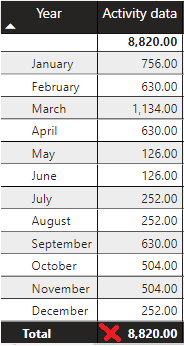
I need to calculate some values based on the total value of a measure and the final value is not getting me right. I have seen that it is a problem that happens to a lot of people but I am not able to come up with a solution. Can you help me, please?


wrong.png


The sum is 8820 and I need 5796.


Formula:

Activity data = [Stock Final Last Month] + [Entradas] - [Stock Final]


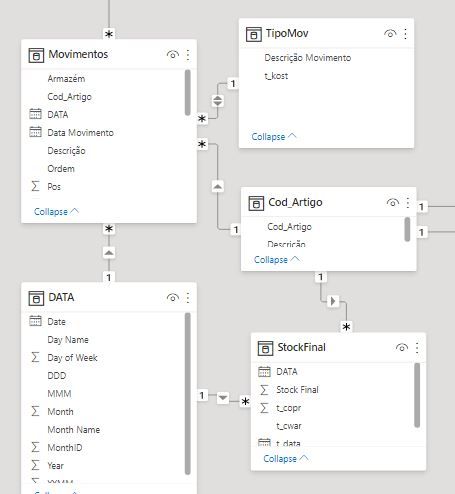
Is based on other measures:


Entradas =
CALCULATE(
sum(Movimentos[Quant.]),
FILTER(TipoMov,TipoMov[Descrição Movimento]="Recepção compra"),
FILTER(Cod_Artigo,Cod_Artigo[Cod_Artigo]="60700400")
)
 
Stock Final =
CALCULATE(
sum(StockFinal[Stock Final]),
PREVIOUSMONTH(DATA[Date]),
FILTER(Cod_Artigo,Cod_Artigo[Cod_Artigo]="60700400")
)
 
Stock Final Last Month =
CALCULATE(
sum(StockFinal[Stock Final]),
DATEADD(DATA[Date],-2,MONTH),
FILTER(Cod_Artigo,Cod_Artigo[Cod_Artigo]="60700400")
)

model.JPG


Thanks
1 ACCEPTED SOLUTION
amitchandak
Super User
Super User

@Anonymous , Try a measure like

Activity data = sumx(Values(Date[Month]), [Stock Final Last Month] + [Entradas] - [Stock Final])


or


Activity data = sumx(Values(Date[Month Year]), [Stock Final Last Month] + [Entradas] - [Stock Final])

Share with Power BI Enthusiasts: Full Power BI Video (20 Hours) YouTube
Microsoft Fabric Series 60+ Videos YouTube
Microsoft Fabric Hindi End to End YouTube

View solution in original post

2 REPLIES 2
Anonymous
Not applicable

Hello again,
 
My PowerBI works but is very slow. So I decided to improve DAX. I apply the same formula but it doesn't work, why?


New =
Var CodArtigo = FILTER(Cod_Artigo,Cod_Artigo[Cod_Artigo]="60700410")


Var AceGarrEnt =
CALCULATE(
sum(Movimentos[Quant.]),
FILTER(TipoMov,TipoMov[Descrição Movimento]="Recepção compra"),CodArtigo)


Var AceGarrStockFinal =
CALCULATE(
sum(StockFinal[Stock Final]),PREVIOUSMONTH(DATA[Date]),CodArtigo)
 
var AceGarrSFinalLMonth =
CALCULATE(
sum(StockFinal[Stock Final]),
DATEADD(DATA[Date],-2,MONTH),CodArtigo)


var AceGarrSFinalLMonth2 =
IF(AceGarrStockFinal=BLANK(),BLANK(),AceGarrSFinalLMonth)


var AceGarrDAct = SUMX(VALUES(DATA[Month]), AceGarrSFinalLMonth2 + AceGarrEnt - AceGarrStockFinal)


return


AceGarrDAct
 
Thanks
amitchandak
Super User
Super User

@Anonymous , Try a measure like

Activity data = sumx(Values(Date[Month]), [Stock Final Last Month] + [Entradas] - [Stock Final])


or


Activity data = sumx(Values(Date[Month Year]), [Stock Final Last Month] + [Entradas] - [Stock Final])

Share with Power BI Enthusiasts: Full Power BI Video (20 Hours) YouTube
Microsoft Fabric Series 60+ Videos YouTube
Microsoft Fabric Hindi End to End YouTube

Helpful resources

Announcements
FabCon and SQLCon Barcelona 2026

FabCon & SQLCon – Barcelona 2026

Join us in Barcelona for FabCon and SQLCon, the Fabric, Power BI, SQL, and AI community event. Save €200 with code FABCMTY200.

60 days of Data Days Carousel

Data Days 2026

Join Data Days 2026: 60 days of free live/on-demand sessions, challenges, study groups, and certification opportunities.

Power BI DataViz World Championships carousel

Power BI DataViz World Championships - June 2026

A new Power BI DataViz World Championship is coming this June! Don't miss out on submitting your entry.

Top Solution Authors