cancel
Showing results for 
Search instead for 
Did you mean: 

The Power BI Data Visualization World Championships is back! It's time to submit your entry. Live now!

Reply
Anonymous
Not applicable

Total value Measure

Good morning,


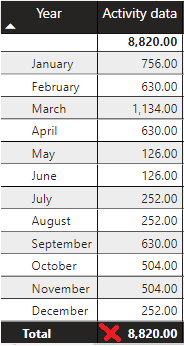
I need to calculate some values based on the total value of a measure and the final value is not getting me right. I have seen that it is a problem that happens to a lot of people but I am not able to come up with a solution. Can you help me, please?


wrong.png


The sum is 8820 and I need 5796.


Formula:

Activity data = [Stock Final Last Month] + [Entradas] - [Stock Final]


Is based on other measures:


Entradas =
CALCULATE(
sum(Movimentos[Quant.]),
FILTER(TipoMov,TipoMov[Descrição Movimento]="Recepção compra"),
FILTER(Cod_Artigo,Cod_Artigo[Cod_Artigo]="60700400")
)
 
Stock Final =
CALCULATE(
sum(StockFinal[Stock Final]),
PREVIOUSMONTH(DATA[Date]),
FILTER(Cod_Artigo,Cod_Artigo[Cod_Artigo]="60700400")
)
 
Stock Final Last Month =
CALCULATE(
sum(StockFinal[Stock Final]),
DATEADD(DATA[Date],-2,MONTH),
FILTER(Cod_Artigo,Cod_Artigo[Cod_Artigo]="60700400")
)

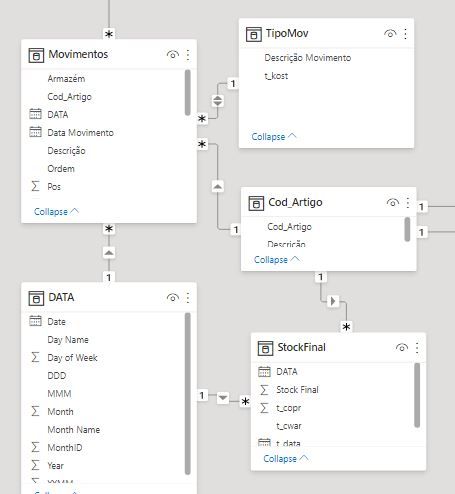
model.JPG


Thanks
1 ACCEPTED SOLUTION
amitchandak
Super User
Super User

@Anonymous , Try a measure like

Activity data = sumx(Values(Date[Month]), [Stock Final Last Month] + [Entradas] - [Stock Final])


or


Activity data = sumx(Values(Date[Month Year]), [Stock Final Last Month] + [Entradas] - [Stock Final])

Share with Power BI Enthusiasts: Full Power BI Video (20 Hours) YouTube
Microsoft Fabric Series 60+ Videos YouTube
Microsoft Fabric Hindi End to End YouTube

View solution in original post

2 REPLIES 2
Anonymous
Not applicable

Hello again,
 
My PowerBI works but is very slow. So I decided to improve DAX. I apply the same formula but it doesn't work, why?


New =
Var CodArtigo = FILTER(Cod_Artigo,Cod_Artigo[Cod_Artigo]="60700410")


Var AceGarrEnt =
CALCULATE(
sum(Movimentos[Quant.]),
FILTER(TipoMov,TipoMov[Descrição Movimento]="Recepção compra"),CodArtigo)


Var AceGarrStockFinal =
CALCULATE(
sum(StockFinal[Stock Final]),PREVIOUSMONTH(DATA[Date]),CodArtigo)
 
var AceGarrSFinalLMonth =
CALCULATE(
sum(StockFinal[Stock Final]),
DATEADD(DATA[Date],-2,MONTH),CodArtigo)


var AceGarrSFinalLMonth2 =
IF(AceGarrStockFinal=BLANK(),BLANK(),AceGarrSFinalLMonth)


var AceGarrDAct = SUMX(VALUES(DATA[Month]), AceGarrSFinalLMonth2 + AceGarrEnt - AceGarrStockFinal)


return


AceGarrDAct
 
Thanks
amitchandak
Super User
Super User

@Anonymous , Try a measure like

Activity data = sumx(Values(Date[Month]), [Stock Final Last Month] + [Entradas] - [Stock Final])


or


Activity data = sumx(Values(Date[Month Year]), [Stock Final Last Month] + [Entradas] - [Stock Final])

Share with Power BI Enthusiasts: Full Power BI Video (20 Hours) YouTube
Microsoft Fabric Series 60+ Videos YouTube
Microsoft Fabric Hindi End to End YouTube

Helpful resources

Announcements
Power BI DataViz World Championships

Power BI Dataviz World Championships

The Power BI Data Visualization World Championships is back! It's time to submit your entry.

January Power BI Update Carousel

Power BI Monthly Update - January 2026

Check out the January 2026 Power BI update to learn about new features.

FabCon Atlanta 2026 carousel

FabCon Atlanta 2026

Join us at FabCon Atlanta, March 16-20, for the ultimate Fabric, Power BI, AI and SQL community-led event. Save $200 with code FABCOMM.