cancel
Showing results for 
Search instead for 
Did you mean: 

Get Fabric certified for FREE! Don't miss your chance! Learn more

Reply
Anonymous
Not applicable

Total stock per day, using todays value, planned refills and forecasted consumption

Hello, all


I have a question that I need your help to solve.

What I have:

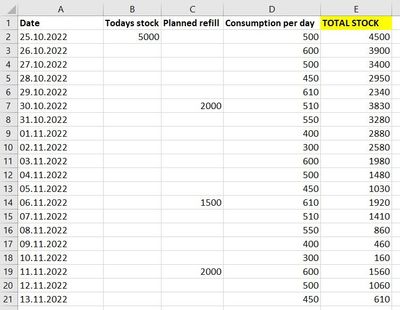
I have a dataset where I run a query everyday to get todays stock. I also have planned future consumption per day, and I have planned refills to the stock. See table below for example.

What I want to create:

I want to create a column that show total stocks per day ("Total stock" in yellow), which is based on todays stock, planned refills and consumption per day.

(Because I run the query for todays stock everyday, I want the table to allways start on todays date)


In excel I would have solved it like this, where "Total stock" for today (in cell E2) is calculated: B2+C2-D2,

     For tomorrow (E3): E2+C3-D3

     For the day after (E4): E3+C4-D4

     And so on:
forum_1.jpg


Any suggestions on how to achieve this?


Thank you, I'm really grateful for all help 🙂

1 ACCEPTED SOLUTION
DataInsights
Super User
Super User

@Anonymous,


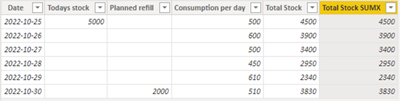
As I understand it, this is a running total of three columns. Here are two calculated columns. You can try both and use the more performant one.


Total Stock = 
VAR vDate = Table1[Date]
VAR vResult =
    CALCULATE (
        SUM ( Table1[Todays stock] )
            + SUM ( Table1[Planned refill] )
            - SUM ( Table1[Consumption per day] ),
        ALL ( Table1 ),
        Table1[Date] <= vDate
    )
RETURN
    vResult
Total Stock SUMX = 
VAR vDate = Table1[Date]
VAR vTable = FILTER ( Table1, Table1[Date] <= vDate )
VAR vResult =
    SUMX ( vTable,
        Table1[Todays stock]
            + Table1[Planned refill]
            - Table1[Consumption per day]
    )
RETURN
    vResult


DataInsights_0-1666792371292.png


Did I answer your question? Mark my post as a solution!

Proud to be a Super User!


View solution in original post

2 REPLIES 2
DataInsights
Super User
Super User

@Anonymous,


As I understand it, this is a running total of three columns. Here are two calculated columns. You can try both and use the more performant one.


Total Stock = 
VAR vDate = Table1[Date]
VAR vResult =
    CALCULATE (
        SUM ( Table1[Todays stock] )
            + SUM ( Table1[Planned refill] )
            - SUM ( Table1[Consumption per day] ),
        ALL ( Table1 ),
        Table1[Date] <= vDate
    )
RETURN
    vResult
Total Stock SUMX = 
VAR vDate = Table1[Date]
VAR vTable = FILTER ( Table1, Table1[Date] <= vDate )
VAR vResult =
    SUMX ( vTable,
        Table1[Todays stock]
            + Table1[Planned refill]
            - Table1[Consumption per day]
    )
RETURN
    vResult


DataInsights_0-1666792371292.png


Did I answer your question? Mark my post as a solution!

Proud to be a Super User!


Anonymous
Not applicable

Thank you, @DataInsights  - the second one worked fine for me! 

Helpful resources

Announcements
Sticker Challenge 2026 Carousel

Join our Community Sticker Challenge 2026

If you love stickers, then you will definitely want to check out our Community Sticker Challenge!

January Power BI Update Carousel

Power BI Monthly Update - January 2026

Check out the January 2026 Power BI update to learn about new features.

FabCon Atlanta 2026 carousel

FabCon Atlanta 2026

Join us at FabCon Atlanta, March 16-20, for the ultimate Fabric, Power BI, AI and SQL community-led event. Save $200 with code FABCOMM.