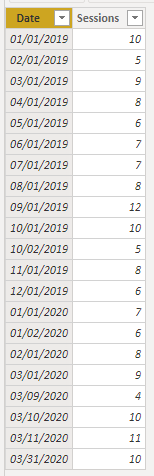
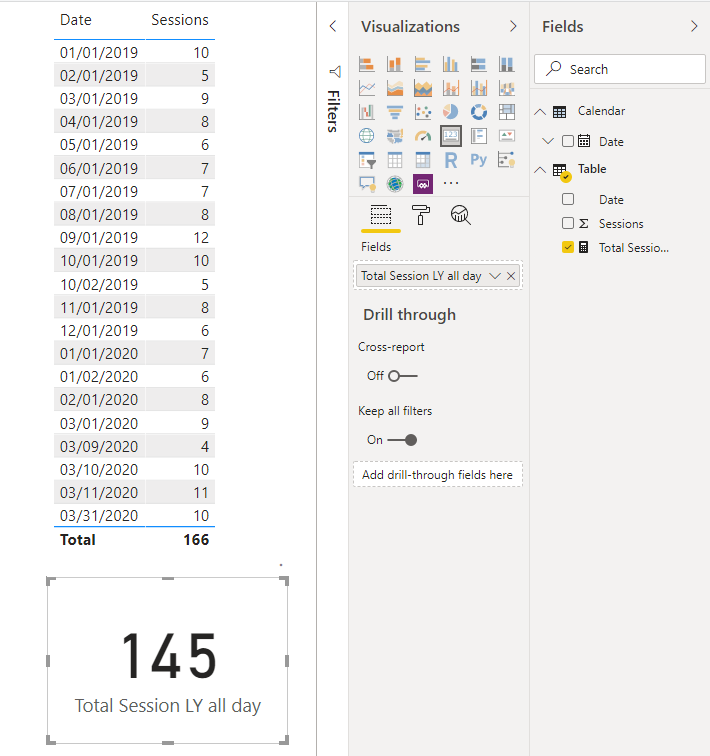
With time intelligence and date calendar you can try
YTD Sales = CALCULATE(SUM(Sales[Sales Amount]),DATESYTD(('Date'[Date]),"12/31"))
This Sales = CALCULATE(SUM(Sales[Sales Amount]),DATESYTD((ENDOFYEAR('Date'[Date])),"12/31"))

Last YTD Sales = CALCULATE(SUM(Sales[Sales Amount]),DATESYTD(dateadd('Date'[Date],-1,Year),"12/31"))
Last YTD complete Sales = CALCULATE(SUM(Sales[Sales Amount]),DATESYTD(ENDOFYEAR(dateadd('Date'[Date],-1,Year)),"12/31"))
Last to last YTD Sales = CALCULATE(SUM(Sales[Sales Amount]),DATESYTD(dateadd('Date'[Date],-2,Year),"12/31"))

Year behind Sales = CALCULATE(SUM(Sales[Sales Amount]),dateadd('Date'[Date],-1,Year))
In case you do not want to use date slicer
-- Force today filter
YTD Sales = CALCULATE(SUM(Sales[Sales Amount]),DATESYTD(('Date'[Date]),"12/31"),'Date'[Date]<=today())

Last YTD Sales = CALCULATE(SUM(Sales[Sales Amount]),DATESYTD(dateadd('Date'[Date],-1,Year),"12/31"),'Date'[Date]<=date(year(today()-1),month(today()),day(today())))

-- with filter

YTD Sales 1= CALCULATE(SUM(Sales[Sales Amount]),DATESYTD(('Date'[Date]),"12/31"))

Last YTD Sales 1 = CALCULATE(SUM(Sales[Sales Amount]),DATESYTD(dateadd('Date'[Date],-1,Year),"12/31"))

--combine

final YTD = if(isfiltered(Date[Month Year]) || isfiltered(Date[Year]) || isfiltered(Date[Date]),[YTD Sales 1],[YTD Sales])
final LYTD = if(isfiltered(Date[Month Year]) || isfiltered(Date[Year]) || isfiltered(Date[Date]),[Last YTD Sales 1],[Last YTD Sales])
To get the best of the time intelligence function. Make sure you have a date calendar and it has been marked as the date in model view. Also, join it with the date column of your fact/s. Refer :
https://radacad.com/creating-calendar-table-in-power-bi-using-dax-functions
https://www.archerpoint.com/blog/Posts/creating-date-table-power-bi
https://www.sqlbi.com/articles/creating-a-simple-date-table-in-dax/
Share with Power BI Enthusiasts: Full Power BI Video (20 Hours)
YouTube Microsoft Fabric Series 60+ Videos
YouTube Microsoft Fabric Hindi End to End
YouTube