Join us at FabCon Atlanta from March 16 - 20, 2026, for the ultimate Fabric, Power BI, AI and SQL community-led event. Save $200 with code FABCOMM.
Register now!The Power BI Data Visualization World Championships is back! Get ahead of the game and start preparing now! Learn more
Hi,
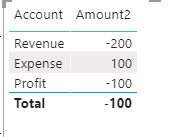
I have a Profit measure to calculate the difference between Revenue and Expense.
The DAX is
| Account | Index |
| Revenue | 1 |
| Expense | 2 |
| Profit | 3 |
| Account | Amount |
| Revenue | -200 |
| Expense | 100 |
Solved! Go to Solution.
HI @hcze,
You can use lookupvalue function to simple get the result based on the current account:
Measure =
LOOKUPVALUE (
Transaction[Amount],
Account[Account], SELECTEDVALUE ( Transaction[Account] ),
SUM ( Account[Amount] )
)
Regards,
Xiaoxin Sheng
HI @hcze,
You can use lookupvalue function to simple get the result based on the current account:
Measure =
LOOKUPVALUE (
Transaction[Amount],
Account[Account], SELECTEDVALUE ( Transaction[Account] ),
SUM ( Account[Amount] )
)
Regards,
Xiaoxin Sheng
@hcze , if you have table like the last one(Table2), Then better create a table like this and join with account table
Union( Table2,
summarize(Table2, "Account", "Profit", "Amount", sum(Table2[Amount])))
hello, perhaps something like :
Amount2
VAR transaction=SUM('Transaction'[Amount])
VAR Revenue=calculate(transaction,filter(account,[account]="revenue"))
VAR Expense=calculate(transaction,filter(account,[account]="expense"))
VAR Profit=Revenue+Expense
RETURN
=IF(HASONEVALUE(account[account]),transaction,Revenue+Expense-Profit)
I am on a mobile so cant error check this but think it will work. you might need to alter a couple of the table names to better suit your situation.
The Power BI Data Visualization World Championships is back! Get ahead of the game and start preparing now!
| User | Count |
|---|---|
| 39 | |
| 38 | |
| 38 | |
| 28 | |
| 27 |
| User | Count |
|---|---|
| 124 | |
| 88 | |
| 73 | |
| 66 | |
| 65 |